Participant
December 6, 2024
解決済み

Adobe premier Plantilla de metodos abreviados de teclado en blanco

  • December 6, 2024
  • 返信数 1.
  • 160 ビュー

La plantilla de Métodos abreviados de Teclado se encuentra en blanco, sin ninguna asignación pre definida.
Instale la version 25. de Adobe Premier y la plantilla de metodos abreviados se encuentra en blanco. Ya actualize a la ultima version 25.1 pero el problema continua. Lo uso en Macbook Pro M2.

このトピックへの返信は締め切られました。
解決に役立った回答 Averdahl

I have seen that before and if i remeber correctly this happens if Premiere Pro don´t have full read & write permissions to the Documents folder on you Mac. After you have set the permissions you will probably have to either unistall/reinstall Premiere Pro or just reset the Preferences so files that not could be written can be written/placed in the correct folders. 


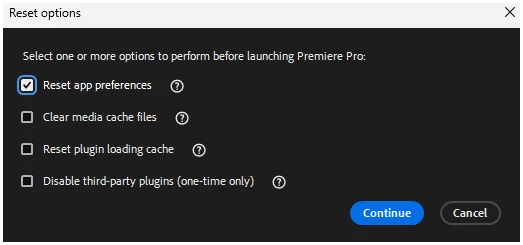
To reset Preferences, hold down the Command key while launching Premiere Pro and check the Reset app preferences in the dialog that pops up and click on Continue.


返信数 1

Averdahl
Community Expert
AverdahlCommunity Expert解決!
Community Expert
December 6, 2024

I have seen that before and if i remeber correctly this happens if Premiere Pro don´t have full read & write permissions to the Documents folder on you Mac. After you have set the permissions you will probably have to either unistall/reinstall Premiere Pro or just reset the Preferences so files that not could be written can be written/placed in the correct folders. 


To reset Preferences, hold down the Command key while launching Premiere Pro and check the Reset app preferences in the dialog that pops up and click on Continue.