


Inspiring
June 13, 2018
解決済み

Any way to turn down/off the audio in Premiere Pro playback?

  • June 13, 2018
  • 返信数 5.
  • 13294 ビュー

Is there any way in Premiere Pro to turn off or turn down the volume for playback?    For many types of editing I'm just working with the video tracks - doing cuts, transitions, masks, adjustment layers, color correction, etc, etc, and I don't need sound or I don't need it to be very loud.     Sometimes the video work is long and tedious and I like to listen to music while I'm working, so I can't just turn down/off the volume of my whole computer.

Thanks in advance.
このトピックへの返信は締め切られました。
解決に役立った回答 SAFEHARBOR11

Um ... I don't see that you're altering any contents.

If you were to Export it at that point, wouldn't it export those tracks as muted?

I recently did a recording at a music festival -  I had 3 cameras, each with it's own audio recording so I could synchronise everything together, plus a 6-channel field recorder with its own good microphones which I intended to use for the audio in in the final output. So that's a lot of audio tracks and I spent a lot of time tweaking and adjusting my audio and I did end up mixing in some content picked up by one of the cameras because it had some interesting crowd noises I wanted.    So I'd be reluctant to take any chances undoing that work by messing around with the individual audio tracks.

Will Ann's suggestion of using the Master (-100) return everything to how I had it when I put it back to 0.0?


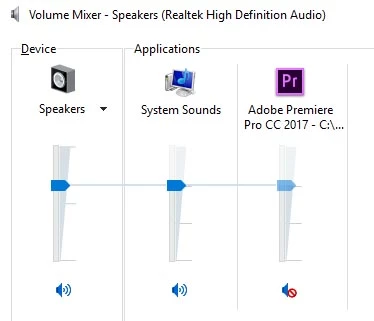
On PC, just access the Volume Mixer (lower right of Windows screen = little speaker thingy) and MUTE Premiere, done! Not changing ANYTHING in Premiere that might bite you later.

Thanks

Jeff Pulera

Safe Harbor Computers

返信数 5

Peru Bob
Community Expert
Community Expert
June 14, 2018
Legend
June 14, 2018

There are no global volume controls for Premiere Pro.

It would be a nice feature, though.  (Resolve has it, and I use it.)

Adobe video & audio apps

Ann Bens
Community Expert
Community Expert
June 14, 2018

Type in -100 and it will set itself to negative infinity -∞

Community Expert
June 14, 2018

You can lower the master track volume in the Audio Track Mixer,

Don't forget to reset it when done

R Neil Haugen
Legend
June 14, 2018

Mute the audio tracks. Controls are in the timeline control header block on the left end of the timeline. You have to mute them all manually, I think ...

Neil

Everyone's mileage always varies ...
peternelson作成者
Inspiring
June 14, 2018

So I have to alter my project's actual contents -  i.e., which tracks are muted?  There's no way to just tell Premiere Pro to not play sound?   Not all editing tasks involve audio tracks -  I don't understand why Adobe would do it that way.   I'm going to leave this open for another day incase anyone knows of some other alternative because this seems so strange.

R Neil Haugen
Legend
June 14, 2018

So I have to alter my project's actual contents -  i.e., which tracks are muted?

Um ... I don't see that you're altering any contents. You just click the mute icon on the left of each audio track. When I'm editing with more than one audio, I'm constantly muting one or more or soloing something ... and you can see quite clearly in the timeline control block whether a track is muted or 'normal' or solo'd.

The green M is a muted track ... the gray M's are "normal", and if a track is "solo'd", the box around the S is yellow.

Neil

Everyone's mileage always varies ...