DanielZapata
Participant
April 4, 2018
解決済み

Anybody having trouble with PNG's with the new Update of Premier Pro 2018 April 3rd?

I cant get Premier to read PNG's, I make them in Photoshop and export them as PNG's but when they come in Premier is all the weird crap.

I already clear the cache, re installed, re exported, started  new project, I cant get it t work! WHAT THE CRAP IS HAPPENING!!!

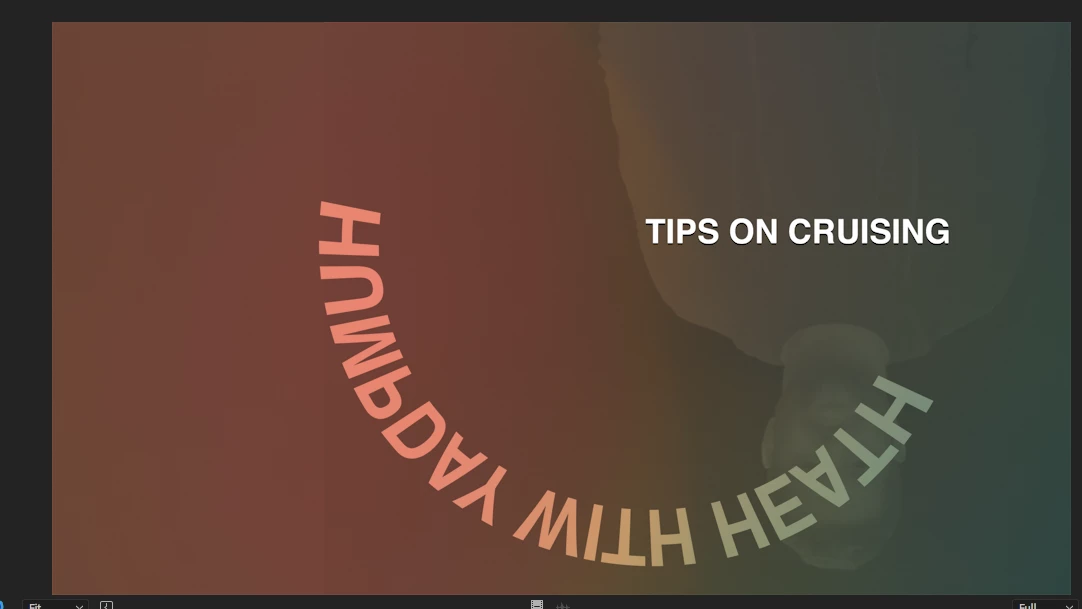
This are two pictures of PNG's it is one title, but Premier is merging all the PNGS in to one picture, same with the one below, it suppose to say TIPS on crussing, not all that weird color and reverse shadow going on.... this is totally wrong!!

このトピックへの返信は締め切られました。
解決に役立った回答 Vinay Dwivedi

Hi,

The patch has been released and live now. This patch includes bug fix related to PNG's.

Bug fixes in Premiere Pro versions 12.1 and 12.1.1

//Vinay

返信数 61

Known Participant
April 5, 2018

Yes me too.  Just posted my own gripe when I came across this thread.  Adobe, you'd better get this fixed in hours, not days.  Major screw up.  Timeline a disaster.  Image freezes, unwanted graphics on certain parts of the timeline.  Flashing everywhere. FIX IT NOW!!

alexander_grant
Participant
April 4, 2018

As of the April 2018 update, on a Macbook Pro running OSX 10.13.3, Premiere selects random PNG images from an imported folder to display, rather than the specified image placed in the timeline. Others display with artifacting. PNG files in exported video @24FPS, mp4, 1080p flicker-- similar to what might happen if there were a framerate issue (which can't be the case as the project is just a bunch of PNG files scrolling across the screen).

Legend
April 4, 2018

I can't reproduce this in version 12.1 on Windows 10 Pro (1709).  My PNGs, all saved out of Photoshop, both with and without alpha, work correctly.

Inspiring
April 5, 2018

Try a png sequence with alpha.

Legend
April 5, 2018

Try a png sequence with alpha.

Still working.

Participant
April 4, 2018

Yes! Having the exact same issue for this show I'm cutting. The update is terrible! I tried everything you've tried and no resolution with the new update. I reverted back to the previous Premiere Pro version, and all is good again.

Inspiring
April 4, 2018

Yes. This is terrible.

DanielZapata
DanielZapata作成者
Participant
April 4, 2018

Guys, after spending 1:45 minutes with Tech support, we find out is an error in the code, and the need to throw it back to the engineering department to fix this bug. They told me to wait at least 5 days. DO NOT UPDATE! spread the word, many people are having the same problem with AE. Like always they rushed the program for NAB to showcase the new features when clearly IT WAS NOT READY! now we are stuck here wasting our time.

WORK AROUND:

I save whatever edit I have and exported a XML file (Final Cut Export) then I DOWNGRADED to the previous version of Premier, Open a new project and imported the XML !! everything works on my timeline and I can import PNG's like always. No stupid work around.

TO THE ADOBE INTERN READING THIS!!

PLEASE FIX THIS PROBLEM!!!

Moderator Warning: Do not use profanity, even if implied, it's against our community guidelines.

Stan Jones
Community Expert
Community Expert
April 4, 2018

And try the new Adobe bug reporting/feature request system. You can upvote issues to show support.

Just learning the system, but it appears to me there's only one report and one vote for what appears to be this png issue.

April Update: Problem importing PNGs, PNGS often have artifact parts from other PSD docs, whats up? – Adobe video & audi…

Remember, this new system is the direct line to the engineers.

Thanks for reporting this has been identified.

Participating Frequently
April 4, 2018

My 15 sec. project with two png files cannot be exported because updated Premiere crashes on export media. Yesterday similar project didn't cause problems. Solution to reinstall old version seems to be very time consuming, I am upset...

Participant
April 4, 2018

Yeah, this is just one of the problems I'm having today. Updating this application was not a very good idea. I have already spent too much time today figuring out how to get it to launch, and then this?

(edit)

This fixed the problem (for me so far):

I toggled the v tracks on and off, moved the pngs in the timeline a few frames; I deleted the media caches, saved, quit, rebooted and relaunched.

Participant
April 17, 2018

Hi this is kinda OT, but a few weeks back (can't remember exactly) I had a big problem with Photoshop not opening or corrupting .png formats when opening. I had to use a different app (Preview) to view any .png files I made in Photoshop. It was after one of the updates and is now not a Photoshop problem anymore, but it makes me wonder if that .png problem a few weeks back is somehow connected with what's going on in Premier now...

Participant
April 4, 2018

Mine is doing it as well.  In Photoshop it is completely transparent...import it in and blammo i have some random video still in purple layered into the PNG.

Really messed me up cause I was working on something that needed to be done almost immediately after the update.  Only way I got it to work was to import the PSD and it worked fine.  But they need to fix the PNG import immediately.

DanielZapata
DanielZapata作成者
Participant
April 4, 2018

is it a Photoshop Problem or a Premier/After Effects Problem, not sure do to the fact all of the products Updated last night... this is complete BS!!! They need to fix this ASAP I have a big deadline and I cant export this garbage.