

Participant
October 4, 2022
解決済み

How to get rid of the box over my video clip?

  • October 4, 2022
  • 返信数 2.
  • 530 ビュー

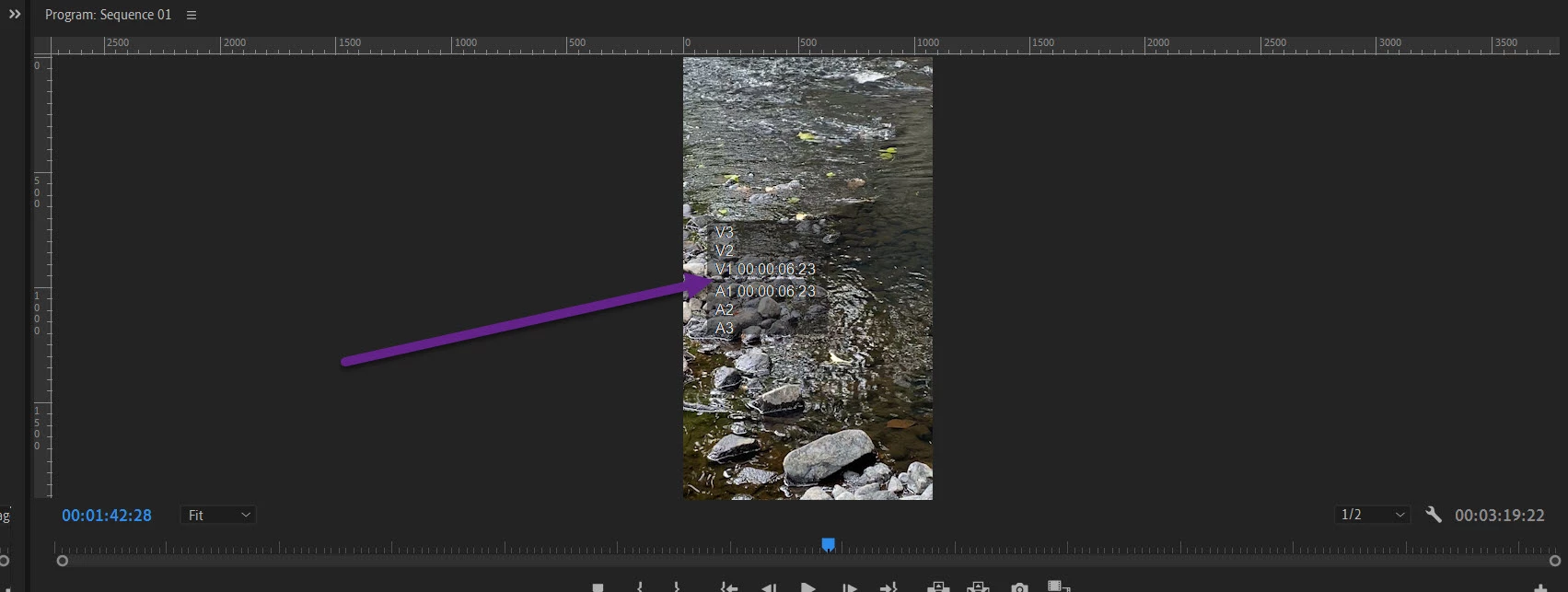
Can someone help me to turn this odd box off?

It blocks my media during editing and it's in every import even after resetting all of my settings.  
 

このトピックへの返信は締め切られました。
解決に役立った回答 Peru Bob

Turn off the timecode overlay:


 You can turn overlays on or off by clicking the Wrench icon 

 in the Program Monitor or Source Monitor, and then select Overlays.


from here:

https://helpx.adobe.com/premiere-pro/using/monitor-overlays.html

返信数 2

Legend
October 4, 2022

Peru Bob  is got the solution but you might benefit by working thru some basic tutorials for Premiere..  This is very basic stuff and it is very useful to get a working knowledge of the interface..  Adobe has many tutorials and there are lots on Youtube.  Linkedin Learning has a number of comprehensive sets of tutorials that are very useful...  It costs something, but there may be a free trial available.  


And gotta say, much of the interface is not particularly intuitive.  Premiere is a very deep program and so the interface is necessarily complex to make all sorts of great stuff available...  I came to Premiere after working in Avid and FCP 1-7 from almost the birth of computer based video editing after working in film and linear video editing for many years and I still found some things difficult to do...  But trust me, it's worth the effort.   And at a certain point, you'll understand the mindset of the programmers and know, as in this case, to go to a specific spot... like the wrench icon below the source and program monitors...


And you're on the right path, here.   This is a great resource with many knowledgable experienced users pitching in to help others...  

Peru Bob
Community Expert
Peru BobCommunity Expert解決!
Community Expert
October 4, 2022

Turn off the timecode overlay:


 You can turn overlays on or off by clicking the Wrench icon 

 in the Program Monitor or Source Monitor, and then select Overlays.


from here:

https://helpx.adobe.com/premiere-pro/using/monitor-overlays.html
