


Participant
August 2, 2023
解決済み
Pasting clips onto selected tracks instead of track from previous timeline you're copying from?
- August 2, 2023
- 返信数 2.
- 273 ビュー
Hi there,
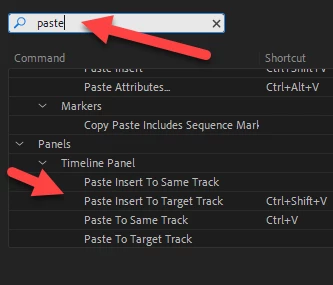
I updated Premiere and I'm noticing something different about pasting clips from other timelines. It used to be the case before the update that you could highlight a track, let's say "V4" for example, and then go to another timeline, copy media, go back to the timeline you want the clip pasted to, and paste the clip onto track V4 regardless of what track the clip lived on in the previous timeline.
Does anyone know what happened? Is this an update issue or is this a settings/preferences thing?
In the images attached, you can see that I copy the clip from V3 from one timeline, then try to paste it to V4 in a new timeline but insteatd it pastes to V3.
Let me know, thanks!
 AdChoices