Inspiring
May 25, 2018
Answered

[Premiere Pro CC 2017] Error compiling movie (GPU Render Error)

  • May 25, 2018
  • 6 replies
  • 6017 views

Hi, let's do this.

I have been haunted by this error since i update Premiere to 2017 version.
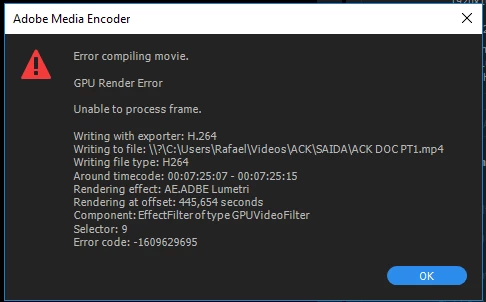
During this time i have prevented this problem, by doing some things:

A -Enable the "Use Previews"

B -Move the Lumetri effects to an adjustment layer.

C- Diseable the CUDA, and utillize the Software only

At first the A and B metods work just fine, but now they dont work anymore.

The metod C is, until this exatly moment, is the only way to solve.

However, as you can see,in this project i have a big sequence and would take a really long time do exporting.
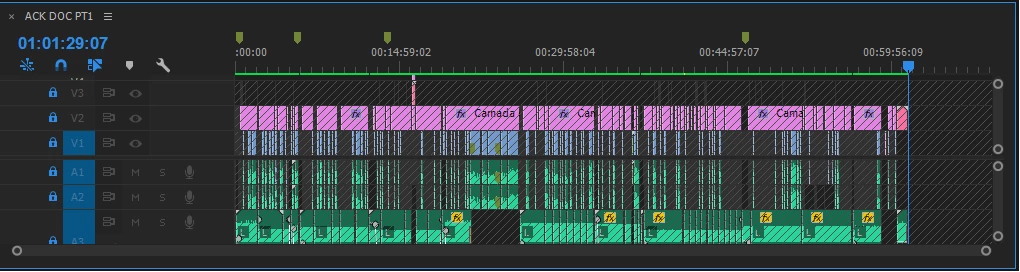
I want avoid the C metod, besides take forever to render, i am afraid the some effect do not work as should work.

Update to Premiere Pro CC 2018 will be a solution?

I dont know if in the Premiere Pro CC 2018 this error stil exist.

But this is a PrCC2017 project with a lot of composition and dynamic links from After Effects 2017 and Adobe Audition 2017 and i am afraid that if a uptade, some compatibliy problems will apear and i wll get more problems.

I will have problems if i update?

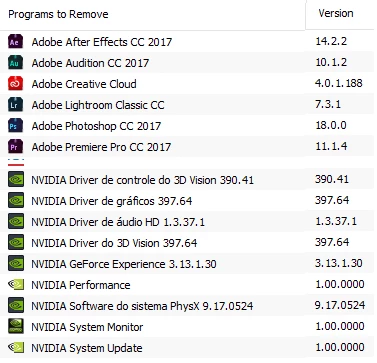
Here some info about my PC.

PLEASE HELP ME, THIS ERROR IS MY NEMESIS

PS: Btw, I only exported the part with the "problem" and it worked. But when I export the entire project I get this error

This topic has been closed for replies.
Correct answer Rafael_Clemente

Hi everyone, that's actions given to me,until now, the solution of this problem.

First of all, make sure your drivers are updated.

  • Delete media cache and media cache files
  • Delete your video previews

After that export your sequence!

Work for me.

I export a couple times to make sure and seems pretty effective.

A huge thanks to carlosz13485882gethoKevin-MonahanPeru BobAnn BensR Neil Haugen

carlosz13485882

6 replies

New Participant
July 29, 2020

which section do I need to go to to enable Use preview

R Neil Haugen
Brainiac
July 29, 2020

That's an option in the Export dialog, near the bottom. And only usable IF your final export and your previews are both intraframe codecs like Cineform, ProRes, or DNxHD/R, you can't use a long-GOP H.264 type format/codec for this.


You then have the Sequence settings Preview section set for the same format/codec, including the same frame-rate/size, and make preiviews. Then on export, with the "use previews" option checked, Premiere will use the sections with previews without re-encoding.


Neil


Rafael_ClementeAuthorCorrect answer
Inspiring
May 28, 2018

Hi everyone, that's actions given to me,until now, the solution of this problem.

First of all, make sure your drivers are updated.

  • Delete media cache and media cache files
  • Delete your video previews

After that export your sequence!

Work for me.

I export a couple times to make sure and seems pretty effective.

A huge thanks to carlosz13485882gethoKevin-MonahanPeru BobAnn BensR Neil Haugen

carlosz13485882

Adobe Expert
May 28, 2018

you are welcome ! Glad your problem is solved

Inspiring
May 25, 2018

I wrote an extensive list of ways to approach this, have a search for it. Summary:

delete media cache and media cache files

delete previews

change sequence previe format to pro res or similar (DMX or Cineform

Inspiring
May 25, 2018

continued... (stupid phone!)...

do ann bens suggestion first. easiest: insert new vid track under v1 and put black video in the whole timeline.

once you've got a decent preview format you can render the project in sections.  Then export using "use previews"

Also (very important) before you try rendering reboot!  Do you have a gtx 1070?

99% of my problems were fixed by moving to gtx 1080

Inspiring
May 26, 2018

Here is my sequence settings:

Wich of this preview file format i should use?

Thanks for your help guys, for real.  This error is stressing me for a long time I need to solve.

Kevin-Monahan
Community Manager
Community Manager
May 25, 2018

Rafael_Clemente,

I have seen this error code before. I am investigating. See if anything in this doc might help: How to fix issues that cause errors when rendering or exporting

Thanks,
Kevin

Kevin Monahan - Sr. Community & Engagement Strategist – Pro Video and Audio
Adobe Expert
May 25, 2018

hi Kevin-Monahan-l4m5Nl I'm noticing that most of these errors are solved when the video previews associated to the project are deleted, this happens with me personally on a monthly basis and i have lot of successful experience with deleting the video previews that premiere pro  creates when rendering, this is something Adobe has to really work on, both the video previews, the pek files and the media cache

Adobe Expert
May 25, 2018

you have to delete your video previews associated to this project, project settings, scratch disks, there you can find their location, don't link them to media cache please, this is different

Inspiring
May 25, 2018

I just did this and still get the same error.

Ann Bens
Adobe Expert
May 25, 2018

You need to fix the error at the given time in the timeline

Delete effect, delete clip from project.

rename clip and import again, add effect.

Try again.

Dont use Previews.

Inspiring
May 25, 2018

I've tried this and it did not work.

The error seems to be random, so every time I try to export, it shows a different time in the timeline.

I will stop using previwes to export.

Btw, I just exported the part with the "problem" / "error" and it worked, I was able to export.

But thank you for answering me.

Inspiring
May 25, 2018

Try updating or rolling back your graphics driver directly from the video card manufacturer’s site and then restart the computer.


Hey man, just tryed and still get the same error.

I uptaded to 397.93

I dont think that rolling back will solve because since 382.53 i have this error.

Should i rolling back to more older version than 382.53?????

Thank for your support.

PS: Also i am able to export small parts of the sequence without any trouble. (1minute max)