


- Startseite
- Premiere Pro
- Diskussionen
- Premiere Pro mute track problem
- Premiere Pro mute track problem

Link in Zwischenablage kopieren
Kopiert
I don't know how but my mute button on A2 track is keyframed and I cant find where is these keyframes. And when I turn it off and move the playhead, mute is still keyframes, and constantly turning on and off by itself.


 1 richtige Antwort

This issue (Tracks muting apparently automatically) was kicking me around for hours and hours until I was about to go "postal" about all of the cash I was losing wasting time with this... Then I looked into Richard Knight's post a little closer. I haven't used it before so I didn't even know where to look. This fixed this issue for me very quickly and easily. This is how I did it:
1) Right click on the grey track toolbar on the left side of the audio track and select "Customize",
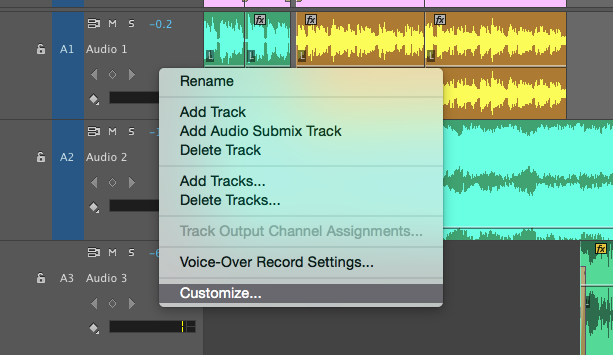
2) Add the "S
...
 54
Antworten
54
54
Antworten
54


Link in Zwischenablage kopieren
Kopiert
Thank you and Richard a million times!

Link in Zwischenablage kopieren
Kopiert
Have the same UNMUTING problem. The problem that began after I added another audio track (Audio Track 10). So now when I try to Voice record on "10"... track "8" unmutes itself. (8 was where I'd recorded before.) None of the suggestions herein corrected it.

Link in Zwischenablage kopieren
Kopiert
SOLUTION>>>
Open up audio track mixer. Select affected track pull-down to 'write'. Set track to desire 'mute' status or not mute. Hit the space bar. It should effectively 'write' your desired mute status for that portion in which you play. So for random mute/unmute glitches, it will revert it to the way you want.

Link in Zwischenablage kopieren
Kopiert
That had been doing my head in as well Thanks a million

Link in Zwischenablage kopieren
Kopiert
Wow, thanks. Great to find an answer to this problem! Except in the customize window i can't left or right click anything so can't start showing mute keyframes. Just love it when you find the right settings and it's the program that's bugged.. This post is from 2015 and now it's 2020 and it still is an issue. Can't understand why mute would be keyframable,. That's like a big no no as the sound will clip instead of ease in and out. Mute should be an editing tool..


Machen Sie sich bereit! Im Januar erwartet Sie ein verbessertes Adobe Community-Erlebnis.
Mehr erfahren
 AdChoices