


Participant
April 3, 2020
解決済み

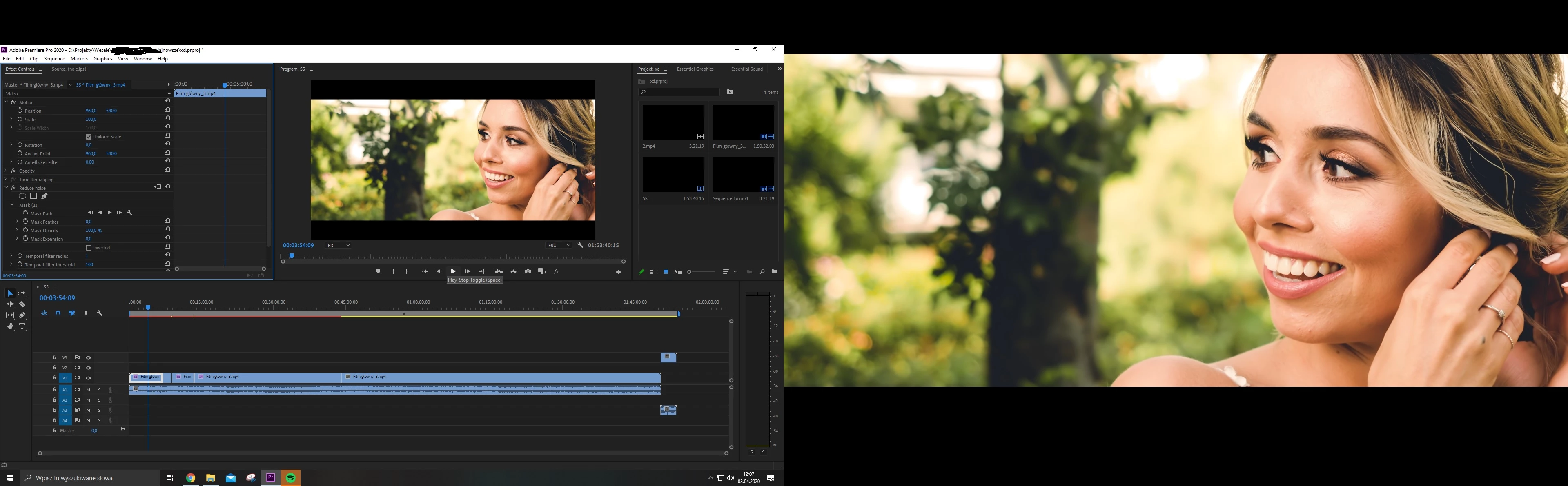
Unable to close Full screen preview on second monitor.
  • April 3, 2020
  • 返信数 3.
  • 6184 ビュー

Till 3 days I have issue that there is full screen preview on primary monitor. I can't close it and it's not really program monitor. Even while I'm writting this post I see this preview. Reinstalling adobe premiere is not getting results.


[title edited by mod]

このトピックへの返信は締め切られました。
解決に役立った回答 B1ackFr1day6660101

Just solved this issue, if you still have it i hope this helps you or at least helps anyone who finds themselves here in the future... Go to your preferences in premiere, then go to playback. under video device you can enable or disable the option for a dedicated monitoring screen. The option is on by default. simply uncheck the box for the monitor that is having the "bug" and your issue will be solved. Hope this helps!

返信数 3

Participant
January 5, 2024

Thank you. That was driving me crazy. I tried everything.


Participant
January 10, 2021

Just solved this issue, if you still have it i hope this helps you or at least helps anyone who finds themselves here in the future... Go to your preferences in premiere, then go to playback. under video device you can enable or disable the option for a dedicated monitoring screen. The option is on by default. simply uncheck the box for the monitor that is having the "bug" and your issue will be solved. Hope this helps!

Participant
January 21, 2023

Thank you so much!
A bit more than two years has passed and your solution helped me like a charm! 💙

Known Participant
March 28, 2023

Ditto - thanks!

MarekMularczyk
Community Expert
Community Expert
April 3, 2020

Hi,


Is the screenshot you attached a view of your main monitor? Both images side-by-side appear on the same screen?

Did you try resetting workspace? Resetting Premiere Perferences?

Adobe Community ExpertAdobe Certified Professional