


Participant
December 10, 2024
Open for Voting

Revert Font Size Settings to Original in Version 25.1

  • December 10, 2024
  • 6 replies
  • 721 views

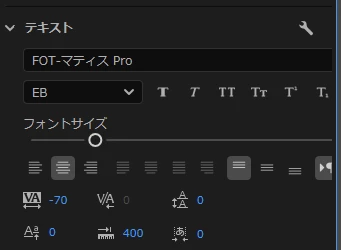
After updating from Premiere Pro 25.0 to 25.1, the font size adjustment setting has shifted to the far right. As a result, it has become inconvenient because adjustments can only be made by either double-clicking to maximize the text settings or enlarging the panel. I would like it to be possible to use the same settings as in version 25.0.
6 replies

MyerPj
Community Expert
Community Expert
February 21, 2025

It looks good, I would like to see less indent space:


Adobe Employee
February 21, 2025

Hi @poni1 ! We have added a small fix in the Text section of the Properties panel where we have added a breakpoint for some controls to adjust to a narrower panel configuration. you can see these changes in the latest beta build of Premiere Pro (starting with build 25.2.112). If you look at the screenshot I attached you can see that the panel now allows you to set it to a pretty thin width. Only the styles browser button and maybe the Responsive Design Position button need fixing, but everything else is now accessible. I'd love for you to take a look and give us your feedback. What do you think?


Stan Jones
Community Expert
Community Expert
December 11, 2024

Fabulous!

MyerPj
Community Expert
Community Expert
December 10, 2024

Yay! Good to see you back @Stan Jones , hope it was good. 🙂

Stan Jones
Community Expert
Community Expert
December 10, 2024

@poni1,


Thanks for highlighting this change. I agree, the field for the editable number/size for the font is not visible when the width of the "new" Properties panel is still plenty wide.


This is part of a significant reorganization of the Text section which put Font size on its own line and moved the number to the right and above the slider. The slider line expands with panel width, and moves the number with it - until it scrolls out of view.


I'll try to find a relevant thread in the Beta to also post this.


Edit: posted in the major thread of the new Properties panel:

https://community.adobe.com/t5/premiere-pro-beta-discussions/now-in-beta-properties-panel-for-premiere-pro/m-p/15030214#M10810


Stan