Participant
September 25, 2018
解決済み

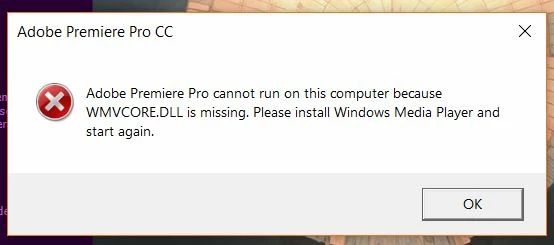
WMVCORE.DLL is missing

  • September 25, 2018
  • 返信数 2.
  • 3649 ビュー

Comment resolut cette problem

[title edited by mod]

    このトピックへの返信は締め切られました。
    解決に役立った回答 juanmario

    For Premiere to work properly you must have Windows Media Player installed.

    This will depend on which exact version of windows you have.

    The N and KN editions include the same functionality as the Windows 10 editions, except Windows Media Player and other related technologies.

    https://www.microsoft.com/en-US/download/details.aspx?id=48231

    Note that the editions of Windows 10 Enterprise and Windows 10 Pro LTSB (long-term service branch) do not include Windows Media Player.

    https://answers.microsoft.com/en-us/windows/forum/windows_10-start/how-to-locate-and-open-windows-media-player-in/7d0f31a1-2999-4597-9c43-b48b075c5e57

    You can also depend if I update Windows from a previous version, in this case you can do the following:

    Copy the WMVCORE.DLL file from the C: \ Windows.old \ Windows \ System32 directory

    And paste it in C: \ Windows \ System32

    返信数 2

    juanmario
    juanmario解決!
    Participating Frequently
    September 25, 2018

    For Premiere to work properly you must have Windows Media Player installed.

    This will depend on which exact version of windows you have.

    The N and KN editions include the same functionality as the Windows 10 editions, except Windows Media Player and other related technologies.

    https://www.microsoft.com/en-US/download/details.aspx?id=48231

    Note that the editions of Windows 10 Enterprise and Windows 10 Pro LTSB (long-term service branch) do not include Windows Media Player.

    https://answers.microsoft.com/en-us/windows/forum/windows_10-start/how-to-locate-and-open-windows-media-player-in/7d0f31a1-2999-4597-9c43-b48b075c5e57

    You can also depend if I update Windows from a previous version, in this case you can do the following:

    Copy the WMVCORE.DLL file from the C: \ Windows.old \ Windows \ System32 directory

    And paste it in C: \ Windows \ System32

    Ann Bens
    Community Expert
    Community Expert
    September 25, 2018

    Is a windows thing:

    Might want to do what it says.