



How can I force text in a table to wrap at the margin? Chinese characters result in wide tables.
Hello all ye RoboHelpers out there.
Background:
We're using RH 9 (latest patch) on Windows 7 machine.
We document in English and then the RH project gets localized into many diff languages and we use that to generate CHM, and Printed outputs.
The Problem:
In the Chinese language, in printed output, the right border of most tables exeeds well beyond the margin.
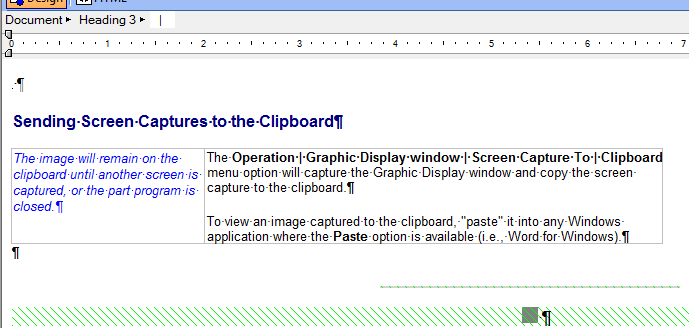
Here's what the localized table looks like in the RH editor:

By comparison, here's the equivalent English topic prior to localization:
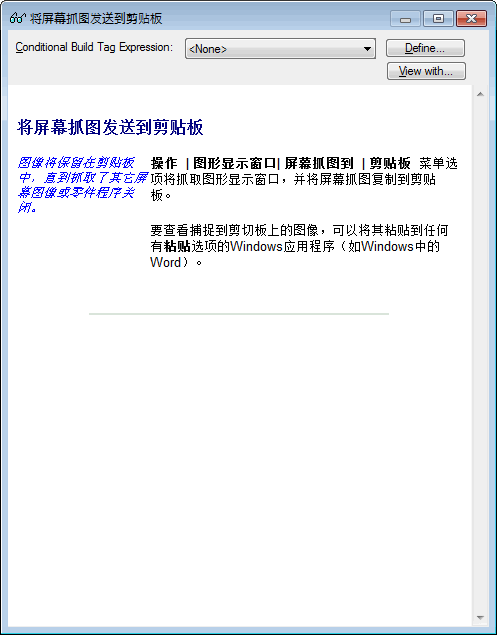
Our CHM output is fine. In fact, here's what the Chinese looks like in when output to a browser or previewed and I drag the right side to
a narrower width. Notice that the table text appropriately wraps to remain within the window's size:
But here's what it looks like when I generate it in Word's printed output:
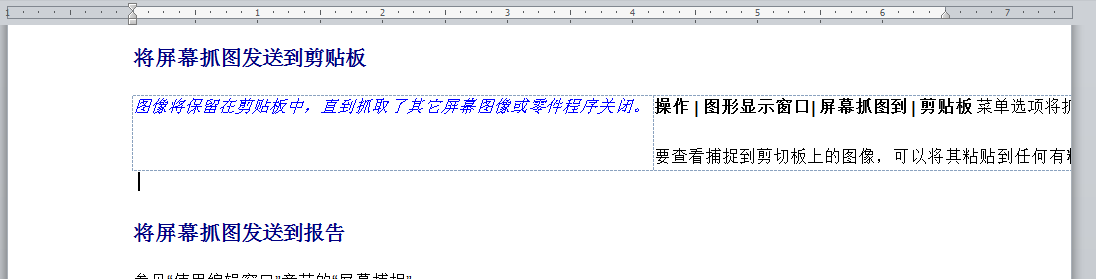
Notice the location of the margin at 6.5 inches. It should be wrapping at the margin. And something is weird with the left cell how it's getting pushed so far to the right.
The actual table width ends up around 11 inches!  I had some tables last time I did this that were as far out as 18 inches but looked perfectly fine in English!
We use Across Systems for our localization tool, and I've verified that our translators are not messing with the table properties at all; only the text is exposed. One interesting difference I've noticed from other languages, is that Chinese characters do not contain a true space or period characters when we get them back from localization. This makes sentences essentially a really long string of unbroken characters, and I suspect this somehow pushes the generated tables to wide extremes in printed output.
What I've Tried:
I've tried to change the table properties in Word to auto fit the size of the window.
I've tried setting the width in RH to a specific size and regenerating. Still doesn't help.
I've added in space character and doing that does cause lines to wrap in some cases, but not in all. But I shouldn't have to do this.
I've tried to create a VBA macro in Word to size the tables, but couldn't get it to work.
What I need:
I need to somehow globally force all the tables' text strings to wrap once they reaches the right margin no mater what, even if the line does not contain space characters. Is there a setting I'm missing somewhere, either on the RH side or the Word side that can do this for these long strings of characters?
I really hope someone else has figured out how to deal with this because last time I did this, I had to go through approximately 500 tables and manually do a very convoluted workaround dragging the table handle in Print layout mode back to the right margin to get the table to wrap appropriately. It was a major pain in neck! 
Many thanks in a advance for any ideas you might have.
 AdChoices