symmetricalMan
Inspiring
November 10, 2015
解決済み

How to modify the style of breadcrumbs - RoboHelp 11 won't behave?

  • November 10, 2015
  • 返信数 1.
  • 2550 ビュー

Short version: Breadcrumbs in CHM files do not display the styles I've configured in RH.

Long version:

  • Am running RH11.
  • Working in an HTML project, generating a CHM for output.
  • I have a Master Page for the project, in which I have generated a breadcrumb placeholder. I removed the formatting code from the placeholder, so what I have left looks like this:
    • <?rh-placeholder type="breadcrumbs" ph-align="0" sep-char="&gt;" home="Home" usetopicformat="0" ph-style="" ?>

  • This Master Page refers to the default CSS file: <link rel="StyleSheet" href="default.css" type="text/css" />
  • Each topic uses this Master Page.
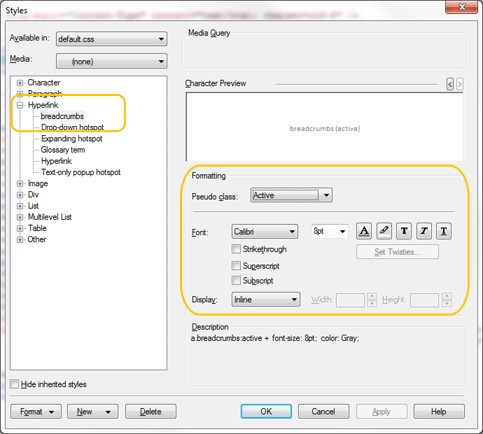
  • Via the Project Manager, I double-click the default.css file in order to modify the appearance of the breadcrumbs. I make changes via these settings:
  • Upon saving this, RH places the following code into the default.css file. *Note (below) that it fails to specify the font I've selected - odd.

a.breadcrumbs:link {

  font-size: 8pt;

  color: #808080;

}

a.breadcrumbs:visited {

  font-size: 8pt;

  color: #808080;

}

a.breadcrumbs:focus {

  font-size: 8pt;

  color: #808080;

}

a.breadcrumbs:hover {

  font-size: 8pt;

}

a.breadcrumbs:active {

  font-size: 8pt;

  color: #808080;

}

Issue: Upon generating the CHM file, the breadcrumbs are present and functional, which suggests to me that the Master Page is being administered correctly. However, none of the style settings I've specified for breadcrumbs get applied. Instead, the breadcrumbs adopt the same styling as the 'normal' style, as if to suggest that the breadcrumb style definitions in the default.css are being ignored. Note that if I manually-modify other styles within the default.css, such as the 'p' style, the changes are reflected in the output - i.e. I'm satisfied that I'm tweaking the correct css file. ...so why don't my breadcrumbs adopt the style(s) I've specified?

このトピックへの返信は締め切られました。
解決に役立った回答 symmetricalMan

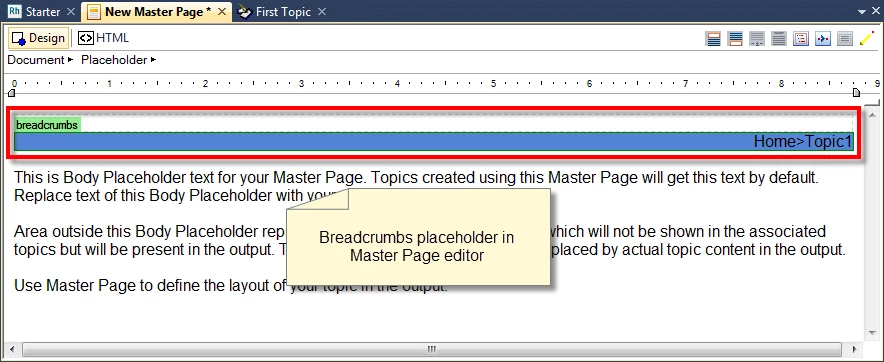
I'm assuming that you created a Master Page, then inserted a Breadcrumbs Placeholder into that. So your editor would look like this:
And if you double-click the placeholder you should see this dialog allowing you to configure the Breadcrumbs.
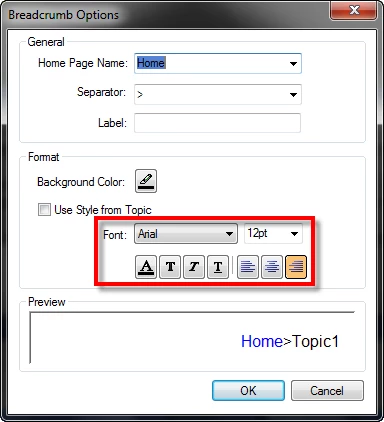
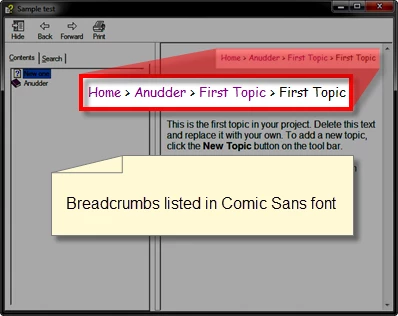
That dialog is what I'm referring to. Seems that if I choose the font and font size there, RoboHelp fully respects what I've selected and it ends up looking as I hoped in the CHM file.
Cheers... Rick


Many thanks, people. With your suggestions, I've managed to resolve this.

Here's what I did:

(being thorough for the sake of anyone dropping in)

  1. Make a backup of the default.css.
  2. Open default.css in an external text editor.
  3. Erase all the style definitions from it.

Then, in RoboHelp;

  1. Open the Master Page, and delete the breadcrumbs placeholder from within in.
  2. With the Master Page still open, add a new breadcrumbs placeholder, ensuring that the Use Style from Topic check box is ticked. Ignore all other settings.
  3. Click the breadcrumbs placeholder, so it's selected. Then, locate the "breadcrumbs" style in the Style and Formatting pod, right-click it, and select Edit. Define the style you want for your breadcrumbs. I'm not sure if this step was necessary.
  4. Switch to HTML view (of the Master Page) and manually modify the breadcrumb's style definition (I needed to change the font type and size for my project). I'm not sure if this step was necessary either.
  5. Within the Project Set-up pod, locate and right-click the Master Page in question, and select Properties.
  6. Within the Properties window, select the Appearance tab, and ensure that the default.css is the selected style sheet.
  7. Open the Topic List pod, select all topics, right-click the list, and click Properties.
  8. Within the Properties window, select the Appearance tab, and ensure that None is selected. Click Apply. It may take a moment for RH to apply this setting to all your topics. This ensures that none of the topics are directly influenced by a style sheet.
  9. Within the Properties window, select the General tab, and ensure that the Master Page drop-down list displays the master page you edited earlier. Click Apply. It may take a moment for RH to apply this setting to all your topics. This ensures that every topic is based on the Master Page, and hence, by proxy, any style sheet that the Master Page is associated with.
  10. Within the Properties window, select the Appearance tab again. Notice that the selected style sheet now reads default.css*, despite having just specified that we wanted no style sheet selected. The * here indicates that the default.css style is being applied, but indirectly, via the Master Page we applied to all the topics.
  11. Click OK on the Topic Properties window. Again, it may take a moment for RH to apply this to all your topics. Note that because I deleted all the style definitions from my default.css, each topic in my project (and the Master Page itself) now displays the default styling of RH i.e. it has no other style definitions to work with - it's reading an empty style guide.

    Now to build the styles...


  12. Open default.css in an external text editor.
  13. Open the backup default.css you made at the start.
  14. Copy from the backup to the default.css each style you want to use in your project. I copied over all the styles I wanted to use, and ignored all the others (styles I wasn't using in this project). As you copy the styles over, save the default.css, and flick back over to RH, and you should see your saved style definition(s) being added to the Style and Formatting pod.

Then, I had to do a little manual tweaking of the breadcrumbs style definitions in the default.css, using the text editor. For my needs, my breadcrumbs work, based on these definitions:

a.breadcrumbs:link {

  font-size: 8pt;

  color: #808080;

}

a.breadcrumbs:visited {

  font-size: 8pt;

  color: #808080;

}

a.breadcrumbs:focus {

  font-size: 8pt;

  color: #808080;

}

a.breadcrumbs:hover {

  font-size: 8pt;

}

a.breadcrumbs:active {

  font-size: 8pt;

  color: #808080;

}

p.breadcrumbs {

  font-size: 8pt;

}

Thanks again, people.

Have I missed anything?

...sorry, am running out the door.

返信数 1

Captiv8r
Legend
November 10, 2015

Hi there

Can you double-click the Single Source Layout recipe and share a screen capture of the dialog?

Thanks... Rick

symmetricalMan
Inspiring
November 10, 2015

As requested. Thanks.

Note however, that I've been playing with these settings, and what you see here is the latest 'fumbling' where I'm applying the default.css to all topics. I've also tried combinations of applying the Master Page to all topics, or where I choose to not apply either of these options.

An aside: I'm a bit confused as to why there are multiple mechanisms for applying a css and/or Master Page i.e. I can apply a Master Page to all topics from here, but why would I when each page is already using the Master Page as a template (which itself references the default.css for its styles).

Community Expert
November 11, 2015

Thanks for your suggestion, but I'm confused about it.

If I tick the Use Style from Topic check box, which style from the topic will the breadcrumbs use?

...and I'm not sure why I'd want it to do that anyhow, when what I'm trying to do is have the breadcrumbs use a specific style definition that is not used in the topic.

As it happens, I've tried ticking this box before, and from what I can tell, all it does is change the breadcrumb placeholder code in my Master Page from

<?rh-placeholder type="breadcrumbs" ph-align="0" usetopicformat="1" home="Home"  sep-char="&gt;" ?>

to

<?rh-placeholder type="breadcrumbs" ph-align="0" usetopicformat="1" home="Home" sep-char="&gt;" ph-style="font-weight: normal;font-style: normal;text-decoration: none;" ?>

And the end result is the same regardless (see my previous post for an example of the resulting breadcrumb appearance).

Thanks, but this hasn't resolved the issue for me.


It should use the breadcrumb styles you defined in the stylesheet applied to the topic (whether that's on the topic specifically, or defined for the whole project).

My setup:

Topic: masterpage assigned. stylesheet not assigned

Master page: stylesheet not assigned, breadcrumbs using style in topic

SSL: Apply to all topics set to the css I defined the breadcrumbs in.

Also, to style the non-link breadcrumb text, you need to set the breadcrumbs style in the Paragraph section of the Styles dialog box.

Hope that helps

(Hmm, although I just noticed that this time some of the breadcrumb links took the p font, rather than the a font. weird...)