


Known Participant
October 26, 2020
質問

"A" character shows up in Chrome for Responsive HTML Output - For every <p> </p> with space between

  • October 26, 2020
  • 返信数 2.
  • 415 ビュー

Once again, this issue occurs ONLY when our help is displayed within our product's application in Chrome. We are using "reimagined" RH 2019 now.  I upgraded my smaller help projects. This problem does not occur when help is displayed as "standalone" - only when help button is clicked in our software to launch help display.

What I've seen is that this character - an A with a character above (don't know character's name) appears for every instance of "<p> </p>" with space between.  When we've had a similar situation (dashes, curly quotes), we used Find/Replace - but I can't see how I would do that here. Here's an image of the character:  

For the example below, there was a <p> space </p> in paragraph before or after.
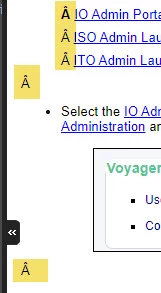


Note also that this problem did not happen when we were using RH Classic 2019, when help was launched via the application.

For the smaller projects, with fewer HTMs, I could almost fix it manually - but our main help project has hundreds of topics.  So we need a non-manual solution.

Need your help!!


Thanks

Susan

    このトピックへの返信は締め切られました。

    返信数 2

    Jeff_Coatsworth
    Community Expert
    Community Expert
    October 26, 2020
    Freespirit-ST作成者
    Known Participant
    October 27, 2020

    Thank you!  Yes - seems to be similar to what I'm seeing. 

    The nightly build did not pick up my latest help output where I did the experiment to copy/paste the space and see if the A character appears.  So I will see tomorrow's build.

    We will be talking to the developers that work on the web server and talking to them about the encoding.

    Keep you posted!!

    Susan

    Community Manager
    October 26, 2020

    Hi Susan,


    this *might* be a Unicode issue with your in-app browser component. The space in question here is actually a non-breaking space (U00A0).


    Can you try the following, please? Copy and paste this space to somewhere else in the text (between two words in a sentence) and try again in your in-product help? Does it show up there as an  (or Ã) there as well? If so, talk to your developers. They might need to make sure, that the HTML file in your in-app help parses and renders the file as a UTF-8 file.


    You can also reach out to tcssup@adobe.com and put me on CC (gentz at adobe.com) so that we can investigate it further with you and your dev team.

    Freespirit-ST作成者
    Known Participant
    October 26, 2020

    Thank you SO much for your help.  I will definitely try that!  A nightly build of our application is usually done, so I will try your experiment to copy/paste the space and see if the A character appears!

    And thank you for your offer to help us and our developers!  You certainly may be hearing from us!

    Susan Tabnik