


Inspiring
October 5, 2018
解決済み

RoboHelp authored manual generating a syntax error in IE.
  • October 5, 2018
  • 返信数 2.
  • 566 ビュー

I have used RoboHelp2017 to author an online user manual.
This includes videos, glossary, index, images, links and using the Search.

Our users navigate to this using Edge, Chrome, Firefox and
IE.  The manual works – opens in all of them.  The videos play, the
images enlarge when selected, links work.

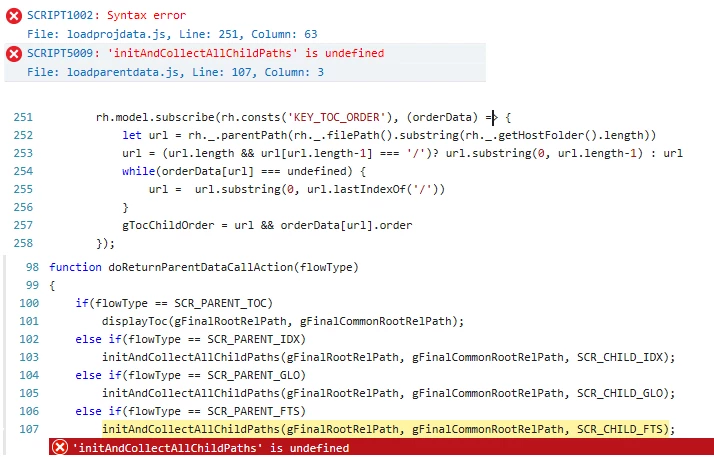
Unfortunately, the search feature is not working in internet
explorer.  I had one of our software developers look into it and there is
a Syntax error.

I am using:

Adobe RoboHelp 2017

I have reproduced the error in: IE version 11.0.9600.19129

Please advise.

Colleen

このトピックへの返信は締め切られました。
解決に役立った回答 colleenpc

When navigating to updates in RoBoHelp it said all updates were done.

Searched on the javascript error and found the following:

https://forums.adobe.com/thread/2398398

Backed  up the common.js, common.min.js, layout.js, layout.min.js, loadparentdata.js, loadprojdata.js, mhfhost.js, mhtopic.js, topic.js, and topic.min.js files from the following location

C:\Program Files (x86)\Adobe\Adobe RoboHelp 2017\RoboHTML\ResponsiveHelpExt\widgets\common\scripts

then downloaded and extracted scripts.zip file

Copied all .js files from the extracted folder and paste in:

C:\Program Files (x86)\Adobe\Adobe RoboHelp 2017\RoboHTML\ResponsiveHelpExt\widgets\common\scripts

I then deleted all Azure_Blue folders from my computer and from the RoboHelp Output setup Screen Layouts.

I downloaded new Azure_Blue.zip and changed to .slz

I published all my projects selecting the Azure_Blue layout from the Gallery and then copied all the files over to out tool and it is working - Search, links, videos, expanding images, index, glossary.

返信数 2

colleenpc作成者解決!
Inspiring
October 9, 2018

When navigating to updates in RoBoHelp it said all updates were done.

Searched on the javascript error and found the following:

https://forums.adobe.com/thread/2398398

Backed  up the common.js, common.min.js, layout.js, layout.min.js, loadparentdata.js, loadprojdata.js, mhfhost.js, mhtopic.js, topic.js, and topic.min.js files from the following location

C:\Program Files (x86)\Adobe\Adobe RoboHelp 2017\RoboHTML\ResponsiveHelpExt\widgets\common\scripts

then downloaded and extracted scripts.zip file

Copied all .js files from the extracted folder and paste in:

C:\Program Files (x86)\Adobe\Adobe RoboHelp 2017\RoboHTML\ResponsiveHelpExt\widgets\common\scripts

I then deleted all Azure_Blue folders from my computer and from the RoboHelp Output setup Screen Layouts.

I downloaded new Azure_Blue.zip and changed to .slz

I published all my projects selecting the Azure_Blue layout from the Gallery and then copied all the files over to out tool and it is working - Search, links, videos, expanding images, index, glossary.

Peter Grainge
Community Expert
Community Expert
October 9, 2018

Thank you for posting what worked for you. It helps others.


See www.grainge.org for free RoboHelp and Authoring information.

@petergrainge

Use menu (bottom right) to mark as Best Answer or to Highlight particularly useful replies. Found the answer elsewhere? Share it here.
Peter Grainge
Community Expert
Community Expert
October 5, 2018

Have you applied all the updates? There was an issue with search.


See www.grainge.org for free RoboHelp and Authoring information.

@petergrainge

Use menu (bottom right) to mark as Best Answer or to Highlight particularly useful replies. Found the answer elsewhere? Share it here.