


eurosGRAPHIX
Participating Frequently
April 30, 2024
解決済み

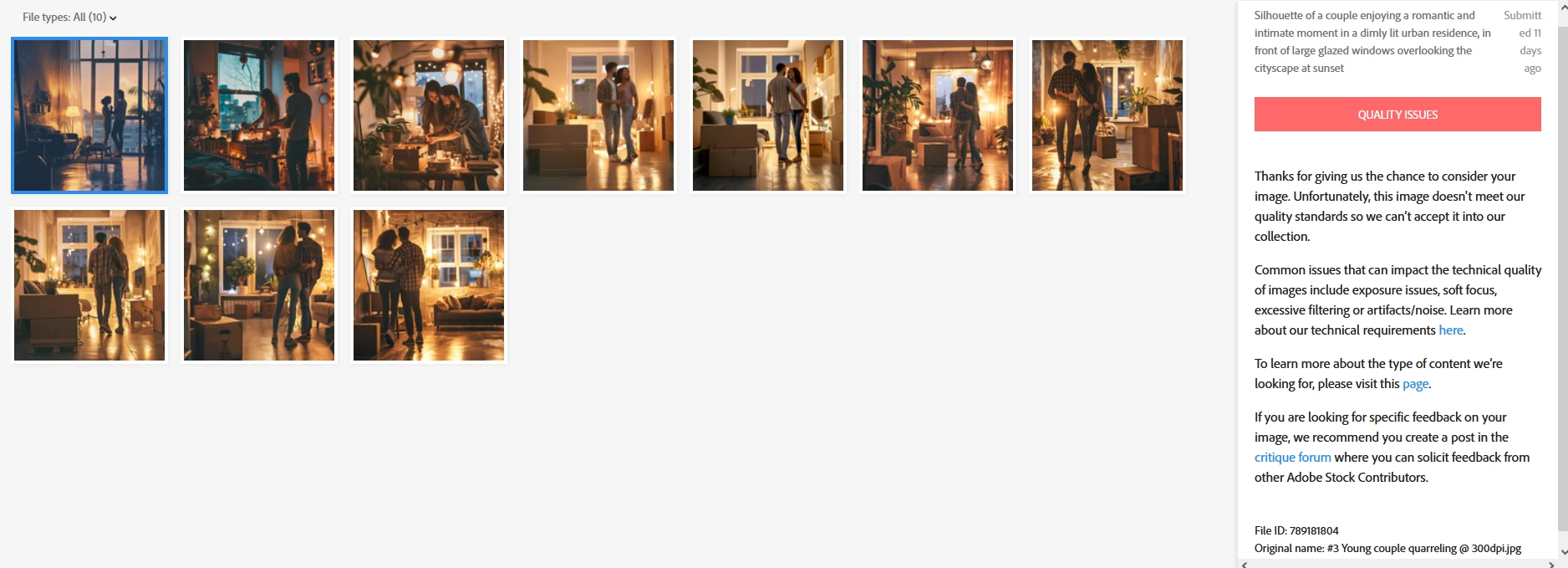
These Ai images of mine were rejected. I hope is not about the lighting. Because it is the concept.

  • April 30, 2024
  • 返信数 8.
  • 14035 ビュー

Hi guys!

I have recently uploaded my 2nd batch of 10 images, and this time were all rejected. 😱

My first batch of images were about graphics birds and were All accepted, sooner than I thought and I was very excited.

But this time, I don't know what went wrong with these images. I am really sad because I spend more than 2 hours for each image in photoshop, to correct and edit them for perfection.

They are Ai images and very high quality @ 300dpi. I removed artifacts, noise, etc... I hope it is not about the lighting, because I want them that way in low lighting the concept.

What else left to do? 😭

On the Upload, I choose Photos instead of “illustration”. Is that a problem?


I really need your feedback, guys.

I uploaded some of my images:
 

このトピックへの返信は締め切られました。
解決に役立った回答 Abambo

Yes, the forum is converting them slightly more blurrier than they are. I've noticed that.

But thanks for the comment.


quote

Yes, the forum is converting them slightly more blurrier than they are. I've noticed that.

But thanks for the comment.


By @eurosGRAPHIX

No, when you download and view in Photoshop, they do not get changed. If you look at them in the browser, the browser may transform them. My Browser here on my iPad is at 85%, my browser on my desktop with a 4k screen is at 150%. It's the browser transforming the pictures for that. The browser is not an accurate pixel machine.

返信数 8

eurosGRAPHIX
eurosGRAPHIX作成者
Participating Frequently
May 2, 2024

Can you point out the errors in these 4 pictures as well, guys?
Thank you All for your valuable feedback and advices.  🙂

eurosGRAPHIX
eurosGRAPHIX作成者
Participating Frequently
May 2, 2024

*By the way, their faces are not that blurry as the Forum post here is making them blurry. It is reducing the quality of my images a little.

Nancy OShea
Community Expert
Community Expert
May 1, 2024

AI is imperfect and will never replace real artists. At best, AI is a tool. But tools don't make quality artwork, people do.


Examine work closely at 100-300% magnfication and fix all errors if you can or discard them and start over.


Compare your best work with current Stock inventory. See examples.

https://stock.adobe.com/search?k=argue%20couple

https://stock.adobe.com/au/images/young-couple-having-quarrel/238431483

  • Is yours better than what Stock has or about the same? 
  • How can you improve yours to make it stand it out from all the rest?
  • Will yours work equally well in print and digital projects?
  • As a customer, would you buy yours?


Nancy O'Shea— Product User & Community Expert
eurosGRAPHIX
eurosGRAPHIX作成者
Participating Frequently
May 2, 2024

Hi Nancy OShea,

Thank you for your feedback and your tips.

You are right. Ai will never be perfect or replace real artists. Yes, my mistake was that I gave all my attention to the people that are the main subject, I created missing hands (fingers), legs, faces, etc... And I skipped most of the surrounding objects, which I considered them not to be that important in the background. My mistake.


Probably I should not try to do such complex images in the future again. Such complicated and difficult scenes. I will do more simpler images and with less clutter.

I also should have chosen the "illustrations" instead of the "Photo" option.

I wanted my images to look fake as illustrations and not real photos. I wanted them to look like painted, or graphic images, Not an actual photo.


The images example you send me are minimal, and they are real photos. Not illustrations.

But you are right. I got your point. There are many mistakes I need to erase and correct.


Thank you. 🙂

daniellei4510
Community Expert
Community Expert
May 1, 2024

I see this happen a lot with AI, where you can almost imagine what the bot is thinking or trying to comprehend, while doing its best to follow instructions but ultimately getting it all wrong. "Let's see...they're moving in, so I'll want to add some moving boxes, so I'll have the woman holding a purse that looks like a moving box."

I once asked my bot to "imagine an image of two beautiful twin sisters" and it gave me a pair of identical siamese cats. Giving instructions to a text to image AI bot is sometimes like trying to communicate with a five year old. 


Adobe Community Expert | If you can't fix it, hide it; if you can't hide it, delete it.
Abambo
Community Expert
Community Expert
May 1, 2024

Your first is clearly missing contrast.

Blacks are mission (left), but also whites (right). That might give you that nice flat look, but it is difficult to correct afterwards.


Just taking out a small part of the asset at 100%:

1) fake face.

2) no details.

3) rendering error on the windows handle.

4) shadow, you get such structures with high noise reduction.

5) flat clothing structure (you may argue that that is by design)

Artefacts in the plants and windows:


What is this?

The cupboard down is missing legs.


Again: what is this?

The shelf has drawing errors.

Next image:

You'll also locate multiple other rendering issues:

(Basically, you generate an image, you do your scaling and you submit. As a customer, I couldn't use any of these pictures.)


If you are new to stock, you should consider these resources: https://helpx.adobe.com/stock/contributor/tutorials.html
Please read the contributor user manual for more information on Adobe stock contributions: https://helpx.adobe.com/stock/contributor/user-guide.html
See here for rejection reasons: https://helpx.adobe.com/stock/contributor/help/reasons-for-content-rejection.html
and especially quality and technical issues: https://helpx.adobe.com/stock/contributor/help/quality-and-technical-issues.html

ABAMBO | Hard- and Software Engineer | Photographer
eurosGRAPHIX
eurosGRAPHIX作成者
Participating Frequently
May 2, 2024

I appreciate your comments, and thank you for showing me my mistakes.
I want to learn to become better.
But as I said, these are not photographs. They are illustrations. illustrtations should look fake and painted.
1+2) And the people are silhouettes. Why should a silhouette must have details?
4) The shadow was there from the original image. But I forgot to remove it. is not from the noise reduction.
You are correct about the artifacts on the plants.
Yes, some objects should be removed. I understand that.

No, you are wrong about generated an image and just sumbited. If you read my previous comments, those images were very bad quality and You I've spend 2-3 hours for each image to correct the most obvious mistakes on the subjects (the people mostly).
I never generate images and just upload them. NO WAY. I always edit in photoshop.


=> See the original generated images how they used to be. Notice the noise, the artifacts everywhere, their heads and hands, their feet, walls, lamps....

Abambo
Community Expert
Community Expert
May 2, 2024

Either you do illustrations or photographs, not something in between.


Well, the assets still look bad, even if you have spent a lot of time on them.

ABAMBO | Hard- and Software Engineer | Photographer
jacquelingphoto2017
Community Expert
Community Expert
May 1, 2024

Hi @eurosGRAPHIX ,

The first file is too blue. 

The blown out highlight and the halo might contribute to the second files refusal.

The third file has a problem with the lady's face.

There's an issue with the lady's hand plus it is entangles with an element on the wall.

Overall I believe the images are not sharp enough.

Best wishes

Jacquelin


eurosGRAPHIX
eurosGRAPHIX作成者
Participating Frequently
May 1, 2024

Hi jacqueling, thank you for your feedback,

-> I didn't do anything with the lighting, I let it intact as it was. I made edit corrections in photoshop. I haven't noticed that halos around the edges of the man's shirt have been created. I thought it was from the strong lights reflections.


-> The Lady didn't have a face at all. I created it from another photo. You can not see the nose, only the cheeks, as she is smiling with open mouth. So the side view looks like that. I took the face from a real photo and angle. I just merged the colors.

-> Yes, about the sharpness, maybe that is a problem, the people must be more sharper i guess.  Not the background. I want the background blurry.

-> The Lady's hand wasn't formed. I created the fingers, and she is holding sunglasses.


See the Before editing images:

daniellei4510
Community Expert
Community Expert
April 30, 2024

Lots of rendering errors, as mentioned by others. Yes, some bad AI has been accepted in the past and some (but not nearly as much) still make it through on occasion. And if they get purchased, and someone complains, that could lead to problems. In any case, the fact that some bad assets get through is no reason to except that your should get through as well when the assets contain obvious issues. Faces matter, hands matter...and objects and surroundings matter. Everything matters.


Adobe Community Expert | If you can't fix it, hide it; if you can't hide it, delete it.
eurosGRAPHIX
eurosGRAPHIX作成者
Participating Frequently
April 30, 2024

Hi Daniellei4510!

Thank you for the helpful and enlightening feedback and Advice!.

I think you are correct! I haven't thought it that way. That if they get purchased and someone complaints will have bad consequences for the contributor.

Can you also clarify please about these 3 objects? What is the mistake to them? The one to the left is a decorative piece of art, like a statue. The other one is a tripod, isn't it? The table leg?


The other object you are correct, they have mistakes. Ok. I accept that.

daniellei4510
Community Expert
Community Expert
April 30, 2024

The "decorative piece of art:" remove it; it looks like the Empire State building is melting or something; it's a random object created by a computer for no particular reason

Not the tripod per se, but whatever is dangling out from the top of the tripod. And why have it there to begin with: It lends nothing. Myself, I'd remove it.           

The table leg is straight and should be slated outward as the others are.

Adobe Community Expert | If you can't fix it, hide it; if you can't hide it, delete it.
Jill_C
Community Expert
Community Expert
April 30, 2024

There are drawings errors in each of these. I've highlighted onky a few, but there are others. From the thumbnail print screen it also appears that you've submitted too many similars. 
in this image, the leaves are malformed - just a messy blob of green:

Jill C., Forum Volunteer
eurosGRAPHIX
eurosGRAPHIX作成者
Participating Frequently
April 30, 2024

Hi Jill, Thank you for the helpful feedback.
They might look similar, but they are very different composition and poses.
You are right in some part of your feedback, But these are Ai generated images. These details you are showing me, are they truly so important for the concept of the couple?
what exactly is the mistakes in these?

Jill_C
Community Expert
Community Expert
April 30, 2024

Yes, AI makes mistakes,  but Adobe doesn't accept images with those mistakes. The errors should be obvious if you zoom in and carefully examine each area.

Jill C., Forum Volunteer
RALPH_L
Community Expert
Community Expert
April 30, 2024

The soft lighting and soft focu in some of the images may be a problem but there are several rendring errors. look closely at connecting lines, angles, shapes. For instance the shelves on the left wall and the middle light bulb in the first image.

eurosGRAPHIX
eurosGRAPHIX作成者
Participating Frequently
April 30, 2024

Hi Ralph!

Thank you for the feedback. What shall I do with the Soft lighting? It is the concept of the images. I want the low light of the atmosphere...  About the connecting lines, these are Ai generated images, and I have corrected many serious mistakes. Such as facial characteristics, hands, shoes, legs. I didn't consider for the shape of the shelves or the lightbulb to be an issue.

I have seen very terrible low-res images of distorted faces and distorted lines, that were accepted by adobe and I was wondering why adobe has accepted such images. If you want I can post some of you to see.

But really? The shelves line is an issue here?

I would like more feedback please.  Will they accept them if I do these changes?

Abambo
Community Expert
Community Expert
May 1, 2024
quote

About the connecting lines, these are Ai generated images, and I have corrected many serious mistakes. Such as facial characteristics, hands, shoes, legs. I didn't consider for the shape of the shelves or the lightbulb to be an issue.


By @eurosGRAPHIX

You are mistaken, those errors are errors and serious moderators will refuse at the first sight. Generative AI should not be an excuse for bad quality images.

quote

I have seen very terrible low-res images of distorted faces and distorted lines, that were accepted by adobe and I was wondering why adobe has accepted such images. If you want I can post some of you to see.


By @eurosGRAPHIX

I've seen those assets too, and if the contributor thinks that he did win because their assets passed the moderation, they err. They will earn complaints from customers and at the end they will earn an account validation issue. Such assets are the reason I do not consider AI when looking for assets. It's good that moderators refuse at least some of that scrap.

quote

But really? The shelves line is an issue here?


By @eurosGRAPHIX

Yes, and all the rest.

quote

I would like more feedback please.  Will they accept them if I do these changes?


By @eurosGRAPHIX

No, they are beyond repair. If you can repair, you will spend as much time with that then you would have to create these images without AI.

ABAMBO | Hard- and Software Engineer | Photographer