








Join our Premiere Elements community for tips & help.
Recently active
Wie kann ich auf die Verschiedenen Audio Tracks der Importierten Datei zugreifen?Es wird nur die erste Audio Spur angezeigt. In Adobe Premiere Pro werden direkt alle 6 Audio Spuren angezeigt und ich kann sie bearbeiten. Gruß Morikami
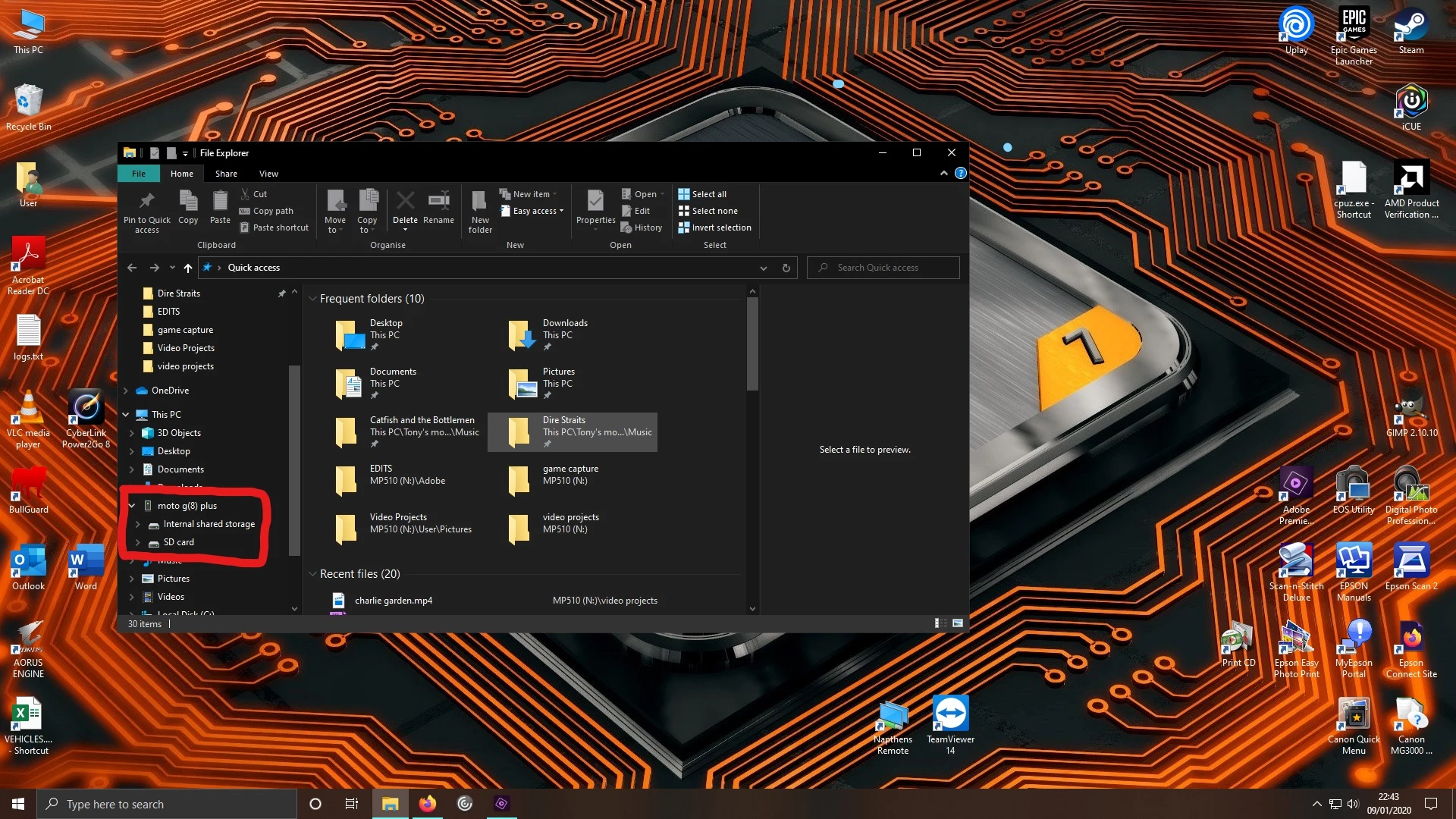
When trying to export a rendered video to my Moto G8 Plus phone, Adobe Prem Elements wont find the phone. I have checked that I have the right settings on my phone to allow transfer of files and if i check the "my computer" it shows up. See screen print when I go back to Premiere it doesnt show the phone, no matter what I do I cant get eEements to regognise the phone so iIcant export it direct to the SD card or internal storage on the phone.Any suggestions? Is there a setting I need to change on Elements or the phone?I dont want to take my SD card out each time Iwant to put a video on there and I dont want to have to save it to the computer then copy it across "out of adobe", defeats the object.Thanks in advance.
Got my new 16 core 3950X up and running and was excited to export/encoding my first project with Premiere Elements 14 (I use this even though I own 2018 because it's the last version to support Blu-ray authoring). Sadly, H.264 exporting only appears to use a quarter the threads this processor can offer. MPEG export uses them all. Any fix for this? Or do the newer version improve multicore support for H.264?
New PC, new fresh DL of APE just right now. There is no sound when I play the timeline. If I double click the video in Project Assets, I hear the sound. If I click the file in Windows Explorer I hear the sound. When I go to >Preferences>Audio Hardware, the Default Output is my computer speakers (that I can hear fine otherwise. Preferences>Audio Output Mapping shows my computer speakers but there are no changeable options that I can tell. . I've rebooted too. Also, I exported the file to .MP4 and played the video w VideoLAN and there is no sound.
I know that it can be done in Premiere Pro, but with Premiere Elements is it possible to combine two projects, with the same project settings, into the same timeline?
I'm an amateur video editor, and occasionally when I try to export, I notice that my ouput file has a big ugly black border, essentially making the video smaller. What setting did I miss? I don't want videos to shrink; I want videos to retain their original size.
Dans première élément 2020 une des possibilités essentielle a disparu; en effet pour pouvoir faire un montage rapide il est essentiel de pouvoir couper un des éléments et supprimer la partie qui ne convient pas par une simple touche; or cette fonction qui existait auparavant dans le mode rapide a disparu; le mode "couper" supprime l'élément en entier maintenant; le mode rapide est devenu sophistiqué et a intégré des possibilités du mode expert. Il perd tout son intérêt
I have been burning to DVD for a couple years with PE13. I now have a new computer with new dvd burner and it won't burn. error message ...... “The data rate of this file is too high for DVD, you must replace the file with one of a lower data rate.I have no idea what to do with this issue. Hopefully some one can help methank you
Recently I've started having problems with correct video and sound timing once I upload a file into editor. The original video file (data source) is fine. But when I upload video to the editor the sound seems playing correctly but the video itself seems to get cut short (couple of seconds at the beginning and couple second at the end of the video) and then the remaining footage expands to the same lenght as the sound. So the video does not fit the sound. I have done nothing with the settings. Please help, I have no idea how to solve this.Thank you.
Hi eveyone,First time posting.I've downloaded Premiere Elements 2019 and Premiere Photoshop 2019 for macOS(I'm running Catalina 10.15.2). Once installed, I open it up, click on Video Editor and it says "Loading Adobe Premiere Elements Workspace" for about a minute before just disappearing, leaving me where i began. I've tried opening the organizer, which prompted me to update the two applications, i did, and then restarted my laptop. No luck!At this point, i havent even been prompted to include my products serial number yet...Scratching my head here. I've posted a screenshot of right after clicking on the video editor and another screenshot after it seemingly gives up. Any help would be greatly appreciated!!-Dustin
I really dont like the light grey background color in the effects windows and the timeline. Can it be changed somehow?
I just purchased Premiere Elements 2020. I had no problem installing and launching the Photo Editor. However, when I try to launch the Video Editor it dumps me out to the Premiere Elements 2020 purchase page. I need help launching the Video Editor please
kan je in premiere elements (2020 of oudere versies) een ronddraaiende fotokubus maken ?
When I go to the Window drop down menu, the option to select audio meters does not show. The drop down menu shows: Restore workspace Dual monitor workspace Project Assets Add media Export and share Adjustments Applied effects History Info Events How do I bring up the audio meters? The PC is Windows 7, the Premiere version is 2018 student version purchased in Oct 2017.
I want to get Premiere Elements with my Creatiive Cloud membership. Then I could burn dvd's with an Adobe product again. Please inform. Thanks
I have been producing video taken on my GoPro5 using Adobe Premiere Elements 12 very successfully in the past and have now obtained Adobe Premiere Elements 2018. Can I transfer my videos made in version 12 to version 2018 and if so what do I need to do in order to make the transformation so that I can edit them using version 2018. I would appreciate any assistance of help please.
I start working with an Iphone 11 PRO. Using videos in adobe premiere elemens, result in a total chrash of the system when smart trim functionality has been used. [Moved from Community Help (which is about the forums) to a better forum... Mod] [To find a forum for your program please start at https://community.adobe.com/]
I am completely new at Editing. I have completed my first segment of four sort clips. My bar shows orange. The video will play fine before rendering. After I render the video, my voice doesn't match the frames and frames freeze during clips. The freezing frames usually happens right before transitions. I am Using a Asus computer with windows 10 and Adobe Premier elements 2019. Thank you.
I'm working on a music video using premiere 2019, I'm using masks to transition to different shots, I have key frames the positioning of the masks, for some reason when the masks move they turn translucent. My opacity is set to 100% and I've found that the only to fix it is by turning the feathering to zero. Which makes no sense, and I need a feather. I'm not sure if it's just a preview or something either, I've never had this issue.
Hi, my input source for my videos is 3686 x 2304 (16 x 10) and when I make a project for this in Adobe Premiere Elements 2019 I can't see how to adjust my project output to the same aspect ratio. Thanks!
I have a Dell Inspiron with an i5 4200U, 6 GB RAM, and no GPU. I have been using premiere elements 14 to edit home movies--MP4. Things work pretty well, and my work with the video is pretty simple--I put in a couple of hours a week. I wish I could render or export the finished videos faster. I'm going to get a new computer, thinking of an i7 and 8 or more GB RAM, with a GPU card if that will help. From an earlier question I asked on a forum, I gather than none of the premiere elements packages will make use of the GPU. The Premiere Pro package on the cloud is too expensive for me. If I could find it does the CS6 package use the GPU? How much improvement would I see with the Premiere Elements 14 if I just get the i7 and more RAM? Any advice to meet the need described will be appreciated.
Picture with serial number removed [personal information removed for your protection][This is a public forum, not Adobe support, please do not post personal information]https://community.adobe.com/t5/Community-Help/Email-signatures-and-personal-information/td-p/4786467 Hi, after trying to render some work, this has come up on my screen. But the link does not work. How can I find the required unlock key? Cheers Harry [Moving from Premiere PRO to Premiere ELEMENTS... Mod]
Hello,I'm making/editing a holiday-movie and at the moment i have imported around 191 4k-clips. The runtime is around 12 minutes now. I still have around 3 weeks moviematerial to select and to add to the movie so the final movie will be around 30-40 minutes. Even though my computer is new and my playback quality is low, i was wondering if you guys have any tips for me to keep everything working fast. I experience some delay when i playback sometimes (not all the time) now. I just want to make sure my computer won't crash and i lose all the edited material (i've experienced that before on my old computer and working in GoPro Studio...) And yes, i save regularly! Is rendering all the material now and than a solution to keep everything fast and solid? Or maybe make 4 different project and connect them in the before making the final movie (if that's possible)?Thanks in advance!
I am no longer able to open two projects at once. When I try to open another project, it closes the original project. I used to be able to have multiple projects on Video Editor open at once. I was already talking to Support for over an hour this morning and they recommended that I reach out here. Please help.
Wanting to shorten audio clips and keep getting audio remix pop up to auto remix. I don't want to use it so how do I turn it off?
Remix with Firefly Community Gallery
Thousands of free creations to fall in love with and remix in Firefly.
Already have an account? Login
No account yet? Create an account
Enter your E-mail address. We'll send you an e-mail with instructions to reset your password.