
Wally R.
Inspiring
June 19, 2024
Question

How to manipulate the length of an imported Media Replacement Asset for MOGRTs?

  • June 19, 2024
  • 1 reply
  • 718 views

I have a L3rd MOGRT that I want to adopt branded Qualifiers (pre-rendered animated top bars) that the Premiere user already has as .movs and can import themselves through Media Replacement


  • The Qualifiers have an outro animation which I want to get rid of. (So I want the qualifier to just animate in, resolve and hold for the entire duration of the MOGRT.)
  • The MOGRT length is longer than the Qualifier animation, so I need to hold and extend its resolve frame.
  • I know time remapping doesn't work, but I tried precomping the Media Replacement asset.mov, and the precomp is duplicated, cropped where the resolve frame is held, then sequenced the layers till the outro animation is cut off from the timeline.
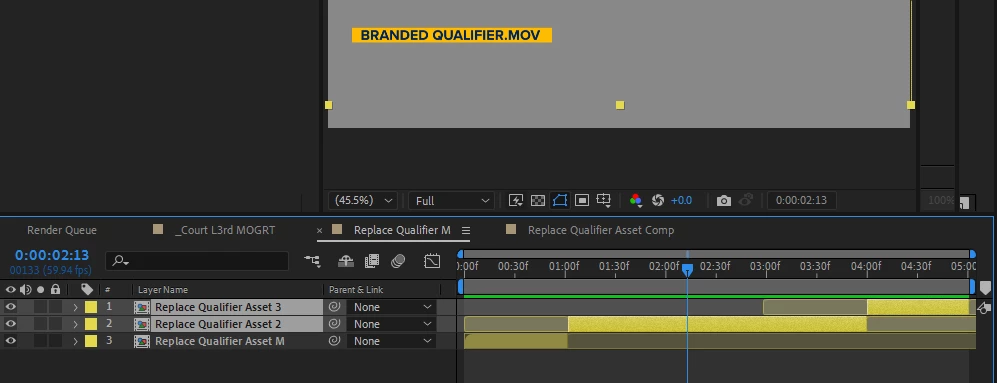

This was my best effort to solve it but unfortunately, it still wouldn't comply on the Premiere end. I don't understand why it won't work because it does not even adopt the precomped extended middle portions at all, and seemingly (or the only way it can make sense to me) is if somehow the Media Replacement happens on the surface level Master Qualifier Comp in _Cout L3rd MOGRT

Any official explanation to this? Or solutions on how to resolve the issue? 

Thanks for the help.

This topic has been closed for replies.

1 reply

Wally R.
Wally R.Author
Inspiring
June 21, 2024

Attached AE File and associated footage.
Replace Qualifier Asset.mov is what's dragged to the Essential Graphics for Media Replacement link.

Roland Kahlenberg
Legend
July 7, 2024

Sorry Wally, but I'm not able to follow the issue. One option I like is to use PProj files which include the pre-Rendered Movies as well as MoGRTs. So, in essence, your solution works as a PProj instead of just a MoGRT. I find these to be more robust and are more straightforward for editors too. You can embed/include an AeMoGRT as part of the PProj file and then include the preRendered files there. 

So, see if this is a viable option and if the editors are comfortable working this way. I find AeMoGRT developers get too technical and try to solve everything in AE, with an AeMoGRT, when actually the better (elegant and user/editor-friendly) solution is a PProj file with an embedded AeMoGRT and this is often the case with tricky time-placement involving pre-rendered movies. 

HTH


Very Advanced After Effects Training | Adaptive & Responsive Toolkits | Intelligent Design Assets (IDAs) | MoGraph Design System DEV
Wally R.
Wally R.Author
Inspiring
July 9, 2024

Thanks for the response Roland.
Just to make sure, were you able to check out the associated files that I attached in my comment of this post and recreate the issue? I wasn't sure if you weren't able to see the issue or if you meant you couldn't resolve the issue.

Currently troubleshooting why my Premiere won't take in new MOGRTs ("unknown error while loading graphics template adobe"), but as for making it a PProj with Prerenders x AEMoGRT,  in Premiere I'm imagining I can do the precomping + duplicating of the prerendered asset (to manipulate its timing) and the user can go in their assets and replace the placeholder prerender, which I assume would automatically update the asset in the precomp? I also gotta see if the user can drag that PProj into their edit PProj and if the EG interfrace from the embedded mogrt show up in their interface. I'd need the mogrt interface esp since the backplate bar I believe would need to be manually adjusted to fit their prerendered qualifier.

Side-question: In AE Expressions, say there's a 1920x1080 .mov with alpha, and the visible pixels only occupy like 500x100px, is there an expression that can identify the visible pixel dimensions and determine that it's 500x100?