Participant
March 26, 2017
Answered

mac won't install AE presets... have tried different ways to do so, but nothing is working, help!

  • March 26, 2017
  • 1 reply
  • 399 views

Hi,

I have tried to install after effects presets by adding them to the presets folder and also going into the .xml file and nothing works. I am not super experienced with ae but it seems as if one of those ways should have worked. Any tips would be greatly appreciated.

thank you

This topic has been closed for replies.
Correct answer Rick Gerard

What kind of presets? OS and Version of AE down to the last decimal point please...

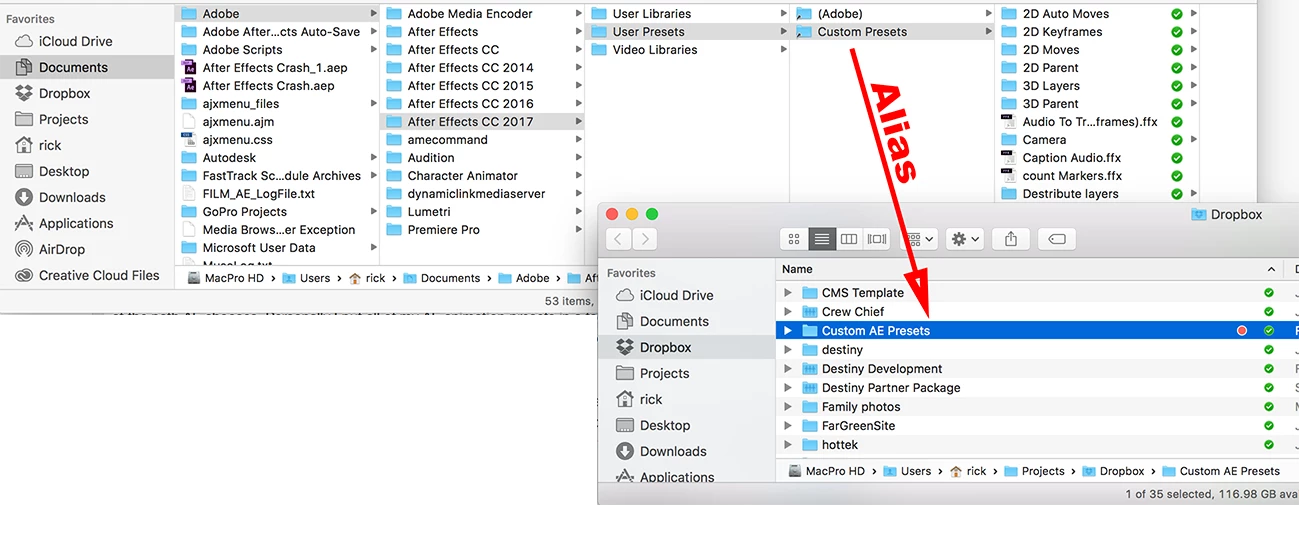
IF you are looking to install animation presets the easiest way is to create an animation preset of your own and then click save and look at the path AE chooses. Personally I put all of my AE animation presets in a folder I have created in Dropbox so I have them available on all my machines. I then put an alias to the dropbox folder in the normal location Here's the structure on a Mac:
If you are not dealing with Animation preset please let us know. To use a preset you don't have to put them anywhere special, you just have to browse to their location using the Animation menu. To get them to show up in the Effects and Presets Panel you should use the standard user presets directory. It's not a very good idea to start mixing them with the standard presets that come with AE.


1 reply

Rick GerardCommunity ExpertCorrect answer
Community Expert
March 26, 2017

What kind of presets? OS and Version of AE down to the last decimal point please...

IF you are looking to install animation presets the easiest way is to create an animation preset of your own and then click save and look at the path AE chooses. Personally I put all of my AE animation presets in a folder I have created in Dropbox so I have them available on all my machines. I then put an alias to the dropbox folder in the normal location Here's the structure on a Mac:

If you are not dealing with Animation preset please let us know. To use a preset you don't have to put them anywhere special, you just have to browse to their location using the Animation menu. To get them to show up in the Effects and Presets Panel you should use the standard user presets directory. It's not a very good idea to start mixing them with the standard presets that come with AE.
