Participating Frequently
January 29, 2023
解決済み

Rotoscoping is very slow. AMD 5950X, RTX 3080Ti 128GB of RAM. What am I doing wrong?

  • January 29, 2023
  • 返信数 3.
  • 1001 ビュー

Hello, my specs are as indicated in the title.

  • CPU: AMD 5950x
  • Graphics: RTX 3080 Ti
  • RAM: 128 GB

Yet, using rotobrush is extremely slow, when going frame by frame and when freezing the rotoscoping, it just takes ages. I have no idea why this happens. 


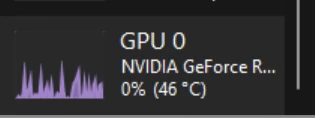
Here are some screenshots of my resources while the roto is doing its thing.
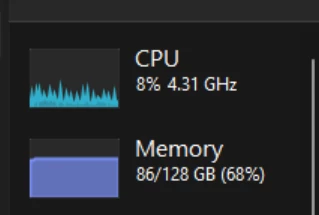
 

Using a ton of memory yet graphics and CPU are barely being used. 


How could I fix this? 

    このトピックへの返信は締め切られました。
    解決に役立った回答 Rick Gerard

    The amount of time it takes Rotobrush to process a frame depends on the size of the selection, the size of the frame, the color depth of the project, and the contrast and detail difference between the object you are trying to mask and the surrounding image. Highly compressed footage like H.264 or HVEC also takes longer to process than frame-based footage like ProRez because of the time and resources it takes to generate the pixels that H.264 and HVEC formats have to create from the reference frames in the file. If your selection is about 400 X 400 pixels, if you increase the selection to about 800 X 800 pixels, the processing time does not double; it goes up by 4 times. The increase in the resources required for Rotobrush goes up logarithmically as the area increases.

    Show us a screenshot of the footage and tell us the frame size, video format, and frame rate, and we should be able to give you some suggestions that will increase the efficiency of your workflow.

    返信数 3

    Rick GerardCommunity Expert解決!
    Community Expert
    January 30, 2023

    The amount of time it takes Rotobrush to process a frame depends on the size of the selection, the size of the frame, the color depth of the project, and the contrast and detail difference between the object you are trying to mask and the surrounding image. Highly compressed footage like H.264 or HVEC also takes longer to process than frame-based footage like ProRez because of the time and resources it takes to generate the pixels that H.264 and HVEC formats have to create from the reference frames in the file. If your selection is about 400 X 400 pixels, if you increase the selection to about 800 X 800 pixels, the processing time does not double; it goes up by 4 times. The increase in the resources required for Rotobrush goes up logarithmically as the area increases.

    Show us a screenshot of the footage and tell us the frame size, video format, and frame rate, and we should be able to give you some suggestions that will increase the efficiency of your workflow.

    rodrigoillas7作成者
    Participating Frequently
    February 18, 2023

    Rick, thank you so much for such a detailed explanation. I appreciate it a lot. 

    In fact, the clips I'm using are from a sony a7s3 shooting (XAVC S) h.264 in 4K and 60 FPS, so per your explanation it

    makes total sense that I am basically torturing my PC. 


    Switching to ProRes is not really practical given the few amount of times that I have to use Rotobrush. Looks like I'll just have to bite the bullet every time I use Rotobrush.


    Again, thank you so much for the level of detail of your explanation

    Peru Bob
    Community Expert
    Community Expert
    January 29, 2023

    Moved to the After Effects forum.

    John T Smith
    Community Expert
    Community Expert
    January 29, 2023

    When you post a question you always need to tell the Adobe program you are using
    There are MANY programs in a full subscription, plus other non-subscription programs
    Please post the exact name of the Adobe program you use so a Moderator may move this message to that forum

    rodrigoillas7作成者
    Participating Frequently
    January 29, 2023

    Thank you for the feedback. It looks like a Mod already moved it. 

    I'll remember that for any future question.