


Participant
September 13, 2016
Answered

Install Previous Version

  • September 13, 2016
  • 2 replies
  • 1591 views

Hi, our school has an Adobe subscription in which we have to install the programs we want by downloading them via Adobe Creative Cloud as trail and then start a program which activate all downloaded programs. Since this activation is currently only possible with previous versions of adobe, we need to download the 2015 version which should be available under "Apps" --> "Filters". But here I just have only the following options:
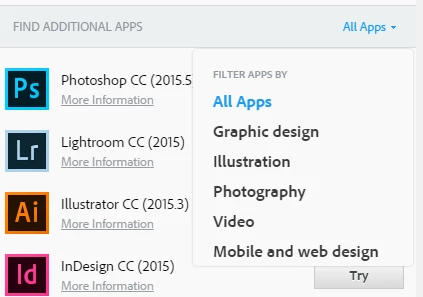
Does someone know where I can find the previous versions?

This topic has been closed for replies.
Correct answer John T Smith

Previous via Cloud https://forums.adobe.com/thread/2185344 may help

or

This is an open forum, not Adobe support... click below to contact Adobe staff to help

While the forums are open 24/7 you may not contact Adobe support at all times

Chat help: Mon - Fri  5am - 7pm  (US Pacific Time) <=== NOTE DAYS AND TIME

Be sure to remain signed in with your Adobe ID before accessing the link below

Creative Cloud support (all Creative Cloud customer service issues)

http://helpx.adobe.com/x-productkb/global/service-ccm.html

2 replies

Atul_Saini
Community Manager
Community Manager
September 14, 2016

Hi Thomass38153875,

In additional what @John's suggested, please make sure you are signed in to Creative Cloud with the Adobe Id with which you have purchased the Creative Cloud subscription. "Previous Version" filter is not available trial users.

Please let us know in case you need further assistance with this.

Thanks.

John T Smith
Community Expert
John T SmithCommunity ExpertCorrect answer
Community Expert
September 13, 2016

Previous via Cloud https://forums.adobe.com/thread/2185344 may help

or

This is an open forum, not Adobe support... click below to contact Adobe staff to help

While the forums are open 24/7 you may not contact Adobe support at all times

Chat help: Mon - Fri  5am - 7pm  (US Pacific Time) <=== NOTE DAYS AND TIME

Be sure to remain signed in with your Adobe ID before accessing the link below

Creative Cloud support (all Creative Cloud customer service issues)

http://helpx.adobe.com/x-productkb/global/service-ccm.html