


manou_26219831
Participant
December 30, 2016
解決済み

Pre-paid lisence doesn't work

  • December 30, 2016
  • 返信数 1.
  • 248 ビュー

Hello!

I used the trialversion of Photoshop for a while and once that ran out, I bought the student version of the entire creative cloud.

When I open Creative Cloud it says 'Buy now' for Photoshop and for the others 'Trialversion'. I entered the serial number and everything, when I try to enter it again when asked, it says 'This number has already been used'. In my account it says that I have a prepaid membership of one year. See pictures below, the pictures are in Dutch, but I'll put a translation with it.

--

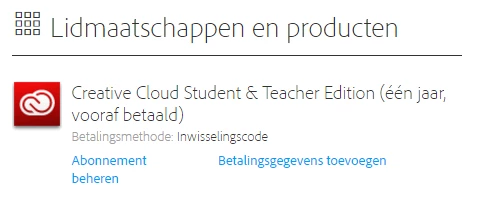
Memberships

Creative Cloud Student & Teacher Edition (one year, pre-paid)

Method of payment: serial number

--
--

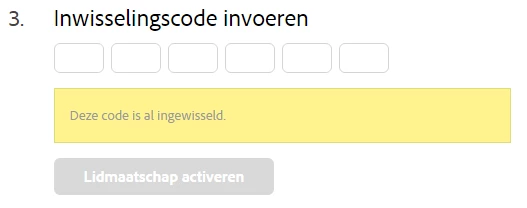
Enter serial number

This number has already been used

--
--

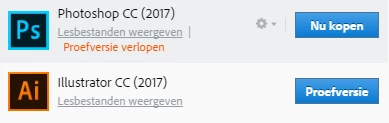
Photoshop CC (2017) Buy now

Trial has expired

Illustrator CC (2017) Trial version

--
Thank you in advance!

Greetings,

Manou

このトピックへの返信は締め切られました。
解決に役立った回答 John T Smith

Some general information for a Cloud subscription

Cloud programs do not use serial numbers... you log in to your paid Cloud account to download & install & activate... you MAY need to log out of the Cloud and restart your computer and log back in to the Cloud for things to work

.

Does your Cloud subscription properly show on your account page?

https://www.adobe.com/account.html for subscriptions on your Adobe page

If you have more than one email, are you sure you are using the correct Adobe ID?

.

If yes

Log out of your Cloud account... Restart your computer... Log in to your paid Cloud account

-Sign in help http://helpx.adobe.com/x-productkb/policy-pricing/account-password-sign-faq.html

-http://helpx.adobe.com/creative-cloud/kb/sign-in-out-creative-cloud-desktop-app.html

-http://helpx.adobe.com/x-productkb/policy-pricing/activation-network-issues.html

-http://helpx.adobe.com/creative-suite/kb/trial--1-launch.html

-ID help https://helpx.adobe.com/contact.html?step=ZNA_id-signing_stillNeedHelp

-http://helpx.adobe.com/creative-cloud/kb/license-this-software.html

.

If no

This is an open forum, not Adobe support... you need Adobe staff to help

Adobe contact information - http://helpx.adobe.com/contact.html

Chat/Phone: Mon - Fri  5am - 7pm  (US Pacific Time) <=== NOTE DAYS AND TIME

-Select your product and what you need help with

-Click on the blue box "Still need help? Contact us"

返信数 1

John T Smith
Community Expert
John T SmithCommunity Expert解決!
Community Expert
December 30, 2016

Some general information for a Cloud subscription

Cloud programs do not use serial numbers... you log in to your paid Cloud account to download & install & activate... you MAY need to log out of the Cloud and restart your computer and log back in to the Cloud for things to work

.

Does your Cloud subscription properly show on your account page?

https://www.adobe.com/account.html for subscriptions on your Adobe page

If you have more than one email, are you sure you are using the correct Adobe ID?

.

If yes

Log out of your Cloud account... Restart your computer... Log in to your paid Cloud account

-Sign in help http://helpx.adobe.com/x-productkb/policy-pricing/account-password-sign-faq.html

-http://helpx.adobe.com/creative-cloud/kb/sign-in-out-creative-cloud-desktop-app.html

-http://helpx.adobe.com/x-productkb/policy-pricing/activation-network-issues.html

-http://helpx.adobe.com/creative-suite/kb/trial--1-launch.html

-ID help https://helpx.adobe.com/contact.html?step=ZNA_id-signing_stillNeedHelp

-http://helpx.adobe.com/creative-cloud/kb/license-this-software.html

.

If no

This is an open forum, not Adobe support... you need Adobe staff to help

Adobe contact information - http://helpx.adobe.com/contact.html

Chat/Phone: Mon - Fri  5am - 7pm  (US Pacific Time) <=== NOTE DAYS AND TIME

-Select your product and what you need help with

-Click on the blue box "Still need help? Contact us"