


Participant
September 3, 2014
解決済み

Trying to extract files for Photoshop Elements, get 0x80004005: Unspecified Error and extraction fails. Windows 7, downloaded through Wacom Intuos purchase.

  • September 3, 2014
  • 返信数 2.
  • 2017 ビュー

Hi, I bought a Wacom Intuos and it came with bundled software. The Photoshop download kept failing at the end (1000mb + out of 1012mb!) and then when it finally did say it had downloaded successfully I get this error message when trying to extract the folder contents:
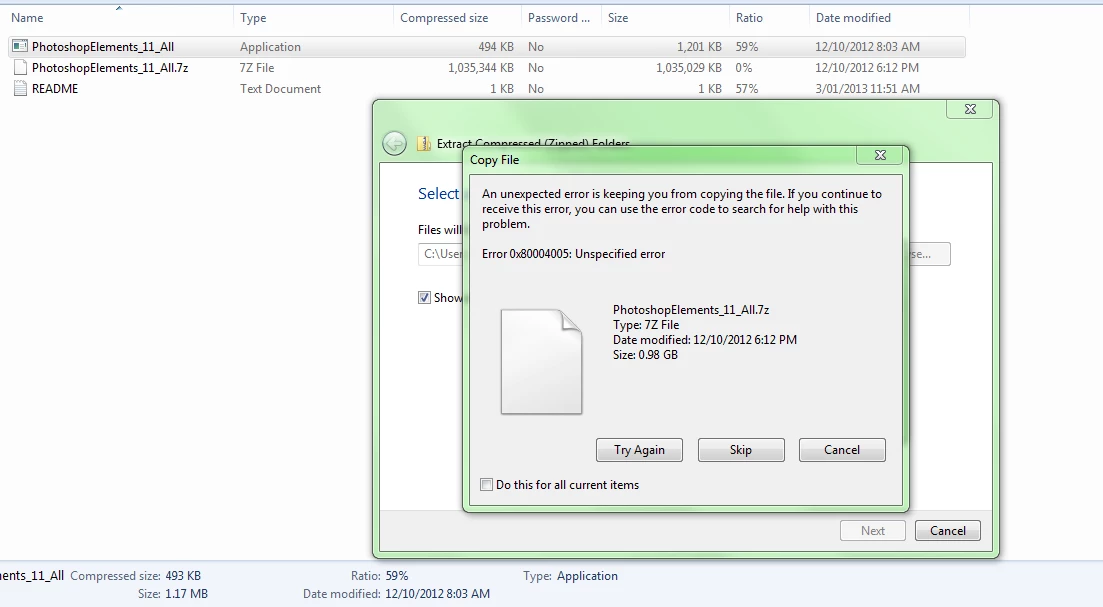
Can anyone please help me? I have also contacted Wacom but they don't provide support for the software they bundle, obviously. I have also exceeded my 5 download limit due to the failures to download. I used Download Ninja to help prevent the failures but it still took 3 goes to get the complete download.

If required I can ask them to once again renew my downloads and attempt to download it again. I can provide my serial key number to an Adobe representative if there's any way I can download the program directly form them using their downloading program? There seems to be no way to speak directly to a customer service person 😕😕

Cheers Jess

このトピックへの返信は締め切られました。
解決に役立った回答 kglad

the exe looks like an incomplete download.  double check the file size if you're in doubt.


Downloads available:

Download and installation help for Adobe links

Download and installation help for Prodesigntools links are listed on most linked pages.  They are critical; especially steps 1, 2 and 3.  If you click a link that does not have those steps listed, open a second window using the Lightroom 3 link to see those 'Important Instructions'.

返信数 2

jess_tas作成者
Participant
September 9, 2014

Thank you, that link was exactly what I needed to try and download again :-)

Best wishes, Jess

kglad
Community Expert
kgladCommunity Expert解決!
Community Expert
September 3, 2014

the exe looks like an incomplete download.  double check the file size if you're in doubt.


Downloads available:

Download and installation help for Adobe links

Download and installation help for Prodesigntools links are listed on most linked pages.  They are critical; especially steps 1, 2 and 3.  If you click a link that does not have those steps listed, open a second window using the Lightroom 3 link to see those 'Important Instructions'.