Participant
May 18, 2022
解決済み

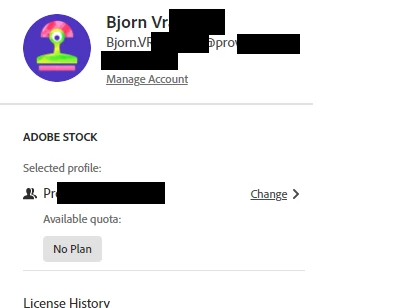
Adobe Stock says I have 'No Plan' but my team has an active subscription for Stock

  • May 18, 2022
  • 返信数 1.
  • 1565 ビュー

Hi, 

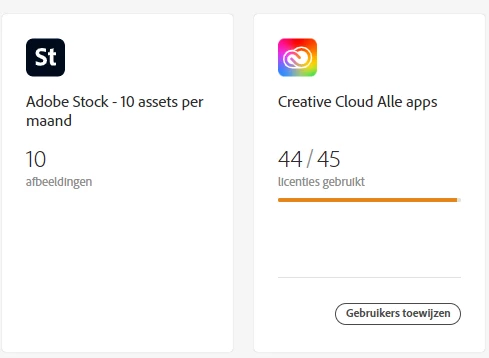
I'm the IT guy in a mid-size company that has an adobe team account with 45 creative cloud licenses.

We've just bought a 10 assets/month license for adobe stock for the team, assuming everyone in the team would be able to use adobe stock then. I've assigned the stock license to one of our admins, but when I go to the adobe stock website, I myself don't have any available assets and it says I have 'No Plan'.


What can I do to make Stock available to every member of our team?


このトピックへの返信は締め切られました。
解決に役立った回答 Bjorn5C98

Hi Vikrant,


Thanks for the suggestions. I checked what you said but none of it solved the issue. I was using the correct org and the results where the same when I tried it on a different computer or when a different team member tried it.


What eventually fixed it for me after several hours of pulling my hair out was to remove the license from the user it was assigned to and reassign it to a different user in the same team. (both are team leads so they both have admin accounts in creative cloud). After that I could see the available assets on my own profile as well.

返信数 1

Vikrant R
Inspiring
May 18, 2022

The obvious place to start with would be to verify that you've selected the Profile associated with the Org that has the Stock for teams plan. Also, just to rule out any browser issues, try in an incognito/private window to rule out any caching issues.


Also, can you check with one of the 45 users on your team if they're also unable to access Stock.

Bjorn5C98作成者解決!
Participant
May 19, 2022

Hi Vikrant,


Thanks for the suggestions. I checked what you said but none of it solved the issue. I was using the correct org and the results where the same when I tried it on a different computer or when a different team member tried it.


What eventually fixed it for me after several hours of pulling my hair out was to remove the license from the user it was assigned to and reassign it to a different user in the same team. (both are team leads so they both have admin accounts in creative cloud). After that I could see the available assets on my own profile as well.

Vikrant R
Inspiring
May 19, 2022

Glad to hear that it is solved! But from what I know there wasn't anything incorrect with what you were doing earlier and it should have worked then too. Thanks for confirming that its working for you. We'll pass this info on to the product teams so that they can investigate and prevent such issues in the future.