


Participating Frequently
December 11, 2017
Answered

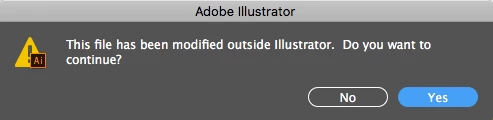
My file has not been modified outside of Illustrator!

  • December 11, 2017
  • 14 replies
  • 20481 views

I keep getting this dialog box when I try to save various files, but the documents have definitely not been modified in any other program. I'm not even renaming these files elsewhere. Does anyone know why I keep getting this message, and what I can do to stop it? I continue saving the file anyway, but it's getting irritating to keep seeing the dialog box so frequently, and it's disrupting my workflow quite a bit when it shows up multiple times throughout the course of trying to save a project.
This topic has been closed for replies.

14 replies

Whirligiggle
Participating Frequently
July 17, 2020

Sorry to say this but your link unfortuantley doesn't offer any solution or fix. It merely states that the bug has been fixed with an update long passed. 

Monika Gause
Community Expert
Community Expert
July 17, 2020

"Sorry to say this but your link unfortuantley doesn't offer any solution or fix. It merely states that the bug has been fixed with an update long passed. "


That is because this thread is 3 years old.

So you have which version on which system?

And where exactly do you save your files?


And please create a new thread, unless you are using Mac OS 10.13 and whatever Illustrator-Version this thread is about.


The same error message can be caused by different issues.

Whirligiggle
Participating Frequently
July 17, 2020

Well excuse me – So many threads to choose from on this subject I was wasn't aware it was a long running problem. I'm runing OS 10.15.05 and have the latest version of Illustrator. Perhaps you can point me to the correct thread for this decade? Thanks.

Jonathan-DeBruhl
Participant
November 12, 2019

Look, this issue clearly has not been solved. I see several people on this forum still commenting that the most recent update still has it happening. I'm up to date, but it still happens. Help! It's aggresively annoying and disrupts my workflow.

Wellsource
Participating Frequently
November 13, 2019

I just started getting the message yesterday after updating CC on Windows 10. Can't recall getting the message before, though it looks like it is an ongoing issue for many years.


Illustrator CC 2020

Windows 10

Legend
August 16, 2019

The most common cause seems to be timestamps. Check in Finder (Get Info, not just the file list) what the modification time is. Classically everyone gets messed up by daylight savings changes, but there could be other problems (clock slow in computer/fast in server for example). And it might not be time at all.

DavidMatos
Inspiring
August 21, 2018

Annoyingly, problem persists on the latest build.

Inspiring
August 29, 2018

This seems to have solved it for me:

Go to System Prefs/General, un check the box that says Allow Handoff between this Mac and your iCloud devices. It's the second up from the bottom.

I don't use Handoff, as this machine is owned by my company, so there's nothing to hand off to. If you do use it, then I don't know what your solution might be.

Hope this helps.

AshutoshChaturvedi
AshutoshChaturvediCorrect answer
Legend
February 26, 2018
Known Participant
August 16, 2019

This doesn't help.  I'm using Adobe Illustrator 23.0.4 and this problem started recently.   OS is Mojave v 10.14.6.  Files are not being saved to a icloud accessible folder and while they are being saved to a server, I can create a file, save it, make a quick change and save it less than a minute later and still get this message.  There is no one else in my department to be modifying files never mind a file that has only existed on the server for less than a minute.

Legend
August 16, 2019

Does it happen without the server involved? The problem with servers is nothing to do with other people modifying it.

Stephen Barrante
Inspiring
February 7, 2018

Having the same issue. We are actually working out of DropBox, but this only began with our High Sierra / CC 2018 update in January. Since then I get these regular, annoying alerts.

Will try the disabling the iCloud handoff, and report back.

Known Participant
February 5, 2018

I usually save to dropbox but was getting the pop up error. after dragging the file to my desktop and opening it up from there still got the error. created new file saved did not get the error . opened that file again got the error. its hit or miss between adobe and apple.

laurad29881623
Participant
January 25, 2018

I am getting this same error message and I have not upgraded to High Sierra. I only have Sierra. So I don’t have that check box that I can select about handoff between mac and icloud devices.

Known Participant
January 25, 2018

Also getting the error with files that are saved on a server. So that means it's not a local disk issue, it is a conflict somewhere between Sierra/HS and Illy.

Known Participant
January 31, 2018

yea it is Sierra, I also get an issue with changing file names and folders on the desktop does anyone have that too. ?

Known Participant
January 19, 2018

I am also getting this error in High Sierra & newest Adobe (2018 Jan). Also High Sierra is misreporting disk space and occasionally not finding files that are definitely there.

Participant
January 2, 2018

This happens to me with every illustrator file ever since I upgraded to High Sierra. Annoying.

My files are all local, and definitely not modified outside of Illustrator.

Known Participant
January 17, 2018

Just upgraded to High Sierra today (v10.13.2) thinking there had been enough time to work things out, and having the same issue. It's giving the error on my iMac with a Fusion drive, interestingly, I've been running HS on my laptop as a test since it came out and I don't get the issue. The MacBook has an SSD using APFS.

Known Participant
January 17, 2018

Interestingly enough, closed out the file, restarted Illustrator and started working. Initial save did not produce the error, subsequent saves cause the error to pop up.

Another difference between my iMac (which has the error) and my MacBook (which does not), I installed High Sierra from scratch on the MBP, the iMac was an upgrade from Sierra.