Participating Frequently
March 17, 2023
Answered

Colour change in Indesign file fake duotone

  • March 17, 2023
  • 1 reply
  • 974 views

Hi


Client has sent magazine artwork in. Previews fine in Acrobat, looks oaky in InDesign, fine in print too. But when the digital version of the magazine is created the green image is coming out as pink. I also noticed in 'Quick look' and on my phone the image was previewing in pink.
Have looked at the source files and they have created a fake duotone in ID using a greyscale tif, with one colour on the image and another on the container. I know it something to do with this setup and colour conversion to RGB in digital mag but not sure exactly what.
Have worked around this time but would like to feed back to client what she needs to do at her end.

Many thanks in advance...
This topic has been closed for replies.
Correct answer rob day

so I'm assuming the conversion to RGB in the digital mag software isn't handling the duotone


The above export settings converts all Process color to sRGB, if you inspect the PDF in Acrobat Pro the image’s color space will be listed as sRGB. If the color applied was a Spot color AcrobatPro would list the color space as Separation, not sRGB, and then the color appearance might change in a browser or other PDF viewer.


Placing a Photoshop Duotone would not likely help because the color would come in as a Spot color and you would have to convert it to Process via Ink Manger.


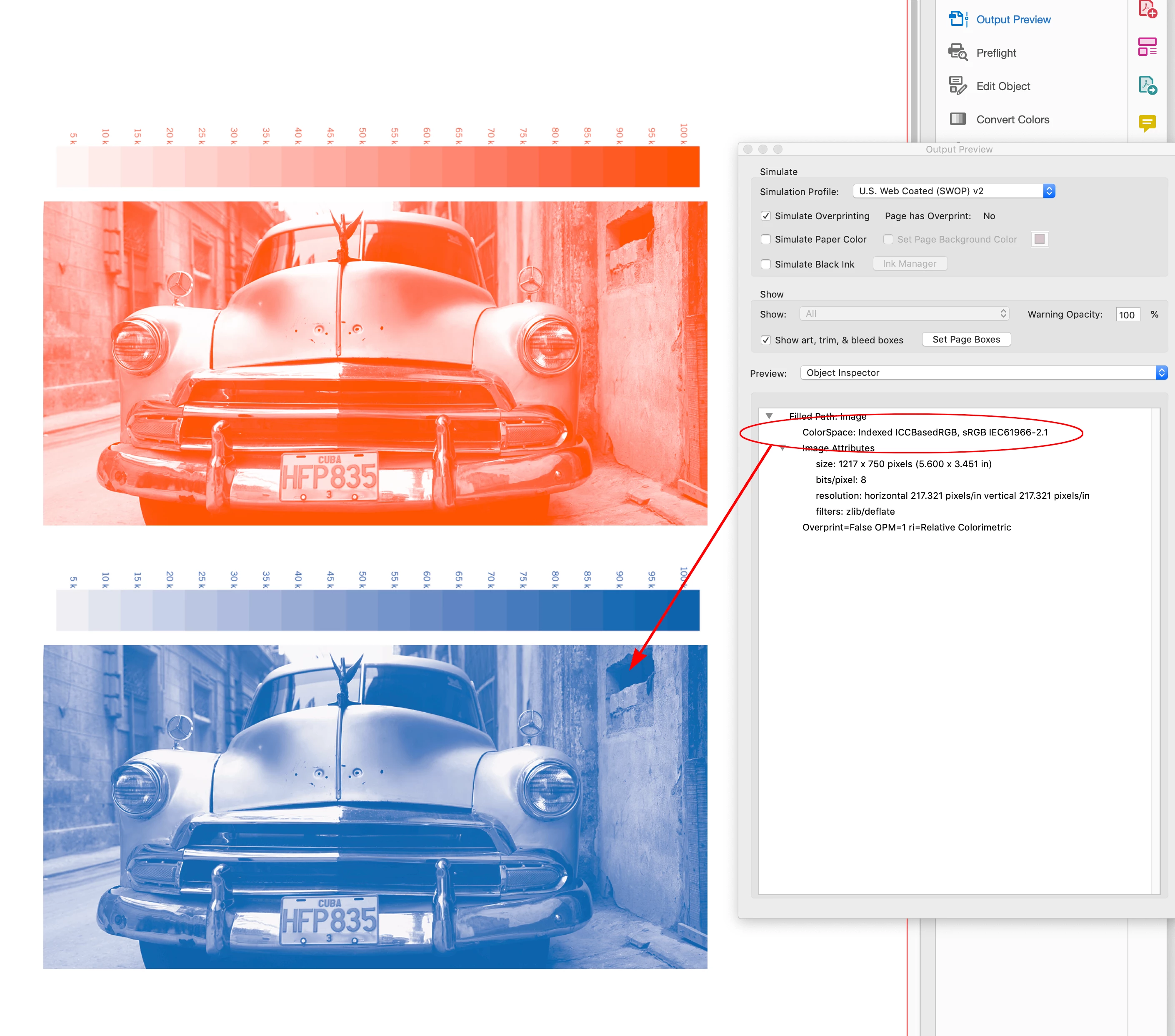
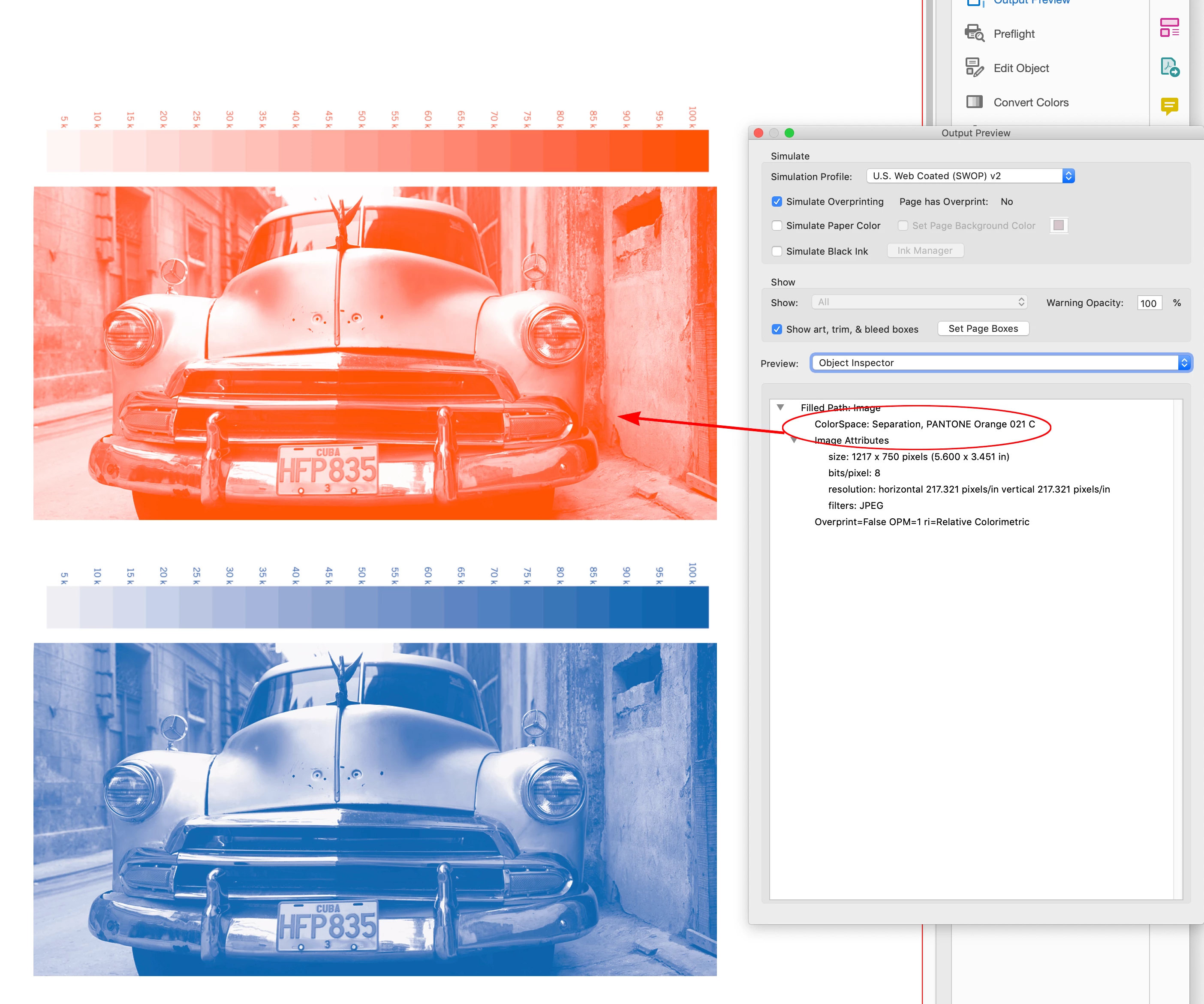
Here the Orange image was colored with a Spot color and did not export in the sRGB space. The blue version has a Process color applied and exported as an sRGB image:


1 reply

rob day
Community Expert
Community Expert
March 17, 2023

Hi @shandmedia , Is the color being used for the duotone a Spot or Process color? If it is Spot change it to Process before exporting the PDF. And, set your PDF Export Output tab to Convert to Destination with the Destination set to sRGB. If the export is to an interactive PDF, the conversion to sRGB is automatic.


Participating Frequently
March 20, 2023

Thanks Rob


That worked - I used those settings and the artwork appeared digitally. It had been output as CMYK so I'm assuming the conversion to RGB in the digital mag software isn't handling the duotone. Would it also be best for the client to create any  duotones etc in Photoshop rather than InDesign? As I said, sometimes the file previews as Pink on mobile and Quick Look on mac.

rob day
Community Expert
rob dayCommunity ExpertCorrect answer
Community Expert
March 20, 2023

so I'm assuming the conversion to RGB in the digital mag software isn't handling the duotone


The above export settings converts all Process color to sRGB, if you inspect the PDF in Acrobat Pro the image’s color space will be listed as sRGB. If the color applied was a Spot color AcrobatPro would list the color space as Separation, not sRGB, and then the color appearance might change in a browser or other PDF viewer.


Placing a Photoshop Duotone would not likely help because the color would come in as a Spot color and you would have to convert it to Process via Ink Manger.


Here the Orange image was colored with a Spot color and did not export in the sRGB space. The blue version has a Process color applied and exported as an sRGB image: