


andress24325115
Participant
February 21, 2022
Answered

Column Split issue

  • February 21, 2022
  • 2 replies
  • 419 views

HI,
I applied a split column to bullets with large text (more than 50% of the page), causing ID to break the sentence and jump the remaining text to the next column. Notice that with short sentences, ID works well. Any idea will be appreciated.


You need to ask program questions in the forum for the program you are using
To ask in the forum for your program please start at https://community.adobe.com/
Moving from Using the Community (which is about the forums) to the correct forum... Mod
This topic has been closed for replies.
Correct answer Brad @ Roaring Mouse

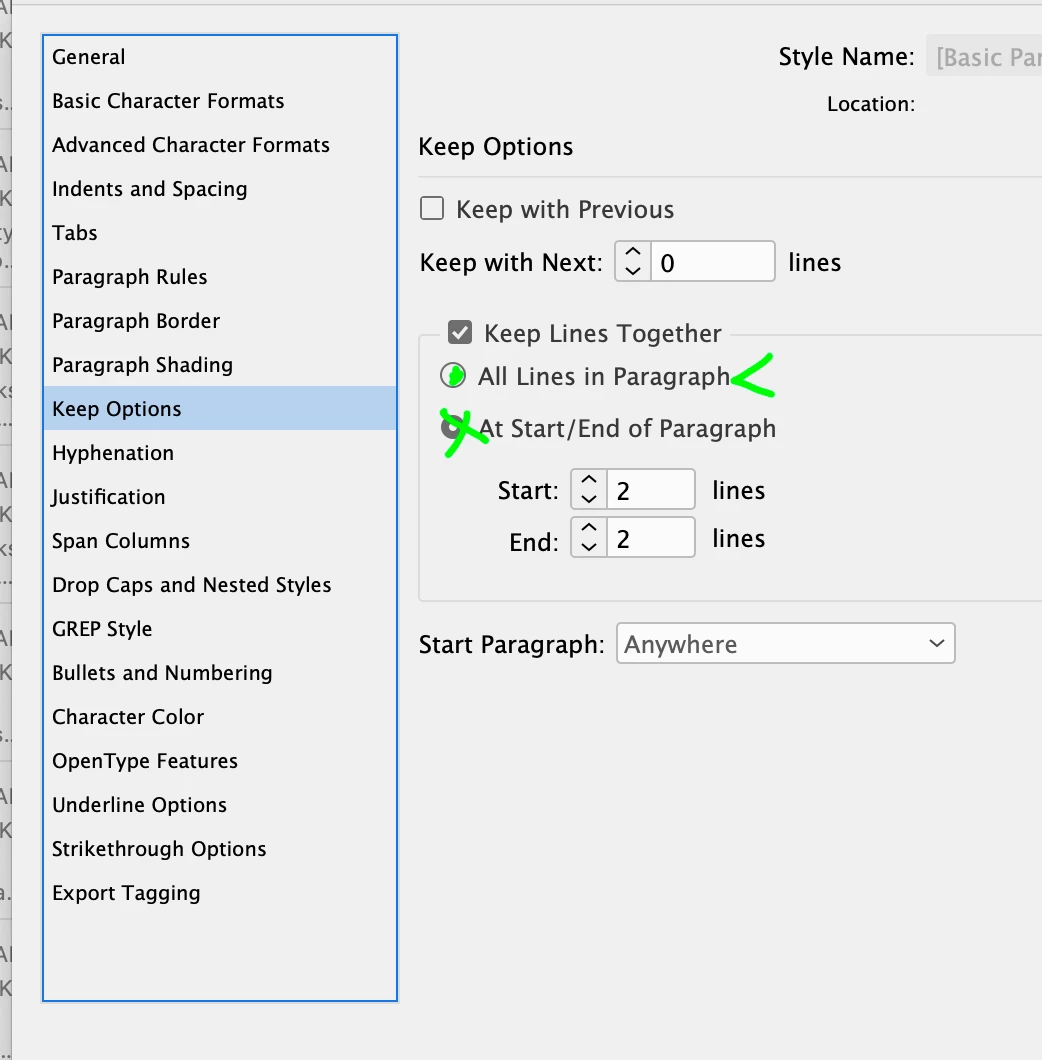
If you don't want your bullets to split, you need to modify the Keep Options in the paragraph style assigned to them. Edit your style and change your Keep Options to Keep Lines Together > All Lines in Paragraph, otherwise, they will break according to the widow/control settings below it (in my case Start 2 lines, End 2 lines)

You can also just change the Keep Options on the fly for a single paragraph by clicking in it and changing the options for it alone as an override instead of editing the Style in case you have reasons for not chnaging all your bullets.

2 replies

Brad @ Roaring Mouse
Community Expert
Brad @ Roaring MouseCommunity ExpertCorrect answer
Community Expert
February 22, 2022

If you don't want your bullets to split, you need to modify the Keep Options in the paragraph style assigned to them. Edit your style and change your Keep Options to Keep Lines Together > All Lines in Paragraph, otherwise, they will break according to the widow/control settings below it (in my case Start 2 lines, End 2 lines)

You can also just change the Keep Options on the fly for a single paragraph by clicking in it and changing the options for it alone as an override instead of editing the Style in case you have reasons for not chnaging all your bullets.

andress24325115
Participant
February 22, 2022

Brad, it works! Thank you very much

BobLevine
Community Expert
Community Expert
February 21, 2022

Screenshots would help.