


Participant
March 24, 2021
解決済み

Group command does not work - Possible bug?

  • March 24, 2021
  • 返信数 4.
  • 3027 ビュー

I've been struggling to figure out why the group command in InDesign does not work...

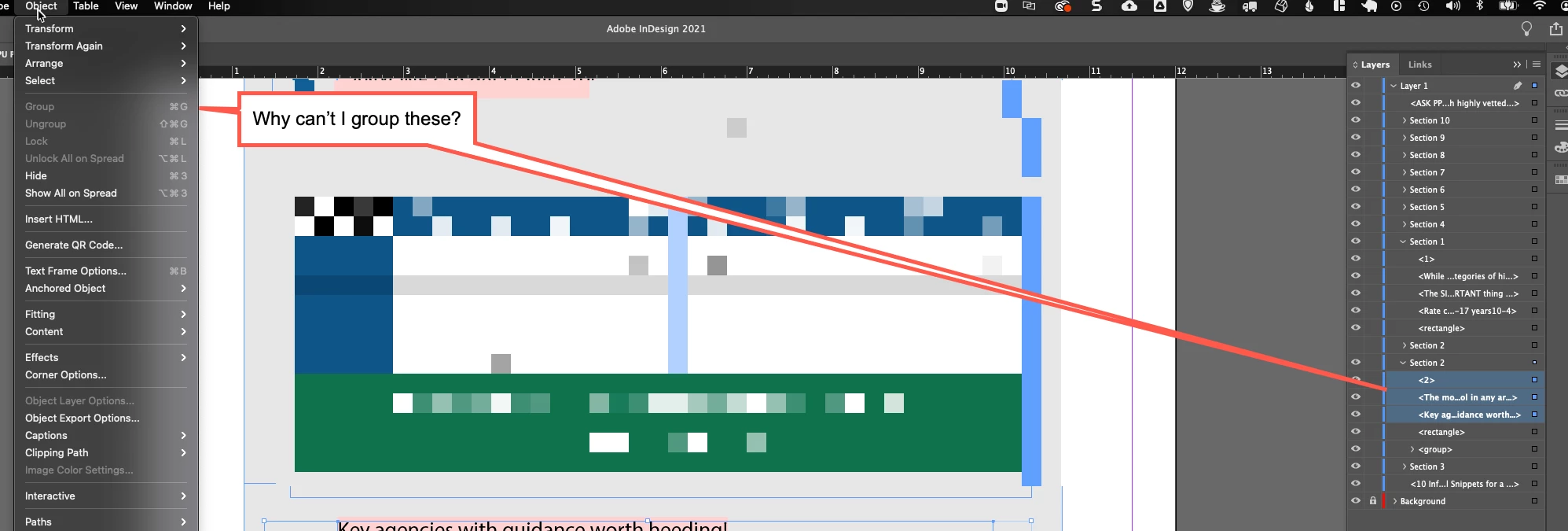
I can group objects when they are in the root of a layer (i.e. not already in a group) but not when they are nested in a group... am I doing something wrong?


I'm using InDesign 16.1
 

このトピックへの返信は締め切られました。
解決に役立った回答 Mike Witherell

Further, you might notice that the Layers panel is specific to what you have clicked on for context. If you select the group *sublayer so to speak* you get your group and ungroup to light up. If you are subselected inside the group to the individual objects, you dont have the context of group/ungroup lighting up. In your screenshot, the way you are subselected, InDesign's contextual condition allows for neither grouping (they already are) nor ungrouping (you dont have the group selected).

InDesign does support nested groupings. 

返信数 4

Mike Witherell
Community Expert
Community Expert
March 24, 2021

Further, you might notice that the Layers panel is specific to what you have clicked on for context. If you select the group *sublayer so to speak* you get your group and ungroup to light up. If you are subselected inside the group to the individual objects, you dont have the context of group/ungroup lighting up. In your screenshot, the way you are subselected, InDesign's contextual condition allows for neither grouping (they already are) nor ungrouping (you dont have the group selected).

InDesign does support nested groupings. 

Mike Witherell
Bill Silbert
Community Expert
Community Expert
March 24, 2021

Actually, it wouldn't make sense if you could group only some of the components of an existing group. Think about what would happen if you used the regular selection tool and clicked on this new group? Since this new group is also part of the larger group the entire group would always get selected—defeating the purpose of making the new group in the first place. InDesign "greys" out things that are as contradictory in purpose as this.

Mike Witherell
Community Expert
Community Expert
March 24, 2021

If they were already part of a group, you should be able to ungroup them.

Another test might be to export the INDD to IDML; then re-open the IDML and save-as to INDD and see if the problem persists.

Mike Witherell
David Popham
Participating Frequently
March 24, 2021

It looks like they are already part of a group named Section 2, along with a rectangle item and another group item. In the Layers panel, try dragging them out of the Section 2 group, and then see if you can group them. You can always drag the new group back into Section 2.


It appears that InDesign doesn't allow access to the Group command inside of a group, at least not from the user interface. If that's something you do often or need, you can make a feature request at InDesign User Voice. My guess is that it might be accomplished with a script, but I haven't tried it.