


Participant
May 16, 2023
Answered

How to troubleshoot Double Hyphenation in Finish Compound Words Using GREP in InDesign?

  • May 16, 2023
  • 2 replies
  • 1378 views

Finnish is a language with many hyphenated compound words. I am looking for a way to prevent double hyphenation in those by using GREP in paragraph styles. The solution I came up with is creating a “no break” character style and applying it to both sides of the hyphen


[\l\u]+(?=-)


and


(?<=-)[\l\u]+


But for some reason InDesign will then not hyphenate the word at the correct location either. Even adding a discretionary hyphen does not help. What am I doing wrong?


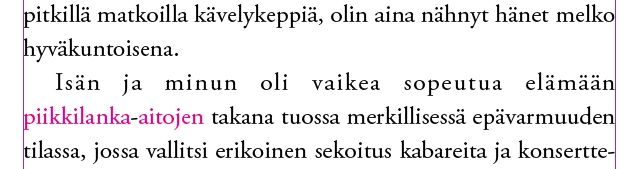
Here’s a picture to clarify what the problem is (with magenta color added to the "no break" character style):


<Title renamed by moderator>

This topic has been closed for replies.
Correct answer Peter Spier

Instead of applying No Break, applying no language should keep InDesign from arbitrarily hyphenating, but it will also keep it from spell checking those words.

It may also work to add a discretionary hyphen to the beginning or the word (without changing the language) which would preseerve the spell checking, but you can't do that with a GREP style, only Find/Change or by editing the dictionary.

2 replies

Inspiring
May 17, 2023

While Peters solution will work just fine, I’m not a big fan of using something ›in the wrong way‹, to get a result. Not having set the correct language could cause other issues later on. 


To my understanding this is why your original solution doesn’t work:
The hyphenation occures between two characters and each of the characters must have breaking activated.  


If the character after the hyphen is allowed to break it works:


To get this, you could alter your GREP query like this:

[^ -]+(?=.-)|(?<=-.)[^ -]+

First, I did put everything in one single query.
The first option ([^ -]+(?=.-) / everything before |) catches the first word without its last character, the second ((?<=-.)[^ -]+) the second word without its first character.


The trick is, to put a dot (= any character) in the lookahead and lookbehind, to exclude the one character from the result. The dot in the first option is not strictly necessary. It makes sure, also words with more than one hyphen are formatted correctly:


TaitanAuthor
Participant
May 18, 2023

This is propably some weird quirk of the Finnish hyphenation algorithm, but that doesn’t help either:


Peter Spier
Community Expert
Peter SpierCommunity ExpertCorrect answer
Community Expert
May 16, 2023

Instead of applying No Break, applying no language should keep InDesign from arbitrarily hyphenating, but it will also keep it from spell checking those words.

It may also work to add a discretionary hyphen to the beginning or the word (without changing the language) which would preseerve the spell checking, but you can't do that with a GREP style, only Find/Change or by editing the dictionary.

TaitanAuthor
Participant
May 17, 2023

Applying no language works. Thank you so much, Peter!