

解決済み
Where has my 'number of columns' icon gone in CC 2017
I've just updated to CC 2017 and there's a big black hole where my columns icons should be. I'd be very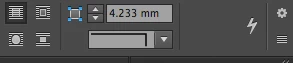
grateful if someone could tell me how to find them? Thanks.

I've just updated to CC 2017 and there's a big black hole where my columns icons should be. I'd be very
grateful if someone could tell me how to find them? Thanks.
It's because the new toolbar has slightly bigger buttons to accommodate HiDPI displays. On smaller displays, all the buttons don't fit anymore.
Three options:
This is a related post that you may find helpful (not to mention that the Frame Fitting buttons are also missing from your screen, and perhaps you haven't noticed that yet!)
https://www.rockymountaintraining.com/adobe-indesign-frame-fitting-buttons/
Enter your E-mail address. We'll send you an e-mail with instructions to reset your password.
 AdChoices