


riskypotato
Known Participant
September 20, 2022
Answered

film strip popping up

  • September 20, 2022
  • 1 reply
  • 486 views

Okay I give up. How do I get the little triangle back on the film strip? I want to keep it from popping up, I don't use the damn thing. There used to be a triangle on it, but now that's gone and every time my mouse gets too close to the bottom of the screen, it pops up. Irritating.
This topic has been closed for replies.
Correct answer Per Berntsen

Thanks for your help. Was able to increase the strip to the maximum size but I still can't get a context menu that offers the options as mentioned above.


When the filmstrip is visible, you have to right click on the black area below the filmstrip (and below the horizontal scrollbar for the filmstrip) to get that context menu.


1 reply

Per Berntsen
Community Expert
Community Expert
September 20, 2022

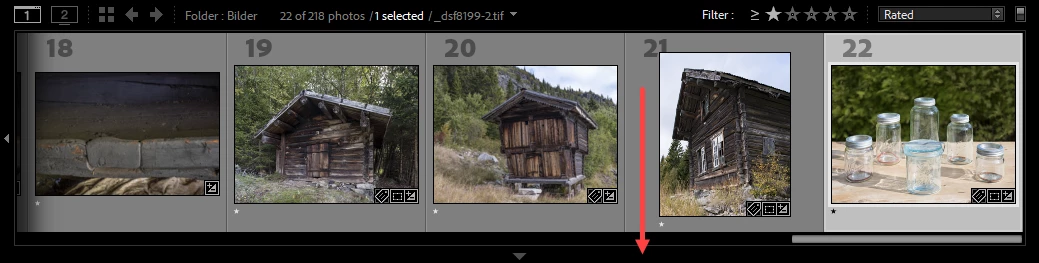
The film strip has been set to Auto hide & show.

Right click in the black area (see screenshot), and set it to manual.

The arrow can be hard to see, but there's no need to click on it, you can click anywhere in the black area.


riskypotato
Known Participant
September 20, 2022

Thanks but no this doesn't work. I don't have a gray and black area, just a black area at the top of the strip, and when I right-click on it, I get a long menu, mostly concerned with "sources".

JohanElzenga
Community Expert
Community Expert
September 20, 2022

The film strip may be set too small to see all icons. When the strip is visible, place your cursor on the line between the strip and the main grid. It should change to two small lines. Drag upwards to increase the size of the strip.


-- Johan W. Elzenga