That is sounding like a very good way, to how i will manage my LrC. But it comes with two more questions.
First:
When I import a catalog to my mane catalog, the pictures get moved into the smart-collection "no labels" and there aren't any folders that are getting createt. So I always have to add the collections from the importet catalog by hand and organize the pictures to it.
Second:
When i create the the travel catalog, i want to also take some pictures with me, which i need to editurgently.
I know how to create a smaler catalog out of my mane catalog but when it comes to managing the files i want to know if one of you knows any good sync-software to copy the files from my destop to an ext. ssd but also when i come back from the trip it deletes the files from my destop which i had deleted on my trip.
Hope you get behind my point in the second qestion
First question:
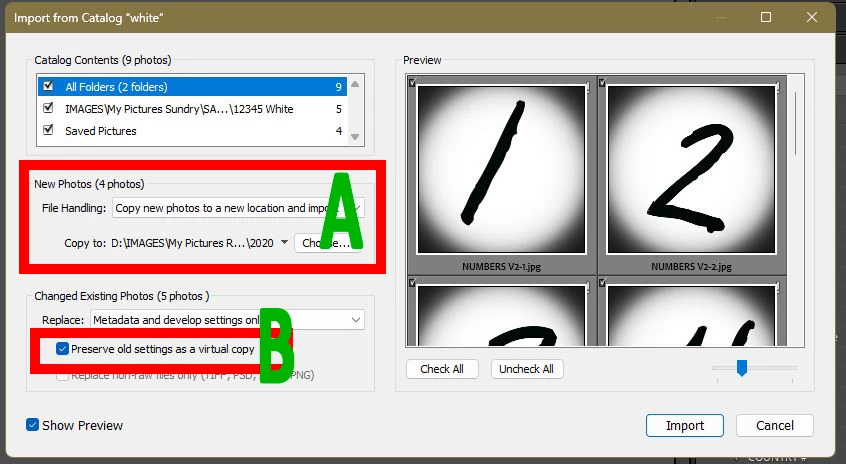
Collections and Labels created in the Laptop transfer catalog should also be merged back into the main desktop catalog. Folders will also be created for new files that you imported into the laptop catalog (See diagram A), [Choose] a folder location in your desktop computer for these new photos in the Catalog merge dialog.
Photos that previously were edited in the Desktop catalog, and subsequently edited in the laptop catalog- when the different edits are merged- you can keep the two edit versions as Virtual Copies. (See diagram B)
Second Question:
"copy the files from my destop to an ext. ssd" - Why? The process to [Export as a Catalog] with Negative files WILL copy the photos to the external drive where you are creating the transfer catalog. (ie. the pictures you want to 'take with you'.) And [Import from another catalog] WILL copy your new photos taken while travelling from the travel catalog into your desktop.
" it deletes the files from my destop which i had deleted on my trip."- DONT DELETE files (anywhere)! Instead use the Reject Flag on unwanted images- then later when the travel catalog is merged back to the desktop- review the Rejected images for deletion.





 AdChoices