


linvilt
Known Participant
August 10, 2022
解決済み

How/Where does Lightroom Classic desktop store photos added to its library on Lightroom mobile?

  • August 10, 2022
  • 返信数 1.
  • 659 ビュー

Suddenly noticing missing images in my Lightroom Classic desktop library.  Exclusively images that have been added to my Lightroom Mobile library from my phone's camera roll.  I've recently adjusted my backup workflow so I'm sure it's something I've done wrong.  Just trying to find out how Lightroom is designed to handle/store these files normally so I can see how I've messed it up and correct the problem.  I'm signed in to my (only) Adobe account on all macines/devices.  I'm up to date on all software, OS/iOS, etc.  Macbook Pro 16 in 2019.  Didn't post as a "Bug" since I'm fairly certain it's not a program issue but rather something I've fumbled in my backup switch. 
このトピックへの返信は締め切られました。
解決に役立った回答 Michael J. Hoffman

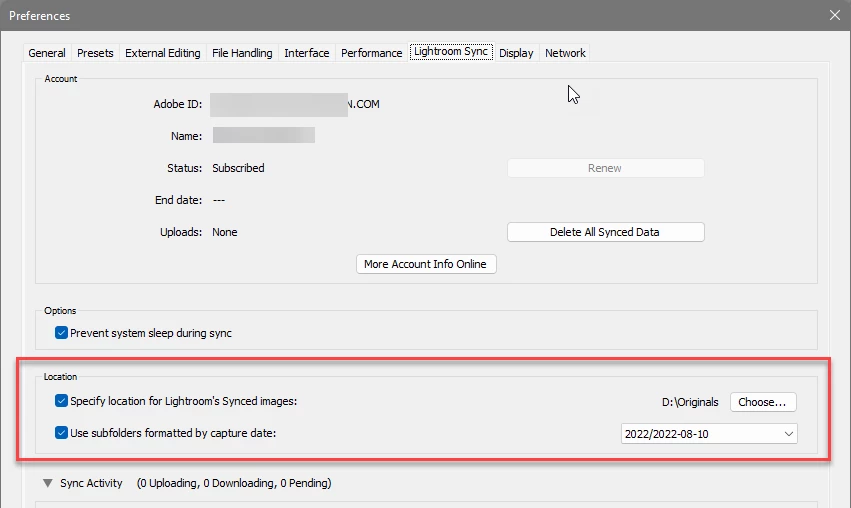
In Lightroom Classic, open Preferences, and go to the Lightroom Sync tab.


There' you'll find the folder and the organizational strategy Lightroom Classic will use for images coming down from the cloud:


返信数 1

Michael J. Hoffman
Community Expert
Community Expert
August 10, 2022

In Lightroom Classic, open Preferences, and go to the Lightroom Sync tab.


There' you'll find the folder and the organizational strategy Lightroom Classic will use for images coming down from the cloud:


linvilt
linvilt作成者
Known Participant
August 10, 2022

Thanks Michael! A huge help.  

Michael J. Hoffman
Community Expert
Community Expert
August 10, 2022

Awesome, @linvilt ! Glad to hear this was helpful. Please consider marking my post as "Correct Answer" if your problem is solved; it helps to signal others that this has been answered.