Elkanan
Known Participant
December 21, 2023
Answered

Lens Profiles for common Sony Lens in Lightroom

  • December 21, 2023
  • 3 replies
  • 2390 views

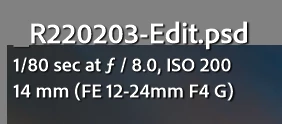
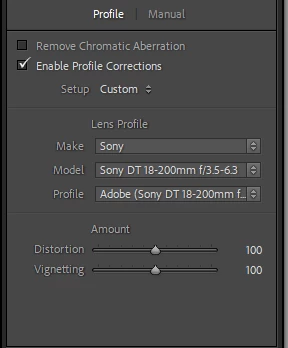
I click on the Enable Profile Corrections and it correct shows that it is a Sony Lens, but it picks the wrong lens. The pull down does not give me any other options although the Meta data is correct. 


I cannot find out how to obtain the profile for the lens in use even through it is listed in the supported lens.


This is frustrating.


Correct answer Jao vdL

You're doing a lens correction on a psd file. Most supplied lens profiles are for raw files so it probably chose the closest profile for non-raw files it had when you turned on lens corrections. Also since this is a FE lens (so your camera is mirrorless), the original raw file was already corrected automatically using a built-in profile. You should not need to apply a lens profile to a derived psd file. Look at the original raw file and you should see a small piece of text in the bottom of this panel that says that built-in lens corrections were already applied. Click the (i) next to it and you'll see what lens profile was applied. Unfortunately for many mirrorless cameras you can't turn this off because Adobe decided to only allow you to turn this of for the most recent mirrorless cameras. For most mirrorless cameras this correction is automatic and cannot be circumvented without hacking the raw file.

3 replies

Jao vdLCommunity ExpertCorrect answer
Community Expert
December 21, 2023

You're doing a lens correction on a psd file. Most supplied lens profiles are for raw files so it probably chose the closest profile for non-raw files it had when you turned on lens corrections. Also since this is a FE lens (so your camera is mirrorless), the original raw file was already corrected automatically using a built-in profile. You should not need to apply a lens profile to a derived psd file. Look at the original raw file and you should see a small piece of text in the bottom of this panel that says that built-in lens corrections were already applied. Click the (i) next to it and you'll see what lens profile was applied. Unfortunately for many mirrorless cameras you can't turn this off because Adobe decided to only allow you to turn this of for the most recent mirrorless cameras. For most mirrorless cameras this correction is automatic and cannot be circumvented without hacking the raw file.

JohanElzenga
Community Expert
Community Expert
December 21, 2023

@Jao vdL  Good catch about the PSD, but most Sony embedded lens profiles are for vignetting only, so there will be an Adobe lens profile if you do use raw format (I know for sure, because I have the same lens).


-- Johan W. Elzenga
Community Expert
December 21, 2023

Ah! didn't realize that as I don't shoot Sony. On my Nikons it does both vignette and lens distortion. But yeah the correction should be done on the raw file if there is no lens distortion correction built in. It's very unlikely there is a jpeg/tiff/psd compatible correction file. 

JohanElzenga
Community Expert
Community Expert
December 21, 2023

Choose the correct lens profile, then click on 'Custom' and choose 'Save New Lens Profile Defaults'.


-- Johan W. Elzenga
kglad
Community Expert
Community Expert
December 21, 2023

in the future, to find the best place to post your message, use the list here, https://community.adobe.com/

p.s. i don't think the adobe website, and forums in particular, are easy to navigate, so don't spend a lot of time searching that forum list. do your best and we'll move the post (like this one has already been moved) if it helps you get responses.


<"moved from using the community">
Elkanan
ElkananAuthor
Known Participant
December 21, 2023
Thanks
kglad
Community Expert
Community Expert
December 21, 2023

no problem.