



Berthold26270905fsh8
Participant
February 19, 2026
Answered

Lightroom Classic does not correctly identify Tokina AT-X 24–70mm F2.8 PRO FX on Nikon Z 7 II (LensDataVersion 0801)

  • February 19, 2026
  • 3 replies
  • 85 views

Lightroom Classic fails to correctly identify and assign the proper Tokina lens profile when the Tokina AT-X 24–70mm F2.8 PRO FX (F-mount) is used on a Nikon Z 7 II (via FTZ adapter).

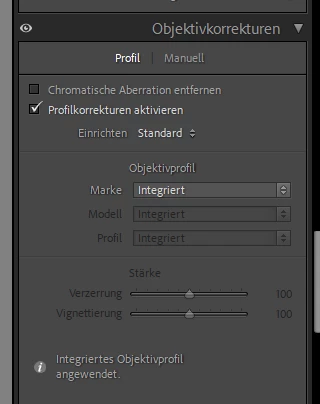
Instead of resolving to the Tokina lens profile, Lightroom shows only “Integrated” under Lens Corrections.

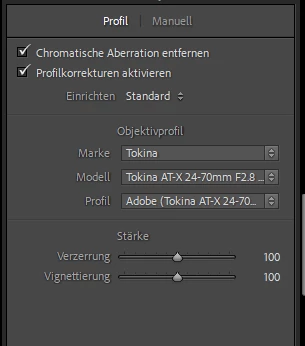
The same lens is correctly identified and mapped to the Tokina profile when used on a Nikon D750.

Environment:

  • Camera (problem case): Nikon Z 7 II
    • Firmware: 1.62
  • Camera (working comparison): Nikon D750
  • Lens: Tokina AT-X 24–70mm F2.8 PRO FX (F-mount)
  • Adapter: Nikon FTZ
  • Software: Adobe Lightroom Classic (latest version)

Observed Metadata Differences (ExifTool):

Working file (D750):

  • Lens Data Version: 0204
  • Lens ID Number: 0
  • Lightroom correctly assigns Tokina profile

Non-working file (Z 7 II):

  • Lens Data Version: 0801
  • Lens ID Number: 0
  • Lightroom shows only “Integrated”
  • Manual profile corrections do not auto-resolve to Tokina

ExifTool correctly resolves the Composite LensID in both files:
“Tokina AT-X 24-70 F2.8 PRO FX”

This suggests that lens identification data is present in Nikon MakerNotes, but Lightroom does not correctly map third-party F-mount lenses when recorded under Nikon MakerNotes LensDataVersion 0801.

Expected Behavior:
Lightroom should resolve the Tokina lens profile on Nikon Z 7 II files in the same way it does for Nikon D750 files with the same lens.


Lens as shown in a photo taken with the D750:


Lens as shown in a photo taken with the Z 7 II:
 

Unfortunately, my RAW files are too big to upload them here. Hence, I tried to extract the EXIF data and attach it as text files. 

I should add that this analysis was largely made by AI - it is beyond my technical understanding but looks plausible, so I hope it would be helpful to you. 

I would be very grateful if this bug could be fixed. 


With best wishes

Berthold

    Correct answer JohanElzenga

    Try this: select the correct lens profile, then choose ‘Save New Lens Profile Defaults’ under ‘Einrichten’. With a little luck the profile should now automatically be selected for new images if the option to apply a profile is activated.

    3 replies

    johnrellis
    Legend
    February 20, 2026

    [View this post in your web browser. It contains formatting and images that don't appear in email.]


    @Berthold26270905fsh8 I just find it odd, that the other lens I use (by Nikon) is displayed in LR, whereas it here just shows ‘integrated’. 


    With the Nikon Z II, a newer mirrorless camera, most lens profiles will be embedded in the raw files by the camera. And most such embedded profiles will be appear as “Camera Settings”:

    You can enable or disable the application of that embedded profile.


    With older mirrorless cameras, and some combinations of newer cameras and lenses, LR will automatically apply the embedded lens profile (as in your case), and you can’t disable it.  It is the camera manufacturer, not Adobe, that decides when to automatically apply the profile.


    Adobe’s documentation about this is woefully out of date and they’ve ignored repeated requests to update it.


    It appears that the ‘integrated’ profile only changes the vignetting, but not any distortions (i.e., there are no geometrical changes when I switch it on or off), whereas the Tokina profile does change distortions. Since every lens has some distortions, I guess that it might be better to use the Tokina profile. What do you think?

    Note that you can’t disable that embedded profile -- it is always applied, whether or not you check the box above.


    When you click the “i”, does it say that it is just correcting vignetting and not distortions?  If so, then when you manually select and apply the Tokina profile, you are applying both the embedded profile’s corrections as well as the corrections in the manually selected profile. So you might be applying the vignetting correction twice.  If it looks like you’re getting too much vignetting correction, you can reduce it by adjusting the Vignetting slider in that panel.  Then resave the settings as Lens Profile Defaults, and that will include your Vignetting adjustment.

    johnrellis
    Legend
    February 20, 2026

    Note “Integriertes Objektivprofil angewendet”, which translates to “Built-in Lens Profile applied”. LR has automatically applied a lens profile that the camera embedded in the raw file. If you click the “i” button, you’ll see more details about the lens corrections that were applied.


    In this case, you shouldn’t manually apply a lens profile, since the corrections have already been applied.


    Older cameras, like your D750, didn’t embed lens profiles in raw files.

    Berthold26270905fsh8
    Participant
    February 20, 2026

    Many thanks! I just find it odd, that the other lens I use (by Nikon) is displayed in LR, whereas it here just shows ‘integrated’. 

    It appears that the ‘integrated’ profile only changes the vignetting, but not any distortions (i.e., there are no geometrical changes when I switch it on or off), whereas the Tokina profile does change distortions. Since every lens has some distortions, I guess that it might be better to use the Tokina profile. What do you think?

    JohanElzenga
    Community Expert
    JohanElzengaCommunity ExpertCorrect answer
    Community Expert
    February 19, 2026

    Try this: select the correct lens profile, then choose ‘Save New Lens Profile Defaults’ under ‘Einrichten’. With a little luck the profile should now automatically be selected for new images if the option to apply a profile is activated.

    -- Johan W. Elzenga
    Berthold26270905fsh8
    Participant
    February 20, 2026

    Many thanks, that works (and, most importantly, does not overwrite the settings for the other lens I use).