


Participant
June 21, 2022
Answered

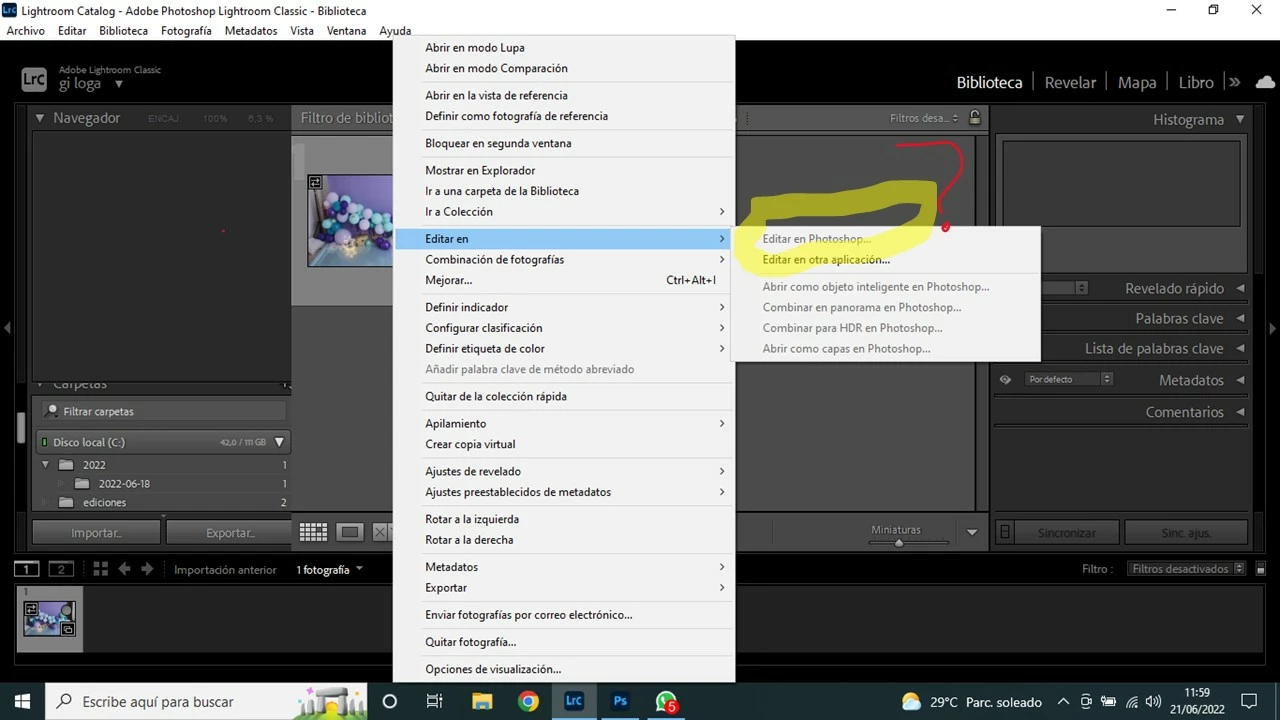
No me aparece activa la opción EDITAR EN PHOTOSHOP desde Lightroom cuando doy clic derecho

  • June 21, 2022
  • 5 replies
  • 1695 views

No me aparece activa la opciòn EDITAR EN PHOTOSHOP desde Lightroom, cuando doy clic derecho èsta opción aparece en gris (inactiva), actualicé las aplicaciones y me pasa esto y no puedo editar las fotos en photoshop. 😞 
This topic has been closed for replies.
Correct answer Rob_Cullen

Maybe be a silly question- Do you have Photoshop installed?

Try un-installing and re-installing Photoshop.

See the Adobe Help article-

https://helpx.adobe.com/lightroom-classic/kb/edit-photoshop-command-missing-photoshop.html?sdid=952G4XMS&skim55662X1322595X2f10f391271a8f620b625b8b6b937229


5 replies

Participating Frequently
August 15, 2022

Yo tengo el mismo problema.

Alguien ha dado con la solución?

Gracias

Rob_Cullen
Community Expert
Community Expert
August 15, 2022

@santiagojakas   Your photos are not available for Lightroom-Classic to send to Photoshop. You only have Smart Previews. Photoshop cannot use Smart Previews.

Connect any external drives that may have the original photo files.

Regards. My System: Windows-11, Lightroom-Classic 15.1.1, Photoshop 27.3.1, ACR 18.1.1, Lightroom 9.0, Lr-iOS 10.4.0, Bridge 16.0.2 .
Participating Frequently
August 16, 2022

@Rob_Cullenthanks a lot for your help!

That's very strange, as I have all my images in a external USB hard drive which is connected at all times.

Is there a way of "reconnecting" or checking if the files are linked to that drive?


Thanks again for your help!

GoldingD
Legend
June 24, 2022

So, from your posting:

 Notice that the first section states Edit in Photoshop.


Now from my Windows 10, LrC 11.4, PS 2022:


I suspect your copy of PS 2022 did not get installed properly, and LrC is pointing to a previous PS that no longer exists on your computer, so the call for a re-install of PS.

GoldingD
Legend
June 22, 2022

Bring up your preferences, select the External Editing tab, share a screenshot of that.

Participant
June 23, 2022

tks, I share this screnshot of Preferences... I still following this issue... 

Rob_Cullen
Community Expert
Rob_CullenCommunity ExpertCorrect answer
Community Expert
June 22, 2022

Maybe be a silly question- Do you have Photoshop installed?

Try un-installing and re-installing Photoshop.

See the Adobe Help article-

https://helpx.adobe.com/lightroom-classic/kb/edit-photoshop-command-missing-photoshop.html?sdid=952G4XMS&skim55662X1322595X2f10f391271a8f620b625b8b6b937229


Regards. My System: Windows-11, Lightroom-Classic 15.1.1, Photoshop 27.3.1, ACR 18.1.1, Lightroom 9.0, Lr-iOS 10.4.0, Bridge 16.0.2 .
Participant
June 23, 2022

ok, I'm gonna try this... thank you! 


Rob_Cullen
Community Expert
Community Expert
June 21, 2022

In your screen-clip I do not see a photo 'Selected' (highlighted). And the Histogram panel is empty also indicating -no photo selected. A photo must be selected.

Also, if a photo is marked as "Missing" with an exclamation mark [!] you cannot Edit in Photoshop.


Regards. My System: Windows-11, Lightroom-Classic 15.1.1, Photoshop 27.3.1, ACR 18.1.1, Lightroom 9.0, Lr-iOS 10.4.0, Bridge 16.0.2 .
Participant
June 21, 2022

Thanks for your answer, but I try and I don't get result even doing this, I attach the situation and I still with the problem 😞