


Participant
July 8, 2021
解決済み

lost "details" slider in the Detail panel of the Edit window

  • July 8, 2021
  • 返信数 1.
  • 355 ビュー

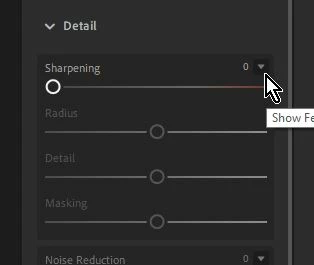
I was using Lightroom to edit some photos.  I think I clicked where/when I shouldn't have and suddenly lost the "details" slider in the Detail panel of the Edit window.  How do I get it back?  Right now in that panel I have "sharpening," "noise reduction," and "color noise reduction," but nothing else.
このトピックへの返信は締め切られました。
解決に役立った回答 Rob_Cullen

Click on the 'carrot' icon to expand the other Detail sliders and make them visible-

返信数 1

Rob_Cullen
Community Expert
Rob_CullenCommunity Expert解決!
Community Expert
July 9, 2021

Click on the 'carrot' icon to expand the other Detail sliders and make them visible-

Regards. My System: Windows-11, Lightroom-Classic 15.4.1, Photoshop 27.8, ACR 18.4, Lightroom 9.4, Lr-iOS 10.4.0, Bridge 16.0.3 .
grizzlypete作成者
Participant
July 9, 2021
Got it! Thanks a bunch! I knew it had to be a simple 'click' somewhere -
I just couldn't figure out where.