


Participant
July 23, 2019
Question

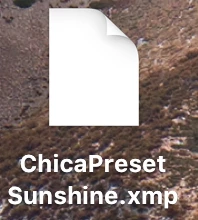
My Lightroom Preset is not exporting properly to my desktop

  • July 23, 2019
  • 1 reply
  • 283 views

Hello!

I recently downloaded Lightroom. I have created a custom preset that I am looking to sell. I have followed video tutorials step-by-step. My custom preset is now saved in Lightroom. However, when I export my preset to my Macbook Pro desktop --- it does not display like ALL tutorials have shown me. (See photo attachment for how it's showing on my desktop). All the tutorials I have seen will have the Lightroom logo on the file export, after they export to their desktop.

Mine shows blank. It will not open. It looks kinda like an empty file.

Any help would be so much appreciated!!
This topic has been closed for replies.

1 reply

Sahil.Chawla
Adobe Employee
Adobe Employee
July 23, 2019

Hi Morgan,

Could you please let us know what operating system you're working on?

It seems like a file association issue within the operating system. You need to assign Lightroom as the default app for opening .xmp files so that the icon looks like Lightroom.

Please have a look at the steps below and let us know how it goes:

macOS: Change the Default Application a File Opens With on Your Mac
Windows: How to Change File Associations in Windows

Regards,
Sahil

Participant
July 24, 2019

I am working on a Macbook Pro. I have followed the steps in the link you sent me! It has changed from the original blank document, and now looks it looks like this. (see my attachments).

Is this correct format? It still is not showing the Lightroom logo - so I am not totally sure.

Thank you for your assistance!!!