


Participant
December 9, 2024
Question

작업창 특정 영역에 투명한 팝업이 나타나 클릭등 작업이 불가함.

  • December 9, 2024
  • 1 reply
  • 149 views

사용환경

Adobe Photoshop 버전: 26.1.0 20241113.r.121 158e617 x64
시작 횟수: 20
운영 체제: Windows 10 64비트
버전: 10 10.0.19045.3930


간헐적으로 포토샵 상단 중앙에 아래 이미지와 같이 팝업창이 띄어짐.

(아래 이미지는 노출 설정으로 잘 보이게 바꾼것)
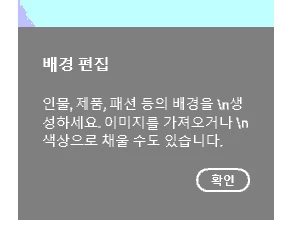
10% 이하 정도로 투명하게 표시되는 팝업으로 자세히 보지 않으면 이런 팝업이 노출되는것을 모를수있음.

문제는 이 팝업이 떠있을경우 해당 영역에서 클릭등의 마우스 작업이 불가함.


이전 업데이트 버전에선 없었던 문제임.

This topic has been closed for replies.

1 reply

Sameer K
Community Manager
Community Manager
December 9, 2024

Hey, @현용35246644piy3. Welcome to the Photoshop Community. I'll need more information to help you figure this out. Please share the system information from Photoshop Help > System info > Copy and paste into a text document > upload and attach here.


Ensure there are no stale preferences in your Photoshop. Go to the location of the preference folder below and rename it to backup.

  • Windows 10/11: Users/[user name]/AppData/Roaming/Adobe/Adobe Photoshop [version]/Adobe Photoshop [version] Settings
  • You can press Press the Windows key > Enter 'Run' > Enter %APPDATA%\Adobe
  • Rename the Adobe Photoshop folder by adding a .old at the end. (Adobe Photoshop 2024 > Rename > Adobe Photoshop 2024. old), you can later restore these preferences if needed.(https://adobe.ly/4860qM9)
  • Restart the computer.

These changes will give a fresh start to Photoshop as a fresh install. Let me know how it goes.

Thanks!

Sameer K

(Type '@' and type my name to mention me when you reply)