


Participant
February 18, 2018
解決済み

Photoshop brushes get deleted when updating to newest Photoshop

  • February 18, 2018
  • 返信数 2.
  • 615 ビュー

I have been using photoshop for a few months now and everytime I use creative cloud to update photoshop, my custom brushes get deleted.  Is there a way to ensure they will be there after the updates are finished? thanks for your help!!
    このトピックへの返信は締め切られました。
    解決に役立った回答 Omar.Fathy

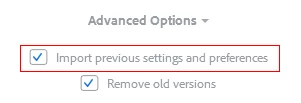
    When you press update you can see this in the Creative Cloud App:

    and when you open your updated version for the first time it will prompt you to migrate.

    but if you didn't make any of it you can use:

    Edit>Presets>Migrate Presets

    to migrate your presets.

    返信数 2

    SonseraeLeese
    Known Participant
    November 16, 2023

    Just to let you know, there is a bug in the Photoshop beta version and even though these advanced options are checked, they still delete your brushes and settings.


    Trevor.Dennis
    Community Expert
    Community Expert
    November 17, 2023

    If you are using Windows, navigate to

    C:\Users\[You User Name]\AppData\Roaming\Adobe 

    where you will see previous versions of the full release version


    Open the full release version folder anbd click on Presets\brushes and you'll find your .abr files.  Copy them across to where you need them, and you are good to go.


    Omar.Fathy
    Community Expert
    Omar.FathyCommunity Expert解決!
    Community Expert
    February 18, 2018

    When you press update you can see this in the Creative Cloud App:

    and when you open your updated version for the first time it will prompt you to migrate.

    but if you didn't make any of it you can use:

    Edit>Presets>Migrate Presets

    to migrate your presets.

    SonseraeLeese
    Known Participant
    November 16, 2023

    Just letting you know that the Photoshop Beta version still deletes everything despite having selected the Advanced options. When I went to select Edit/Presets/Migrate Presets, Migrate Presets is grayed out so that option doesn't work either.