


Known Participant
October 27, 2024
解決済み

Re: Photoshop organization screen looks small. how do you enlarge the menu bar, panel like the fold

  • October 27, 2024
  • 返信数 1.
  • 579 ビュー

I'm on Mac OS Sequoia using PS v. 26.0.0. Since a recent update the type in the menu at the top has shunk to be barely readable. The toolbar on the laft always has been too small. Surely users should be able to tweak this? I can find nothing in Settings.

    このトピックへの返信は締め切られました。
    解決に役立った回答 jane-e

    @JacktheMac 

    What do you have for UI Scaling in Preferences > Interface? Be sure to restart after making a change.
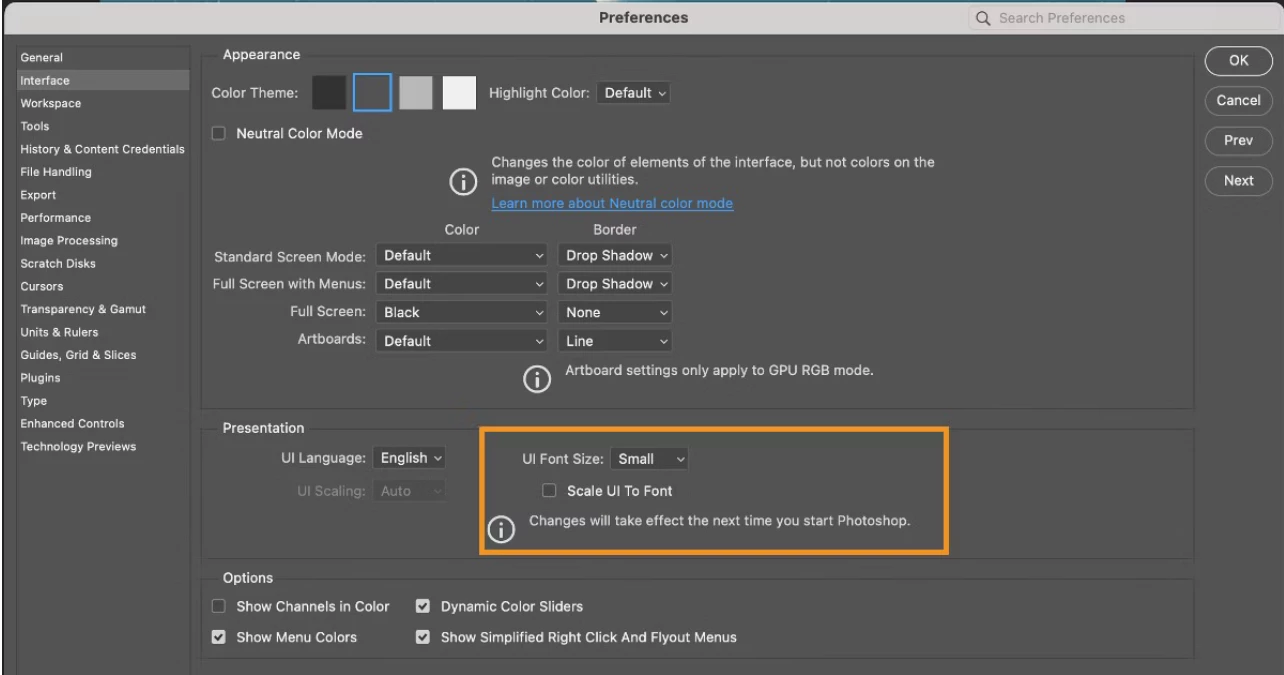


    • If you are on Windows, start in Edit Menu > Preferences
    • If you are on macOS, newer versions have change the name to Settings, which is in the Application menu (in this case "Photoshop")


    Jane


    返信数 1

    jane-e
    Community Expert
    jane-eCommunity Expert解決!
    Community Expert
    October 27, 2024

    @JacktheMac 

    What do you have for UI Scaling in Preferences > Interface? Be sure to restart after making a change.


    • If you are on Windows, start in Edit Menu > Preferences
    • If you are on macOS, newer versions have change the name to Settings, which is in the Application menu (in this case "Photoshop")


    Jane


    JacktheMac作成者
    Known Participant
    October 27, 2024

    I'm on Large. Unsure what 'Scale to UI to Font' means but will experiment in the morning.