



yash-lucid
Inspiring
May 28, 2026
Answered

Project is not working, neither are any of the autosaves, URGENT!

  • May 28, 2026
  • 1 reply
  • 29 views

I’m working on a project and saved yesterday but suddenly today I get:
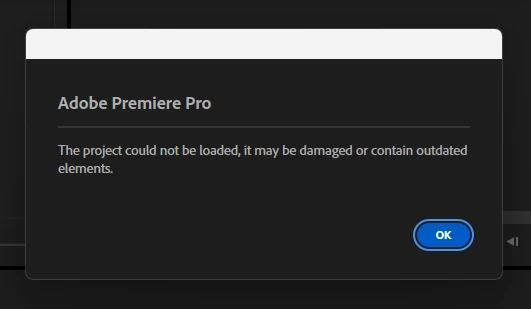
 

It’s a massively important project! None of the autosaves from yesterday work either, I tried 20!

The only that works is one from really far back with significantly less work.

I thought I found a solution, the files work in Premiere Beta! (V26.5.0 Build 3) But then Premiere just closes after about 30 seconds. No error, just closes. It’s taking time to update to latest beta - and when it does maybe it will be a workaround, however it still doesn’t work in my actual, latest version of normal Premiere.

I also tried importing into a fresh new premiere session, no luck, same error.

Please help.


PPro file: https://we.tl/t-7A20g4wxuH9BHfYd


SPECS
Intel Core i9-14900HX
NVIDIA GeForce RTX 4060
64GB DDR5 RAM

1TB M2 SSD [OS, ADOBE, PPRO PROJECT FILE, AE FULL PROJECT]

2TB M2 SSD [PPRO FOOTAGE, CACHE]
(Up to 7,100MB/s read, 6,000MB/s write)

All latest Adobe 2026/Win11Pro/and Nvidia Studio Driver

Alienware AW2725DM 27"
DELL SE2419HR 24"

    Correct answer yash-lucid

    UPDATE: Adobe support was not able to help me and said there is no solution.

    Bummer, because I found a workaround. Since I rendered the file last night for client review, I opened Adobe Media Encoder and checked the log file. Each time Adobe renders, it saves a version of your file to a temp directory. I located the temp file in the directory which it used to render, and it worked. Surely the Premiere expert could have suggested this to me? In any case, solved.

    1 reply

    yash-lucid
    yash-lucidAuthorCorrect answer
    Inspiring
    May 28, 2026

    UPDATE: Adobe support was not able to help me and said there is no solution.

    Bummer, because I found a workaround. Since I rendered the file last night for client review, I opened Adobe Media Encoder and checked the log file. Each time Adobe renders, it saves a version of your file to a temp directory. I located the temp file in the directory which it used to render, and it worked. Surely the Premiere expert could have suggested this to me? In any case, solved.

    Community Manager
    May 29, 2026

    Hi yash-lucid,
     

    Thanks for sharing the workaround. We’re checking a similar issue. Please allow us some time. We will share updates here in this thread.


    Regards,
    Sumeet