


May 1, 2013
解決済み

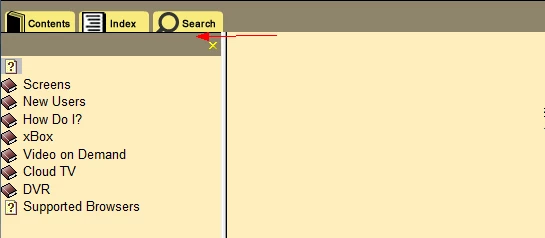
In Firefox, the Skins toolbar is not displaying correctly. Is there any way to add padding to fix it

  • May 1, 2013
  • 返信数 1.
  • 620 ビュー

The Skins toolbar looks great in Internet Explorer and Chrome, but Firefox does not have any padding around the toolbar buttons (see picture). Is there a way to add padding?
Thanks for your help,

Colleen

このトピックへの返信は締め切られました。
解決に役立った回答 Captiv8r

Hello again

Your response makes me wonder if you misunderstood me. Especially the bit about "transparent" buttons. Because that's precisely what I was suggesting. Add the "padding" you want, by adding some transparent area at the bottom of the buttons. That way the appearance should be that the buttons have some blank space below where the image ends and the divider.

At least that's what I interpreted you to be wanting.

Cheers... Rick

返信数 1

Captiv8r
Legend
May 1, 2013

Hi there

Does anything change if you edit the buttons using something like Photoshop or Microsoft Paint and make them taller?

Cheers... Rick

May 2, 2013

Unfortunately, it doesn't fix the problem.

Do you know if there is a way that I can add a transparent button underneath my existing buttons/toolbar, rather than to the side?

Captiv8r
Captiv8r解決!
Legend
May 2, 2013

Hello again

Your response makes me wonder if you misunderstood me. Especially the bit about "transparent" buttons. Because that's precisely what I was suggesting. Add the "padding" you want, by adding some transparent area at the bottom of the buttons. That way the appearance should be that the buttons have some blank space below where the image ends and the divider.

At least that's what I interpreted you to be wanting.

Cheers... Rick