


January 25, 2013
Question

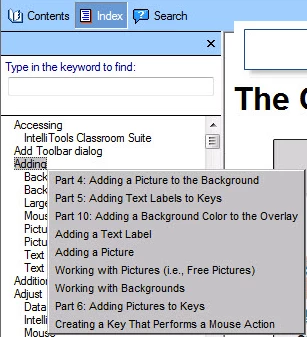
index panel's popup windows are clipped in MSIE 10

  • January 25, 2013
  • 3 replies
  • 1690 views

We're seeing a problem with our RoboHelp 10 generated web help, and I'm hoping someone more RoboHelp-saavy can cast me a pearl or two.

this is what I want, and see on other browsers:
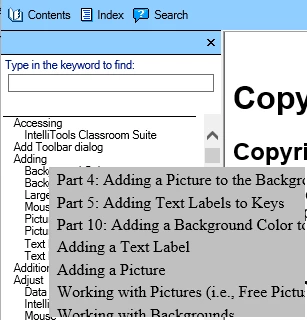
This is what MSIE-10 does. Note the popups are the same size, but the text is too large in MSIE, so it gets clipped.
This topic has been closed for replies.

3 replies

Inspiring
August 9, 2013

Did you ever find a resolution to this issue? We are having the same problem with index entries that reference multiple topics. We have the same issue occuring and changing fonts has not seemed to resolve it. We also have installed the patch that was referenced in a separate post.

August 9, 2013

I don't think this was every resolved, no.

January 29, 2013

First, a correction.  I wish I could change the title to "... in MSIE 10". 

Second, our doc writer generated webhelp for the sample project "EmployeeCare".  It too looks bad in MSIE 10.

Peter Grainge
Community Expert
Community Expert
January 29, 2013

I can and have changed the title.

Is the help being generated on a Windows 7 or 8 machine? Rh10 was released before the final version of Windows 8. If done on Windows 8, can you install on a Windows 7 machine in trial mode to compare?

Please also respond re browser default font.


See www.grainge.org for RoboHelp and Authoring tips

@petergrainge

Use the menu (bottom right) to mark the Best Answer or Highlight particularly useful replies. Found the answer elsewhere? Share it here.
January 29, 2013

1) Thanks, Peter, for the title change. 

2) It's my understanding that the doc-writer did the generation on Win7.

3) How does one change the default font in Win8/MSIE10?  I've found the 'gear icon' on the right hand side, but don't see anything there or in the system control panels that suggest "default font".

RoboColum_n_
Legend
January 26, 2013

Looking at this a little more closely it seems like it is not just the font size that is different but the font also. I think what is happening is that IE is substituting the font specified in the output for a default font - probably Times New Roman. Why it is doing this I don't know.

Is this happening on all projects you generate? Try using one of the supplied dummy projects and see if you get the same results.

Peter Grainge
Community Expert
Community Expert
January 29, 2013

Maybe it is simply the browser default font?


See www.grainge.org for RoboHelp and Authoring tips

@petergrainge

Use the menu (bottom right) to mark the Best Answer or Highlight particularly useful replies. Found the answer elsewhere? Share it here.