

Participant
December 16, 2015
Answered

how do you resize a signature line in echo sign

  • December 16, 2015
  • 3 replies
  • 17888 views

I'm creating an Echo Sign document from a template I created in Word format.  I'm tying to fit the signature field in the space I created but the size is not adjustable. How do I change it?

This topic has been closed for replies.
Correct answer abhissha

Hi Liza,

When you select the document and before initiating the signature process please go to custom form options and from there you can resize the Signature field.
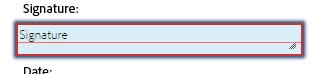
Just click and hold from the bottom right corner of this field and resize it.

Thanks,

Abhishek

3 replies

Meenakshi Negi
Legend
October 1, 2019

Hi Wstoneman,


You get an option to resize the form fields while adding them in the form.

Could you please confirm if you are trying to resize the field while creating the form or while filling the form?

Please share the exact workflow you do and the screenshot for the same.


We will be waiting for your response.


Regards,

Meenakshi


UtahNestRE
Participant
June 24, 2021

No, you DO NOT get that option when you are adding them to the form. 

Participant
August 13, 2021

Hello,


Thank you for reaching out and sorry for the trouble.


In Adobe Sign, you can resize all the form fields including the signature field.

Please let us know if you are still experiencing the issue with resizing the signature field.

If the issue persists, it would be helpful if you can share the screen recording of that issue.


Thanks,

Meenakshi


There is no optoin to resize the siganture field. The option to resize appears on all other field options in the bottom right corner. There is no option for the signature box to resize in any way. The signature takes up a significant size in its placement however the signaure itself appears very small once signed.


Participant
September 30, 2019

there is no blue grab bar in the bottom right hand corner of the signature field like there is in a tex field or date field or anyof ther field.  How do you resize the signature field.

abhissha
Community Manager
abhisshaCommunity ManagerCorrect answer
Community Manager
December 21, 2015

Hi Liza,

When you select the document and before initiating the signature process please go to custom form options and from there you can resize the Signature field.

Just click and hold from the bottom right corner of this field and resize it.

Thanks,

Abhishek

dianem80424205
Participant
May 24, 2017

Hello abhissha,

I had Adobe Sign working just great and using the Digital Signature and resizing each time but I don't know what happened but it will not allow me to resize going down anymore.  Do you know how to fix?

Thanks,

Diane