

Inspiring
October 29, 2024
解決済み

Importing my image to Firefly

  • October 29, 2024
  • 返信数 2.
  • 6540 ビュー

Firefly Folks,

How can I import my own image into Firefly to work on it there?   I use Windows 11 and PS.

Thanks,

Richard

解決に役立った回答 Oh.N8

Hey @richardg52861327 
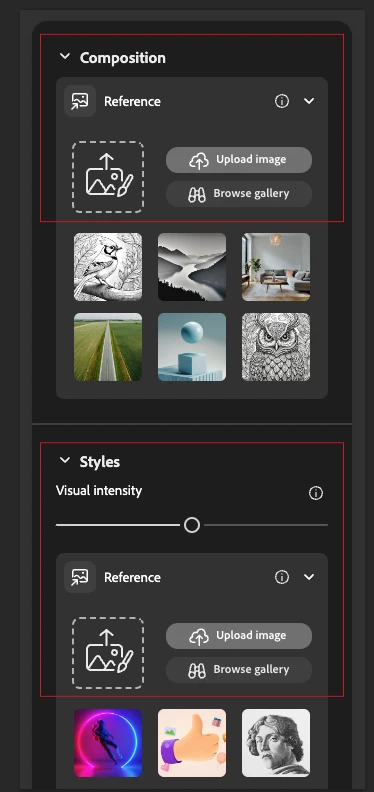
Just to add a bit more to what @Kevin Stohlmeyer  said and to give you a visual. On the right side of FF there is a panel w drop down menus. Within the menus you can add photos, change effects, and so on. 
The composition image attempts to generate and composite the image as closely or roughly as you choose based on the slider settings.

The Style Reference image is the type of style that you want. Again the sliders effect the outcome of generated image. 
In my experience, the composition image has the most influence on the outcome.


Cheers,
O.Nate

返信数 2

Oh.N8Community Expert解決!
October 30, 2024

Hey @richardg52861327 
Just to add a bit more to what @Kevin Stohlmeyer  said and to give you a visual. On the right side of FF there is a panel w drop down menus. Within the menus you can add photos, change effects, and so on. 
The composition image attempts to generate and composite the image as closely or roughly as you choose based on the slider settings.

The Style Reference image is the type of style that you want. Again the sliders effect the outcome of generated image. 
In my experience, the composition image has the most influence on the outcome.


Cheers,
O.Nate

Inspiring
October 30, 2024

Kevin and Oh.N8,

Thank you both for your help. While I can bring an image of my own into FF I cannot place it in the main editing window. When I download an image created FF I can bring it into PS. However, I am having a beast of a time blending it with an image of my own in PS. Is this a common complaint and can a FF image not be combined with any other real image?  Thanks,  Richard 


Kevin Stohlmeyer
Community Expert
Community Expert
October 31, 2024

@richardg52861327 the only method on Firefly.com is to use Generative Fill features on your original image to add Firefly elements. There are no blending/compositing workflows on the Firefly site - you are correct to use Photoshop to blend elements using layers and other compositing techniques.

Kevin Stohlmeyer
Community Expert
Community Expert
October 29, 2024

@richardg52861327 If you have Photoshop, you could use Generative Fill to add elements or edit your image.

If you want to use your image as a composition reference, you can either upload in Photoshop via Edit>Generate Image (upload a reference image) or using the left panel in Firefly.adobe.com to upload a composition or style reference.