Exit
  • Global community
    • Language:
      • Deutsch
      • English
      • Español
      • Français
      • Português
  • 日本語コミュニティ
  • 한국 커뮤니티
0

Adding GoPro Telemetry Data

New Here ,
Sep 13, 2021 Sep 13, 2021

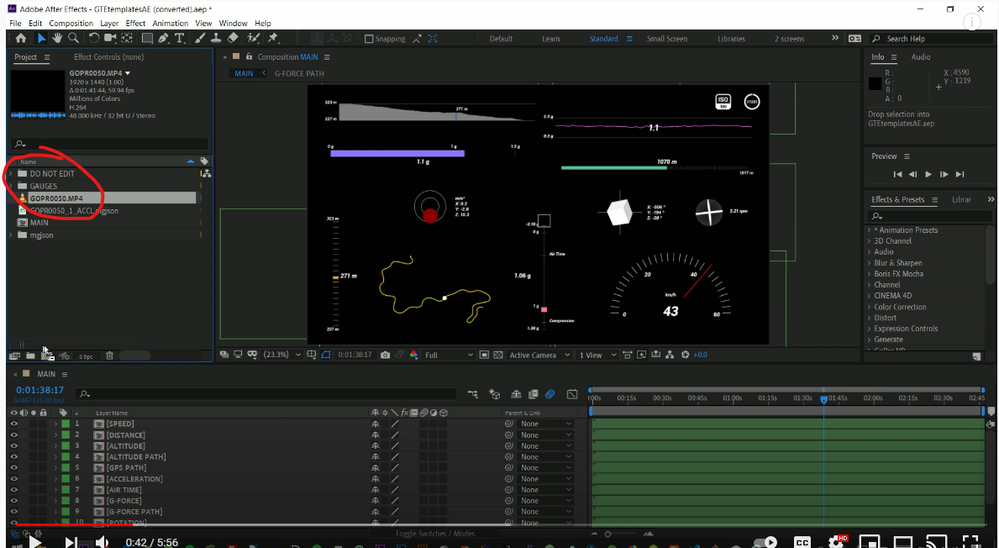
Where is this "Gauges" folder???? I don't have any folders there... There is 2 tutorials on Youtube of how to do this and when they show their After Effects window it's just there.....


If anyone knows how I can simply add telemetry data to my GoPro with a program that is a little less mind numbing to look at... that would be great 


ss.png

TOPICS
How to
3.6K
Translate
Report
Community guidelines
Be kind and respectful, give credit to the original source of content, and search for duplicates before posting. Learn more
community guidelines
Community Expert ,
Sep 13, 2021 Sep 13, 2021

The telemetry data needs to be acquired outside of After Effects.  That information can then be used to create a data-driven animation in After Effects.


After Effects User Guide > Work with Data-driven animation

https://helpx.adobe.com/after-effects/using/data-driven-animations.html


As far as extracting the data goes, you need a 3rd party utility that does that.  Here's the top result that came back when I searched for it:

TELEMETRY EXTRACTOR PREMIUM FOR GOPRO

https://goprotelemetryextractor.com/gopro-gps-telemetry-extract


Although, I have not used that product and cannot give it a recommendation.  Perhaps other users will chime in with options that they like for extracting telemetry data.


Since the "GAUGES" folder in your screenshot is part of an After Effects template, I'd reach out to whomever you purchased that template from for what they recommend to use to extract that data.

Translate
Report
Community guidelines
Be kind and respectful, give credit to the original source of content, and search for duplicates before posting. Learn more
community guidelines
New Here ,
Sep 13, 2021 Sep 13, 2021
I already have my telemtry data extracted using the software that you
recommended and I was able to download their template files and get the
"gauges" folder I was looking for but now I've run in to a new problem...

Now when I upload my videos they just a solid green screen... Any idea what
I've done wrong?
Translate
Report
Community guidelines
Be kind and respectful, give credit to the original source of content, and search for duplicates before posting. Learn more
community guidelines
LEGEND ,
Sep 13, 2021 Sep 13, 2021

Your hgardware acceleration is not working correcxtly if videos show green or in weird colors. Update your graphics driver and check the relevant settings inside AE.


Mylenium

Translate
Report
Community guidelines
Be kind and respectful, give credit to the original source of content, and search for duplicates before posting. Learn more
community guidelines
New Here ,
Sep 13, 2021 Sep 13, 2021
LATEST
Sweet thanks
Translate
Report
Community guidelines
Be kind and respectful, give credit to the original source of content, and search for duplicates before posting. Learn more
community guidelines