Exit
  • Global community
    • Language:
      • Deutsch
      • English
      • Español
      • Français
      • Português
  • 日本語コミュニティ
  • 한국 커뮤니티
0

AE 2018 problem with loopOut() expression

Community Beginner ,
Nov 08, 2017 Nov 08, 2017

When using the loopOut() expression on a time remap enabled layer (of a precomp), the last frame before the layer loops is all the layers inside of the precomp.  So I'm getting this bad hic-up in the loop.   Also, when I enable time-remapping, the layer does not hold on the last frame, if you extend the layer beyond the last keyframe it's completely blank.

To loop a layer in previous versions you could add the loopOut() expression to a time remapped layer without issue so is there a solution for this?

7.7K
Translate
Report
Community guidelines
Be kind and respectful, give credit to the original source of content, and search for duplicates before posting. Learn more
community guidelines

correct answers 1 Correct answer

Community Beginner , Nov 08, 2017 Nov 08, 2017

I'm using a PC running windows 10. What I'm trying to loop is a sequence of illustrator layers that have been precomped--and I just went back into the file and turned on collapse transformations--doing that solved the problem.  I don't believe turning on collapse transformations was required in previous versions since I know I've never had an issue with this expression in the past, but I could be wrong.

Translate
LEGEND ,
Nov 08, 2017 Nov 08, 2017

Sounds like the usual cache corruption issues that plague current versions of AE, so start by flushing them regularly. You hzaven't realyl provided any real technical info, anyway. no system info, no details about the comps, no nothing.

Mylenium

Translate
Report
Community guidelines
Be kind and respectful, give credit to the original source of content, and search for duplicates before posting. Learn more
community guidelines
Community Beginner ,
Nov 08, 2017 Nov 08, 2017

I'm using a PC running windows 10. What I'm trying to loop is a sequence of illustrator layers that have been precomped--and I just went back into the file and turned on collapse transformations--doing that solved the problem.  I don't believe turning on collapse transformations was required in previous versions since I know I've never had an issue with this expression in the past, but I could be wrong.

Translate
Report
Community guidelines
Be kind and respectful, give credit to the original source of content, and search for duplicates before posting. Learn more
community guidelines
LEGEND ,
Nov 09, 2017 Nov 09, 2017
LATEST

this is the only way to loop properly:

1. highlight the precomp and use Ctrl+Alt+T to enable the time remapping property. it will automatically create 2 keyframes for you

2. go one frame before the last keyframe and create a keyframe by clicking on the diamond icon

3. now copy the first keyframe over the last keyframe
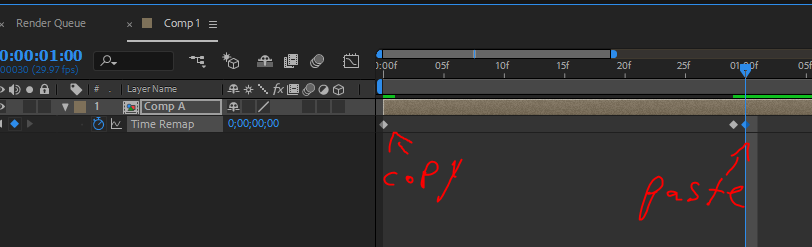
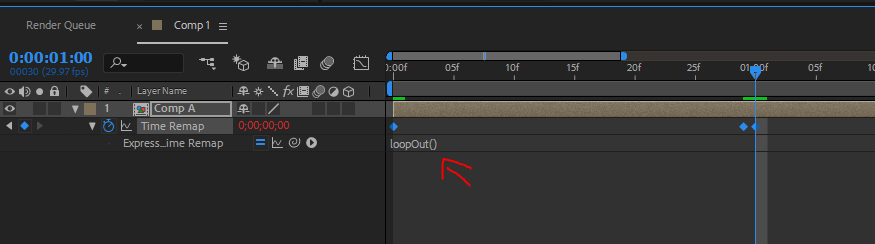
4. add this expression to the property by pressing Alt+on the stopwatch: loopOut()

Translate
Report
Community guidelines
Be kind and respectful, give credit to the original source of content, and search for duplicates before posting. Learn more
community guidelines

