- Home
- After Effects
- Discussions
- Re: I am getting the same error. After attempting...
- Re: I am getting the same error. After attempting...

Copy link to clipboard
Copied


 1 Correct answer

I was able to solve this by installing the right driver. I was simply updating Intel drivers instead of NVIDIA drivers a noob mistake of mine. Not sure if that's also the reason for the others with this issue though.

 58
Replies
58
58
Replies
58


Copy link to clipboard
Copied
But if you disabled the reports then youare basically "continuing with known issue" so are you having rendering issues or quality issues?? Your idea is sound but not if quality is sacrificed.

Copy link to clipboard
Copied
No everything works fine. As I said, the report went away after I updated my video driver but then returned for no apparent reason. Anyway, no problems since I updated the driver (AE and Premiere wouldn't run before the update).
Rusty

Copy link to clipboard
Copied
premiere is unusually slow for me so I still need a fix
Copy link to clipboard
Copied
Update: By disabling the report I 'was' continuing with a known issue. I did not realize it. Only by reinstalling the 'adobe' windows driver did ae work completely. If I reboot I must reinstall the driver. It was the orb plugin that wouldn't work after a reboot and I start getting the compatibility message again. Once I reinstall the driver I'm good until the next reboot.
Don't know what to do otherwise.
Rusty

Copy link to clipboard
Copied
Same boat here, it looks like this is a widespread issue. It's pretty much messing up my work and income at this point.
Uncomprehensible why Adobe is not doing anything (Or, failing that, at least acknowledging this)
I've got a NVIDIA QUADRO M1000M in a wacom mobile studio pro.
iZeMo

Copy link to clipboard
Copied
Really frustrating. I did all the steps, correctly, to update the drivers and when I open either PremierPro, I get the issue. Try again, it works but then reappears for After Effects. "Fix" that, then it doesn't work for PremierPro.
I'm on an Alienware 15 R3 Signature Edition laptop
Intel Core i7-7700HQ CUP @ 2.80GHz
16 Gigs of RAM on a 64 bit system
NVIDIA GeForce GTX 1060
Completely capabile of running anything. I usually have Cinema4d (the actual one, not lite) open and PremierPro, Photoshop and sometimes AfterEffects all at once and whenever I'm actually working in either, everything is fine.
I would like the actual technical explanation, in NASA terms, why there is even a need for this... what 'new' components or features in After Effects or PremierPro require driver updates?
I feel the whole idea of working in Agile has become a falsely believed mantra among so many developers world-wide that the notion of just releasing is more important than developing something that works...100% of time. It's possible. It really is, but line managers, product managers and especially project managers need to step back, have more pride about making stuff that works rather then showing their bosses they got something shipped.
Get this addressed. There are really only four flagships: Illustrator, Photoshop, After Effects and PremierPro.. in that order, that matter right now.. forget people working on the next Animate, or XD or even InDesign and get the group solving these issues... better yet, be progressive and partner closer with 3rd parties like Intel and NVidia and just have new drivers as part of the actual install.
Copy link to clipboard
Copied
Amen.

Copy link to clipboard
Copied
This.

Copy link to clipboard
Copied
Having same exact issue. Hardware is:
Windows 10 Home
Processor: Intel core 17-1789 CPU@3.60GHz
Memory: 32.0 GB
64-bit Operating System, x64-based processor

Copy link to clipboard
Copied
NVIDIA GeForce GTX 750 Ti not supported? Why? This is an up to date graphics card that has been working FINE until today. There goes what little that was left of my client projects in the epidemic.

Copy link to clipboard
Copied
I have same problem. 😞
hp zbook 17
17 4700mq 2.4ghz
nvidia quadro k3100m 4gb
intel hd 4600
32gb ram
win10

Copy link to clipboard
Copied
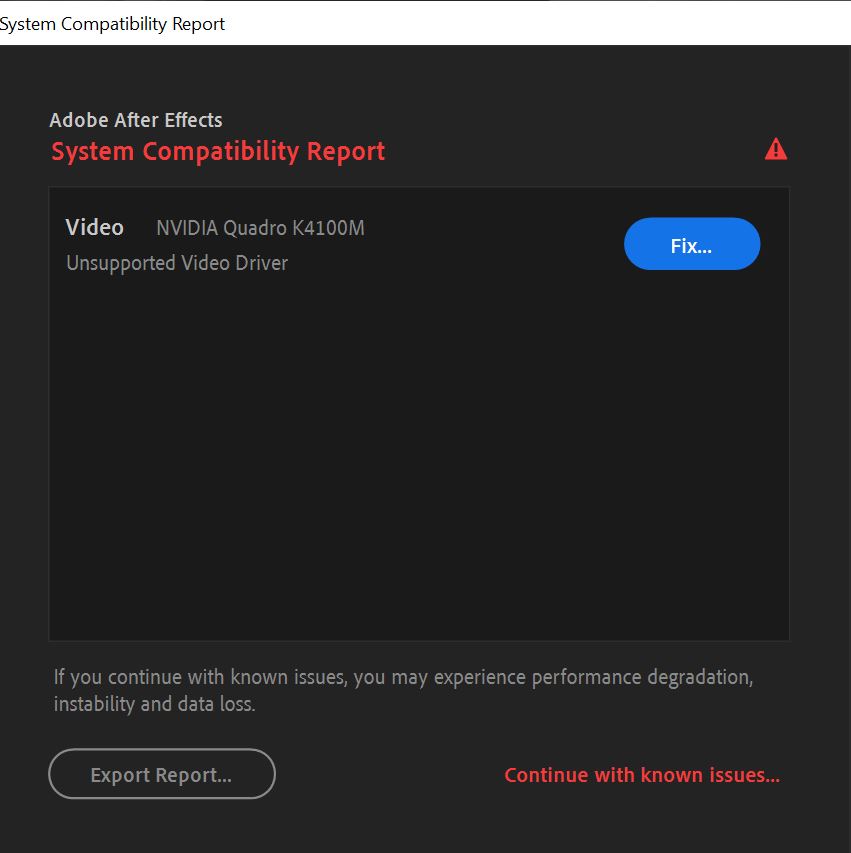
All my friends have this issue, we all have different computer builds. ALL 10 OF US HAVE THE SAME EXACT ISSUE! And the fix adobe tells you to do doesn't even work... WHY have they not fixed this yet. If you continue with known issues, there is a huge performance drop, at least for me... and there a quite a lot of random glitches that happen.

Copy link to clipboard
Copied
This is so messed up. Basically I'm having the same issue and the only difference is the 2020 update. Nothing else. PC ran fine for years and everything is up to date. Brand new Win10 v.1909 re-install too and all fresh everything on i7 3.40GHz with 32GB RAM Quadro 4000
Adobe please focus on making existing software run without issues rather than introduce new features. Solid software is better than rocky one with new features.

Copy link to clipboard
Copied
I have exactly the same issue with AE and Premiere Pro - Unsupported Video Driver for HD Graphics 4600 and Quadro K3100M
All drivers updated!
System: HP ZBook 17 G2
Intel(R) Core(TM) i7-4810MQ CPU 2.80GHz
32 GB Ram

Copy link to clipboard
Copied
any one GOT SULOUTION FOR THIS PROBLEM EVEN I HAVE THE SAME ISSUE

Copy link to clipboard
Copied
Copy link to clipboard
Copied
To be honest i don`t think there is a fix, the graphics card is just "too old" an not supported anymore by Nvidia. Especially for a "professional" Quadro-GPU thats not acceptable i think. But also Adobe could make it work anyway in my opinion. Not everyone wants or can buy a new PC every five years...
Copy link to clipboard
Copied
going to be animation/post production specific.
Copy link to clipboard
Copied
This is so annoying. Aside from updating from 2019 to 2020 version of AE & Premiere, nothing else changed except the stupid software update that brought me more issues.

Copy link to clipboard
Copied
I had the issue with the studio driver from Nvidia, and then updated to the game driver that was a bit newer and After effects worked. So not exactly the same config as you, but same error with Version: 442.92 - Release Date: 2020 April 16. I suspect the driver version you are using is not liked by Aftereffects. See if they have a newer version of the video driver, and if your video card line has a studio version and a game ready driver, switch to the game ready driver if its newer. This was the only thing that worked for me.
Copy link to clipboard
Copied
I could try that. I'm not sure. I got the Quadro4000 and will try it. Hope is will work.

Copy link to clipboard
Copied
Why you are getting an error with your integrated intel graphics.
Part 1:
Intel will not support GPUs older than 4 years. Most PCs ship with integrated graphics even when they are paired with a discrete card.
Adobe doesn't support these older GPUs because Intel is no longer updating them besides critical security updates. AKA your GPU is old and dead 😞
_____________
Part 2:
If you only have an Intel GPU and no Nvidia or AMD you are out of luck. You are no longer supported. The only solution is to upgrade. Sorry. RIP!
_____________
Part 3:
If you happen to have a new-ish -- This worked with an Nvidia GTX970, which by all accounts is a pretty dated card (your mileage may vary) --, then:
Go to your BIOS and find the setting to disable the integrated GPU. I recommend googling your PC's brand name + bios + "how to disable integrated GPU" -- there are many variations, so just search in the most generic wording you can and read, read, read!
The nice thing is, even if you mess up and change a BIOS setting you are unsure of, you can just set the whole thing back to default as ALL BIOS have an option to reset to the default set by the manufacturer.
I hope this helps!
- My friend who wrote this post & me
Copy link to clipboard
Copied
I had this exact same issue.
My PC Specs are -
Intel i7 7700k @3.4Ghz / 16 GB DDR4 3600Mhz RAM
GTX 1050ti / Z170 Gaming K3 Gigabyte Motherboard / 500GB SSD
I could not find any solution that works other than this one solution - (Note I am on Windows 10 - 64 Bit)
-Go To the 'Search Panel' Found in the bottom left of your screen > Type Device Manager > Open the Display adaptors > Uninstall your Intel HD Integrated Graphics > Relaunch Adobe AE/Pr P.
Unfortunately the integrated Graphics Drivers reinstall themselves after you turn your PC off/on again, but you'll just have to uninstall them again... Its a pain, but the only solution i found that legitimately works.
If you dont have an external GPU (Nvidea/ Radeon) Then im afraid there is legitimately no way of fixing this issue...
Copy link to clipboard
Copied

Copy link to clipboard
Copied
Same for me. I've to do this everytime.
Seems to me that is a easy problem to solve, the AE and PP are stupidly identifying the motherboard's graphic card as your main graphic card. This strongly impact performance. It just need a button to solve, "select your graphic card".
But Adobe isn't listen their users. Almost a year with this problem with no solution, a big shame. Not even an answer like "we're working on that". Hope someday they have a competitor.


Find more inspiration, events, and resources on the new Adobe Community
Explore Now
 AdChoices