
Inspiring
November 26, 2018
Question

after Effects CC2019 Crashing upon launch intermittently, "scripting" error

  • November 26, 2018
  • 5 replies
  • 2487 views

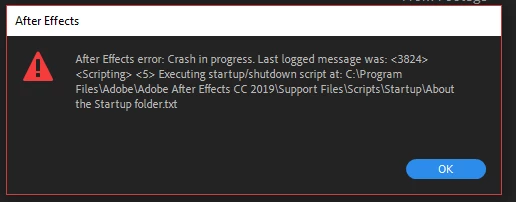
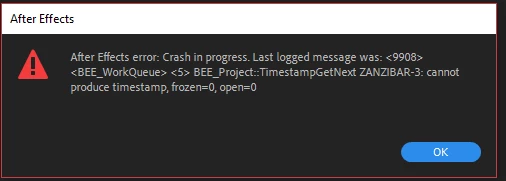
The Crash occurs after the splash screen. I get messages about offending items in the script startup folder. When I remove those items it runs down the line from one to the other until I get a "can not produce timestamp" error. Then it says illegal command sequence and crashes. Occasionally, when I remove these items AE will start successfully and I am able to work. A couple of times it's worked with no intervention as well.

I've checked for updates, rebooted, and removed offending files before launching.


1.
2.
3.
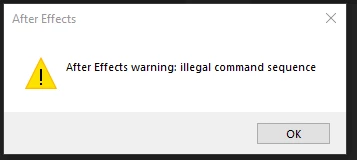
4. items noted in the crash report:

System Specs:

Windows 10 Pro (Up to date as of 11.25.18)

Asus STRIX GTX 1080

Geforce Driver version 416.94 (11.13.18)

i7-3930K CPU 3.2GHz

60Gb Ram

After Effects CC2019 v16.0

Many thanks for your help!

    This topic has been closed for replies.

    5 replies

    sinatheory
    Participant
    January 21, 2019

    I had the same issue

    I installed a script earlier and forgot to run AE in administrator mode and I got the same error

    try to run it in administrator, it may works

    Known Participant
    December 17, 2018

    Same issue for me!!! Same issue for many users.. I have reverted to CC2018...

    Inspiring
    December 13, 2018

    So I learned the Adobe cleaner, clean 'all' wasn't actually removing the problematic program files even after uninstalling via cc desktop app  I had todelete them manually in Windows explorer after running cleaner before reinstalling.

    Now it appears to launch expected, only I haven't installed any 3rd plugins or scripts yet.

    ToolfarmJP
    Community Expert
    Community Expert
    November 27, 2018

    Hello,

    Would you try to uninstall  After Effects, using CC Cleaner? You install it again.

    Use the Creative Cloud Cleaner Tool to solve installation problems

    Inspiring
    December 11, 2018

    I used The CC Cleaner tool to uninstall and rebooted and the problem still persists. It down versioned all of the other installations as well.

    ToolfarmJP
    Community Expert
    Community Expert
    November 27, 2018

    Hello,

    Would you try to reset your current parameters to default?

    Reset preferences


    To restore the default preference settings, press and hold the following keys while the application is starting.

    • Ctrl+Alt+Shift (Windows)
    • Command+Option+Shift (Mac OS)

    Setting preferences in After Effects

    Inspiring
    November 27, 2018

    Hey ToolfarmJP,

    Thanks for your response! I just tried resetting preferences and the issue persists.