

m1jackson
Inspiring
November 8, 2024
Question

Automation Blocks - List Reduction

  • November 8, 2024
  • 1 reply
  • 629 views

I'm looking to reduce a list from a spreadsheet and don't know how to do it.

I've got a .csv where column B is the 'type' of sequence that the shot belongs to.

Column C is the the actual sequence name and Column D is the shot name.
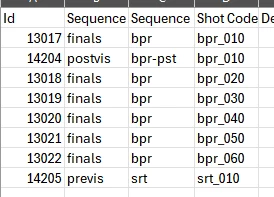
 

This is my current block set.
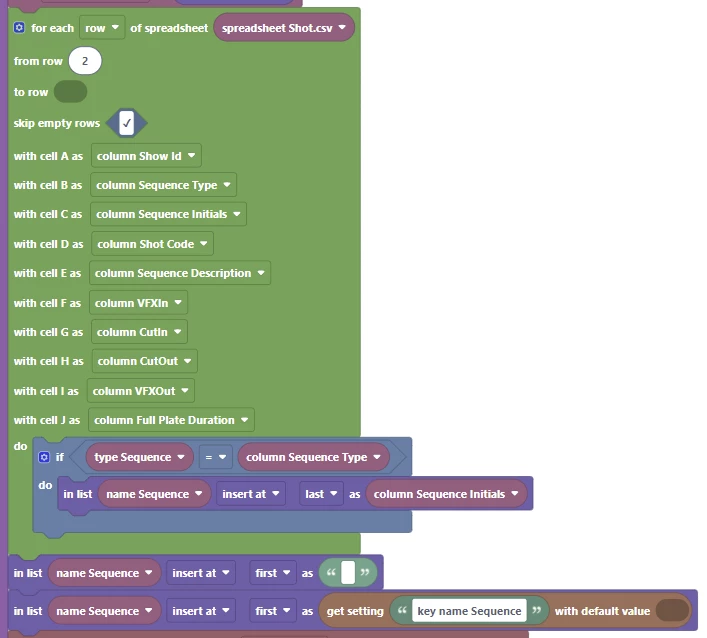
The last two "in list" blocks add the last selected item to the top of the list with a space. (Super handy, but I can't figure out an easy way to exclude the space from actually being selected.)


It creates a list that is every single line of the .csv
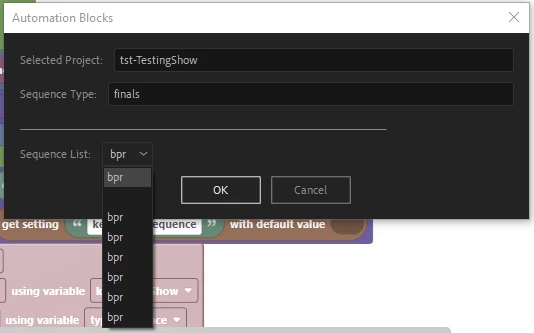
How can I reduce all the "same" sequence to a single item? Or if I had many "reduced" sequence initials that would get pulled if they match the "if" block?

This topic has been closed for replies.

1 reply

Mathias Moehl
Community Expert
Community Expert
November 8, 2024

Alternative 1:


Alternative 2
if you want to remove the duplicates for whatever reason after you already inserted all of them, the easiest way is to ask  ChatGPT for a JavaScript function which removes all duplicates from an array of strings and then execute that one with the Execute Code Block.

Mathias Möhl - Developer of tools like BeatEdit and Automation Blocks for Premiere Pro and After Effects
m1jackson
m1jacksonAuthor
Inspiring
November 8, 2024

I had never thought to look at ChatGPT. So I followed your advice and was able to cobble together something that worked exactly as you mentioned in Alternative 2.

So NEAT!

Thank you for opening up so many possibilities...

Mathias Moehl
Community Expert
Community Expert
November 9, 2024

Oh, yes, the Execute Code block with ChatGPT is a very powerful combination 🙂
Whenever you need to do something with your data, like filtering, searching, replacing,sorting, ...  ChatGPT is pretty reliable. 

Mathias Möhl - Developer of tools like BeatEdit and Automation Blocks for Premiere Pro and After Effects